The National Cybersecurity Center of Excellence (NCCoE) has published for comment Preliminary Draft NIST SP 1800-38A, Migration to Post-Quantum Cryptography.
The public comment period for this draft closes at 11:59 p.m. ET on June 8, 2023.
All comments that are received will be reviewed and adjudicated to inform a future draft of the publication.
We value and welcome your input and look forward to your comments.
Project Description
Advances in quantum computing could compromise many of the current cryptographic algorithms being widely used to protect digital information, necessitating replacement of existing algorithms with quantum-resistant ones. Previous initiatives to update or replace installed cryptographic technologies have taken many years, so it is critical to begin planning for the replacement of hardware, software, and services that use affected algorithms now so that data and systems can be protected from future quantum computer-based attacks.
NIST has been soliciting, evaluating, and standardizing quantum-resistant public-key cryptographic algorithms (https://csrc.nist.gov/projects/post-quantum-cryptography). To complement this effort, the NIST National Cybersecurity Center of Excellence (NCCoE) is engaging with industry collaborators and regulated industry sectors and the U.S. Federal Government to bring awareness to the issues involved in migrating to post-quantum algorithms and to prepare the crypto community for migration.
As the project progresses, this preliminary draft will be updated, and additional volumes will also be released for comment.
This month’s episode of Uncovering Hidden Risks will discuss Information Governance and the industry trends we are seeing in this space. This is a Post from Microsoft. Information governance is the overall strategy for managing information at an organization. It is a discipline that spans several markets, including data governance, security, compliance, data privacy, content services, and more. Recently, these markets have begun to converge, highlighting the sometimes conflicting requirements between these disciplines.
Joining our host Erica Toelle is our guest, Randolph Kahn. Mr. Kahn is a globally recognized leader in Information Governance, with his consulting team advising major multinational corporations and governments on various information management issues. He has been an expert witness in major court cases and is a trusted advisor to corporations and governmental agencies. Mr. Kahn is also an accomplished author, speaker, and adjunct professor of Law and Policy of Electronic Information and The Politics of Information.
Natalie Noonan joins us as our guest host. Natalie is one of Microsoft’s top information governance experts, and helps our customers to define and plan their strategies. She is also a former program manager in financial services.
Together, we’ll explore how you can master information governance in your organization.
In this episode, we’ll cover the following:
Trends around the convergence of security, data governance, privacy, and compliance.
How the increase in laws and regulations around the management of data, especially regarding privacy, affected these trends.
How people can approach a data governance solution.
What requirements as important for data governance.
Options for implementing these requirements.
Looking ahead to the future, what is coming for data governance.
Listen to this episode on your favorite podcast platform:
Identity and Access Management (IAM) represents the complex orchestration of multiple technologies, standards, and protocols that enable someone to access services, benefits, and data—and it’s a key component to creating trusted, modern digital services. NIST has long played a leadership role in advancing critical research, standards, and technology in support of IAM efforts—and this role continues to be a major priority today.
NIST’s multi-disciplinary Identity Program is committed to the advancement of a more secure, privacy-enhancing, and inclusive Identity Ecosystem. We invite you to join us as co-creators of this envisioned end state by contributing to our draft IAM Roadmap, which presents a set of strategic objectives, priorities, and initiatives that we intend to pursue alongside our community of collaborators like you.
Comments received on this initial draft will help NIST gain detailed input and feedback from the public so that our efforts are prioritized to address the most relevant and impactful problems facing our world today.
Please submit comments to digital_identity@nist.gov by Thursday, June 1st, 2023. All relevant comments will be made publicly available on the IAM program page [1].
This is a copy of a Microsoft Post that I think my readers would be interested in.
This post starts a series explaining why we at Microsoft Security Services for Incident Response recommend some of our favorite protections. Our first post in the series talks about identity hygiene.
If you’re new to our services, we’re a team of cyber-security experts at Microsoft who help companies get global response with investigation and recovery by applying proven practices against various types of attacks before, during and after a security incident. You’ll learn more about us and what to do in our page here: https://aka.ms/MicrosoftIR
Our goal with this post is to highlight the importance of getting the right privileges as a protection mechanism to prevent a cyber-attack. The post will cover some definitions and some calls to action so your company can be better protected though identity hygiene.
When we mention identity hygiene you might think of shiny-bright and clean identities. And yes, at some point, they look like this because it takes some brush-up and polishing of your current, and maybe new identities. Identity hygiene process is a series of steps that we follow when we’re helping customers recover from attacks, it starts with a discovery of the environment and its configurations and of course, some of these configurations include identities and these are subject to be cleaned up.
Why is this technique needed at all? Imagine Magda, the administrator of your company’s file server. When she’s about to enter a meeting, she gets an urgent call from her manager, saying that he is not able to access some important files he needs. She’s in a hurry, but can’t leave her manager unable to work, so she quickly gives him full control permission over the files so he can’t complain.
In an ideal world this shouldn’t have happened at all, but, if for any strange reason her manager had gotten these excessive permissions, she should analyze what just happened and would correct this by putting the least permissions required for the manager to access the files. Yeah, but that’s the ideal world… Unfortunately, many times this happens in a less-than-ideal way. When we look at customers’ environments after a compromise, we find all kinds of excessive permissions being applied to files, folders, identities, directory structures, resources, organizational units, storage accounts, group policies and all kinds of assets in a company’s environment. This sort of situation happens every day, in most companies, and keeps happening over the years! Imagine cleaning up all this mess after years of hurries!
When we talk about de-privileging in cybersecurity, and especially in Microsoft Security Services for Incident Response, we’re talking about taking away from an entity those permissions and features that make it relevant for a security investigation, or for an attacker to own control of it. If an account has many permissions applied (and that’s noticeable!) An attacker will likely try to get a hold of that account to perform their activities, as they would expect that the account has some sort of special value and, because of that, it has been given those extensive permissions.
De-privileging is key in our compromise recoveries, but, unfortunately, you cannot just strip privileges to ALL your identities… there must ALWAYS be at least some privileged identities in the system… otherwise how would you delegate permissions to others to help you in your job if they don’t have at least some privileges?
Removing privileges is not only about cleaning up existing accounts, but sometimes also we find accounts that are no longer used (never logged on in months!) or have not changed their passwords in a long time (meaning that an old attack might be replayed), or accounts might have been disabled without removing their permissions first, allowing for a potential escalation should that account gets re-enabled. These situations should also be avoided, and their prevention should be part of the credential hygiene process.
What are we doing here?
Privileges can be permanent, or they can be temporary, the most common way nowadays to have temporary permissions is to use solutions like Azure Privileged Identity Management (described here: https://docs.microsoft.com/en-us/azure/active-directory/privileged-identity-management/pim-configure) or solutions from some of our partners in the industry. Any of these are good if they cover your business’ specific needs and preferences. It’s always a good idea to evaluate several of them and ideally choose the one, or ones, that best suit your case. The ability to grant privileges temporarily is a great idea as it allows you to build a process to audit, revoke and integrate the identity lifecycle in a way that makes sense for your company.
Another important discipline you can (and should) use is performing Access Reviews. An access review is an activity where you ask the user, or the person responsible for their access, if the outstanding privileges are still needed by that user. You cannot ask for access reviews every day to every user, (it would make users hate (even more!) their security departments!), you need to learn the art of balancing the opportunity, the value of the assets being protected and the process that it takes to perform the access review, which is also key in its success. You can visit this page to see an example of how access reviews work in our Azure AD platform: https://docs.microsoft.com/en-us/azure/active-directory/governance/access-reviews-overview
When we have this feature, revoking privileges and making things clean is easily done. However, many systems still allow you to provide users with permanent privileges. This is, by the way, the default way in most running operating systems and applications which have been designed with this concept in mind, so we can say it is present in most of the customers we work with. The problem with permanent privileges is that they are easy to forget, so it is easy to end up having users who have more power than desired… sadly, attackers are very good at finding these and will go after those credentials to perform their attack (most of the times through lateral movement (http://en.wikipedia.org/wiki/Network_Lateral_Movement)
Unused privileges is another problem, people might have been granted temporary access to assets but then they’re not needed anymore. With the help of tools such as Microsoft Entra Permissions Management we can discover, remediate and monitor the permission “creep” that can be created, and we can even fix it across multi-cloud environments. There’s a nice article here: https://learn.microsoft.com/en-us/azure/active-directory/cloud-infrastructure-entitlement-management/overview, that introduces the concepts behind Entra Permissions Management
One of the techniques we use in Microsoft Security Services for Incident Response during our interactions with customers is to de-privilege those accounts that we found with excessive power over the systems which are more critical for managing the environment. We will discuss which kind of systems those are in a future post. By de-privileging we attempt to leave identities with the minimum required access to perform the tasks they are supposed to do, and we encourage the use of the delegation tools available in the system to manage the permissions according to the best practices.
The value of de-privileging
Let’s suppose that every account that has excessive permissions was worth $1000 (It can actually give an attacker way more value than that!). Often, when we analyze a customer’s environment, we find hundreds of accounts that have more privileges than required. For the attacker it is just a matter of finding the right account to have success in their attack.
If we analyze recent environments where we have worked, we’ve managed to find that over 4/5ths of the accounts they had configured to have excessive permissions could be de-privileged to leave them either as standard users or properly delegated administrators. In some cases, we prefer to remove those accounts and create new accounts which have passed through the right delegation process.
Another way of looking at the value of de-privileging is looking at the exposure surface you have in your system. Imagine that you have 100 accounts, if 80 of those accounts have more privileges than required, you have an exposure of 80%. This means that a potential attacker has an 80% success rate to get a hold of a privileged account, making it possible for them to cause a lot of harm in your environment or your data.
The process of de-privileging takes time. You need to understand why each user has the current privileges, and you need to assess how harmful it is to remove those privileges in terms of the ability for the user to perform the task they have in assigned to. If you don’t have an access review process in place, the understanding of the status of your user accounts is going to take a big effort to get.
How to avoid de-privileging?
For a new system, it is easy to build some sort of privilege-granting rule. You need to make sure that everybody who can grant a privilege is conscious of the implications of granting that permission. This is one point to consider. Education, in this case it’s not for the end user, but for the team administering your systems, so they keep conscious about this fact. Education for your end users to reject and report when they see they have too many rights would be ideal, but that’s very hard to achieve and then unlikely to happen.
For existing systems, you really want to make sure what permissions are outstanding. To do that, you will need some sort of tool that will collect information about your current permissions. These tools are not easy to find in the market and sometimes they are expensive. If you happen to be working with our Microsoft Support services or with our Microsoft Security Services for Incident Response, you will have several tools included in your engagement. And you can keep using it for some time after we leave.
Apart from the education and the tools, you need a team. When we’re engaged with you, teamwork is essential in getting to a successful eviction or recovery, we have learned with our engagements, that building a team of people creates powerful responses to attacks. Communication, clarity, and agility make great skills to a team that helps protect your environment. A well-formed team is, indeed, one of the best ways to avoid having to de-privilege identities in your systems.
TL;DR (well, you read already!)
Cleaning up your permissions will help you be more resilient to attacks. Of course there are more techniques and we will be covering those soon but, for now, make sure your important permissions are given ONLY to the right identities you’re expecting to use it. Uncontrolled permissions might be a source for someone to get control of your environment.
PaperCut, a print management software developer, released a March 2023 update that patched critical and high vulnerabilities found in PaperCut MF/NG: CVE-2023–27350 and CVE-2023–27351, respectively. The March 2023 security advisory was updated on April 19 to include information regarding the active exploitation of unpatched PaperCut MF/NG servers and a separate April 20 blog post provides additional details. PaperCut software is used by many corporations, government agencies, and educational institutions.
CVE-2023-27350 is a remote code execution flaw impacting all versions of PaperCut MF/NG versions 8.0 or later on all operating system (OS) platforms for both application and site servers. This vulnerability could be exploited to bypass authentication and execute code. CVE-2023-27351 is an unauthenticated information disclosure flaw impacting all PaperCut MF/NG version 15.0 or later on all OS platforms for application servers. This vulnerability could be exploited to bypass authentication on the system.
Users and administrators to upgrade PaperCut MF and PaperCut NG to versions 20.1.7, 21.2.11, and 22.0.9 or later. PaperCut versions older than 19 are considered end-of-life and will not receive updates; these users are encouraged to purchase updated licenses to ensure their servers are supported. The updated March 2023 security advisory also includes steps to help determine if a server may have been compromised. The impact and remediation steps for compromised PaperCut servers will vary greatly depending on network architecture and extent of unauthorized access.
I posted this here for you so see if you like to get this information directly from Microsoft Directly if you want to receive future issues, sign up >
Get started with Azure OpenAI Service – now generaly available. Explore text, code, and image capabilities and discover how to use Azure OpenAI to build solutions. Resources Learn new skills with step-by-step guidance, learning paths and modules.
Featured What is Azure OpenAI Service > Azure OpenAI Service provides REST API access to OpenAI’s language models including the GPT-3, and Embeddings model series. These models can be easily adapted to specific tasks from content generation and natural language to code translation.
What’s New What is new in Azure OpenAI Service > Azure OpenAI Service now has GPT-4 series models, increased training limits, ChatGPT, and more available for preview.
Ask the Expert: Powerful Devs / On demand > Experts answer questions from the PowerDevs Conference about full-code and low-code integration. Closed captions available in multiple languages.
LearningIntroduction to Azure OpenAI Service > Learn more about Azure OpenAI language, code, and image capabilities to build solutions against AI models within Azure.
Bash for Beginners video series > Create your own scripts and automate tasks with Bash. Closed captions available in multiple languages.
Celebrate National Small Business Week with the NCCoE! NIST’s National Cybersecurity Center of Excellence (NCCoE) will be hosting two virtual events during National Small Business Week (April 30–May 6, 2023) as part of its NCCoE Learning Series. The webinars will feature new and existing NIST small business resources and will give attendees the opportunity to share ideas, ask questions, and engage with NIST subject matter experts. View and register below:
Overview of the NIST Small Business Cybersecurity Corner Date: Tuesday, May 2, 2023 Time: 2:00–2:45 PM (ET) Event Description: Join us on May 2, 2023 for a 30-minute overview of the NIST Small Business Cybersecurity Corner. We’ll not only provide an overview of what resources are currently available on the site, but will give attendees an opportunity to express what resources they want to see there. Additionally, attendees will be introduced to the new NIST Small Business Community of Interest, which will convene companies, trade associations, and others who can share business insights, expertise, challenges, and perspectives to guide our work and assist NIST to better meet the cybersecurity needs the small businesses community. Register Here
Data Analytics for Small Businesses: How to Manage Privacy Risks Date: Thursday, May 4, 2023 Time: 3:00–3:45 PM (ET) Event Description: Data analytics are being promoted as a method to help small businesses increase innovation, enhance customer experience, save money, and improve their brand. If your small business is using data analytics—whether in-house or relying on a service provider to do it for you—it is important to be aware of the privacy implications of these activities. Join us for an interactive discussion about how to manage privacy risks associated with data analytics. During the webinar we will cover: A brief introduction to data analytics Common privacy risks that arise from data analytics practices Tips to help you meet your privacy objectives Resources for enhancing privacy risk management within your small business
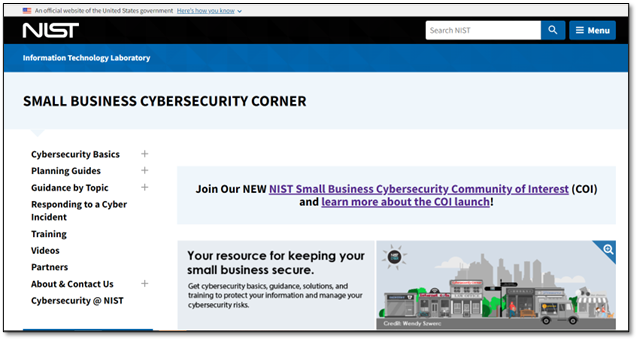
Did you know that 99.9% of businesses in America are small businesses? Small businesses are a major source of innovation for our country—but they’re often faced with limited resources and budgets. Many of them need cybersecurity solutions, guidance, and training so they can cost-effectively address and manage their cybersecurity risks. Hmmm…where can you find guidance like this all in one place?
This website was created by NIST in 2019 in response to the NIST Small Business Cybersecurity Act, which directed us to “disseminate clear and concise resources to help small business concerns identify, assess, manage, and reduce their cybersecurity risks.” This resource repository has grown over the years and offers videos, planning guides, case studies, topical guidance (e.g., ransomware, phishing, and teleworking), and important information that small businesses can put into action. We didn’t stop there…
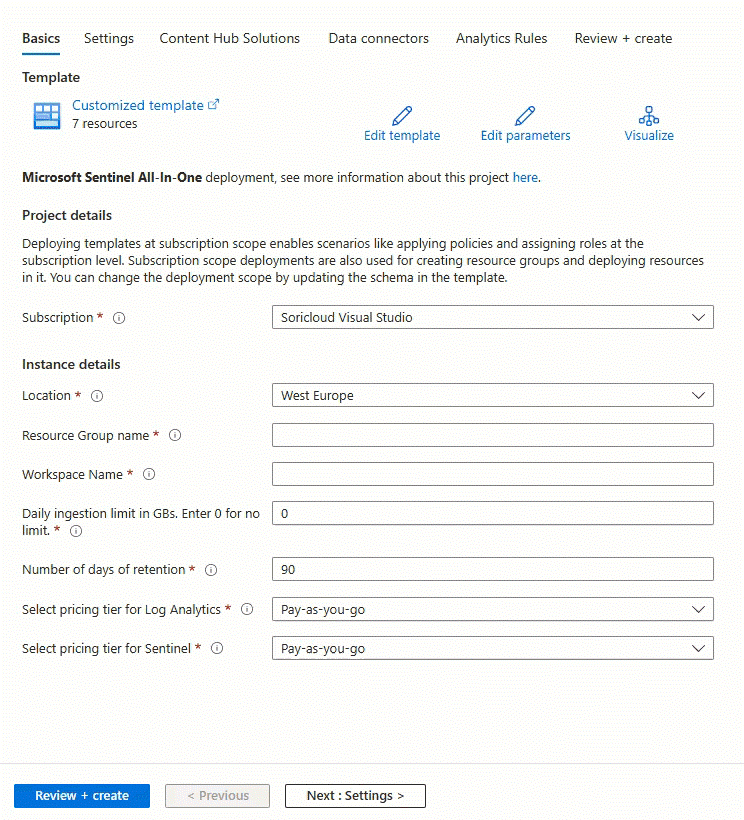
Microsoft Sentinel All-in-One is aimed at helping customers and partners quickly set up a full-fledged Microsoft Sentinel environment that is ready to use by customers speeding up deployment and initial configuration tasks in few clicks, saving time and simplifying Microsoft Sentinel setup.
What’s new
This new version automates the following steps:
Creates resource group
Creates Log Analytics workspace
Enables Microsoft Sentinel on top of the workspace
Sets workspace retention, daily cap and commitment tiers if desired
Enables UEBA with the relevant identity providers (AAD and/or AD)
Enables health diagnostics for Analytics Rules, Data Connectors and Automation Rules
Installs Content Hub solutions from a predefined list
Enables Data Connectors from this list:
Azure Active Directory
Azure Active Directory Identity Protection
Azure Activity
Dynamics 365
Microsoft 365 Defender
Microsoft Defender for Cloud
Microsoft Insider Risk Management
Microsoft Power BI
Microsoft Project
Office 365
Threat Intelligence Platforms
Enables analytics rules (Scheduled and NRT) included in the selected Content Hub solutions
Enables analytics rules (Scheduled and NRT) that use any of the selected Data connectors
The only thing you need to start using Microsoft Sentinel All-in-One, is an Azure Subscription and an account with permissions to deploy Microsoft Sentinel. Higher privileges might be required if you wish to enable UEBA and some of the supported connectors. You can find details about the required permissions here .