You’re Invited: ITL AI Program Hosted Webinar on Development of an AI Agent Enrichment Workflow at the National Vulnerability Database

You’re invited to join NIST on September 17, 2026 for an Information Technology Laboratory (ITL) AI Program hosted webinar on the development of an AI agent enrichment workflow at the National Vulnerability Database.  

  • Workshop Title: Development of an AI Agent Enrichment Workflow at the National Vulnerability Database
  • When: Thursday, September 17, 2026 | 11:00 am – 12:00 pm Eastern Time 
  • Where: Virtual (Register) 

The National Vulnerability Database (NVD), established and operated by NIST, serves as the U.S. government repository of standards-based vulnerability management data. The NVD is a foundational resource for vulnerability management, software security, compliance automation, and cybersecurity risk analysis across the public and private sectors. It provides standardized vulnerability enrichment and associated metadata consumed by a broad ecosystem of security tools and operational workflows. It is a part of the broader vulnerability management ecosystem that encompasses processes, standards, and tools involved in one or more phases of the vulnerability lifecycle of identifying, validating, disclosing, disseminating, prioritizing, and remediating software and system vulnerabilities.

The increasing scale and complexity of discovered vulnerabilities poses a challenge for the NVD to provide timely information that is actionable to users of NVD data. The increasing use of AI tools to aid in the discovery and exploitation of vulnerabilities contributes even more to the job that is required to keep pace with the flow of publicly disclosed vulnerabilities.

To solve this, NIST has begun work on an AI agentic workflow to aid in the enrichment of vulnerability information provided by NVD. 

Join NIST to discuss the approach taken, the architecture of the solution, the various issues discovered during implementation, and early results with the use of the tool at the NVD.
Learn More and Register

Supply Chain Traceability & Manufacturing Meta-Framework Webinar

Join the NIST National Cybersecurity Center of Excellence (NCCoE) on September 29, 2026 at 1:00 P.M. EDT for a webinar to further explore the newly available NIST Supply Chain Traceability and Manufacturing Meta-Framework!

You still have two weeks left to register for this event! Secure your spot today.

Background

The NCCoE is helping to advance supply chain traceability by addressing one of the greatest barriers to effective supply chain risk management: securely verifying product pedigree and provenance across complex, multi-tier supply chains. Earlier this month, the NCCoE published the finalized version of NIST IR 8536, Supply Chain Traceability Principles: A Manufacturing Meta-Framework.

The Meta-Framework introduced in this report details a practical, conceptual approach for organizing, linking, and querying traceability data across diverse manufacturing supply chain ecosystems.

This webinar will explore:

  • The Traceability Challenge: An overview of the barriers to verifying product provenance across fragmented ecosystems, illustrated through a simplified discrete manufacturing supply chain use case example.
  • Core Principles for SCRM Support: A review of the foundational traceability principles necessary to inform organizational Supply Chain Risk Management (SCRM) programs.
  • Architectural Mechanics: How these foundational principles are operationalized within the Meta-Framework using structural data patterns (such as encapsulation and standardized interfaces) to establish a continuous, cross-sector provenance chain.
  • Data Privacy and Verifiable Trust: The utilization of hash-based traceability links to securely exchange product history without requiring suppliers to expose sensitive intellectual property or internal trade secrets.

Register Today!

Reserve your virtual seat before it’s too late! Visit the NCCoE event page to learn more and register.Register Now!

NIST Releases NIST SP 800-171A, R3 Small Business Primer

NIST has published Special Publication (SP) 1352, Assessing Security Requirements for Controlled Unclassified Information (CUI): NIST SP 800-171Ar3 (Revision 3) Small Business Primer. This guide provides small business owners and operators with a high-level overview of SP 800-171Ar3, Assessing Security Requirements for Controlled Unclassified Information. The goal of the primer is to help the small business community understand foundational SP 800-171 assessment concepts and basic strategies for planning for an assessment.   

Who is this Guide For?  

This primer is for business leaders or employees who are tasked with managing the implementation of SP 800-171r3, including conducting self-assessments or preparing to work with external assessors.

View the Primer

Open Radio Access Networks (O-RAN) CSF Profile for Federal Agencies | Initial Draft of NIST IR 8623

Federal agencies that deploy an Open Radio Access Network (O-RAN) as part of their infrastructure must include that deployment in their risk management programs. This draft Cybersecurity Framework (CSF) 2.0 profile – NIST Interagency Report (IR) 8623 – describes how components that conform to the security specifications produced by the O-RAN ALLIANCE support various CSF 2.0 outcomes. It also includes references to O-RAN ALLIANCE-produced documents and other relevant guidelines that may help federal agency cybersecurity managers.

The public comment review period is open through November 2, 2026. See the publication details for a copy of the draft and instructions for submitting comments. Find additional information on the NIST Advanced Security Architectures for Next Generation Wireless project webpage.

Read More

Multiple Vulnerabilities in Adobe Products Could Allow for Arbitrary Code Execution – PATCH: NOW

Multiple vulnerabilities have been discovered in Adobe products, the most severe of which could allow for arbitrary code execution.

  • Adobe ColdFusion is a commercial rapid web application development platform and application server.
  • Adobe Commerce is an enterprise-level e-commerce platform built on the proven technology of Magento.
  • Adobe Lightroom is a popular cloud-based image organization and photo-editing software developed by Adobe.
  • Adobe Content Credentials SDK is a software tool kit that lets developers add secure, tamper-evident provenance metadata to digital files.
  • Adobe Campaign Classic is an enterprise-grade marketing automation and campaign management platform.

Successful exploitation of the most severe of these vulnerabilities could allow for arbitrary code execution in the context of the logged on user. Depending on the privileges associated with the user, an attacker could then install programs; view, change, or delete data; or create new accounts with full user rights. Users whose accounts are configured to have fewer user rights on the system could be less impacted than those who operate with administrative user rights.

THREAT INTELLIGENCE:
There are currently no reports of these vulnerabilities being exploited in the wild. 

SYSTEMS AFFECTED:

  • ColdFusion 2025 2025.0.11 and earlier versions
  • ColdFusion 2023 2023.0.22 and earlier versions
  • Adobe Commerce 2.4.9-2026-jul and earlier versions
  • Adobe Commerce 2.4.9-2026-jul and earlier 2.4.8-2026-jul and earlier versions
  • Adobe Commerce 2.4.9-2026-jul and earlier 2.4.7-2026-jul and earlier versions
  • Adobe Commerce 2.4.9-2026-jul and earlier 2.4.6-2026-jul and earlier versions
  • Adobe Commerce 2.4.9-2026-jul and earlier 2.4.5-2026-jul and earlier versions
  • Adobe Commerce 2.4.9-2026-jul and earlier 2.4.4-2026-jul and earlier versions
  • Adobe Commerce B2B 1.5.3-2026-jul and earlier versions
  • Adobe Commerce B2B 1.5.3-2026-jul and earlier 1.5.2-2026-jul and earlier versions
  • Adobe Commerce B2B 1.5.3-2026-jul and earlier 1.4.2-2026-jul and earlier versions
  • Adobe Commerce B2B 1.5.3-2026-jul and earlier 1.3.4-2026-jul and earlier versions
  • Adobe Commerce B2B 1.5.3-2026-jul and earlier 1.3.3-2026-jul and earlier versions
  • Magento Open Source 2.4.9-2026-jul and earlier versions
  • Magento Open Source 2.4.9-2026-jul and earlier 2.4.8-2026-jul and earlier versions
  • Magento Open Source 2.4.9-2026-jul and earlier 2.4.7-2026-jul and earlier versions
  • Magento Open Source 2.4.9-2026-jul and earlier 2.4.6-2026-jul and earlier versions
  • Lightroom 15.4 and earlier versions
  • Content Credentials Rust SDK c2pa-v0.90.5 and earlier versions
  • Content Credentials Rust SDK c2pa-v0.90.5 and earlier C2PA Tool c2patool-v0.27.5 and earlier versions
  • Content Credentials Rust SDK c2pa-v0.90.5 and earlier Content Credentials JS SDK @contentauth/c2pa-web@0.12.0 and earlier versions
  • Adobe Campaign Classic ACC v7: 7.4.3 build 9399 and earlier

RISK:
Government:

  • Large and medium government entities: High
  • Small government entities: Medium

Businesses:

  • Large and medium business entities: High
  • Small business entities: Medium

Home users: Low

TECHNICAL SUMMARY:
Multiple vulnerabilities have been discovered in Adobe products, the most severe of which could allow for arbitrary code execution. Details of these vulnerabilities are as follows:\ 

Tactic: Execution (TA0002)
Technique: Exploitation for Client Execution (T1203):

Adobe ColdFusion:

  • Improper Neutralization of Special Elements used in an OS Command (‘OS Command Injection’) (CVE-2026-48362)
  • Improper Neutralization of Directives in Dynamically Evaluated Code (‘Eval Injection’) (CVE-2026-48273)
  • Incorrect Authorization (CVE-2026-71384, CVE-2026-71387, CVE-2026-71385, CVE-2026-25652, CVE-2026-71383, CVE-2026-48375)
  • Cross-site Scripting (XSS) (CVE-2026-71386)
  • Use of Hard-coded Cryptographic Key (CVE-2026-34635)
  • Heap-based Buffer Overflow (CVE-2026-48440)
  • Improper Input Validation (CVE-2026-21279, CVE-2026-48384)
  • Use of a Broken or Risky Cryptographic Algorithm (CVE-2026-48386)
  • Improper Encoding or Escaping of Output (CVE-2026-48376)

Adobe Commerce:

  • Incorrect Authorization (CVE-2026-71362, CVE-2026-48415, CVE-2026-48416, CVE-2026-48411, CVE-2026-48412)
  • Cross-site Scripting (Stored XSS) (CVE-2026-48414, CVE-2026-48413)

Adobe Lightroom:

  • Improper Limitation of a Pathname to a Restricted Directory (‘Path Traversal’) (CVE-2026-48441)
  • Deserialization of Untrusted Data (CVE-2026-48397)
  • Integer Overflow or Wraparound (CVE-2026-47940)
  • Out-of-bounds Write (CVE-2026-48404, CVE-2026-48405, CVE-2026-48406, CVE-2026-48407, CVE-2026-48408, CVE-2026-48409, CVE-2026-48410)
  • Incorrect Authorization (CVE-2026-48447)

Content Credentials SDK:

  • Uncontrolled Resource Consumption (CVE-2026-48439, CVE-2026-48434, CVE-2026-48443)
  • NULL Pointer Dereference (CVE-2026-48438)
  • Improper Limitation of a Pathname to a Restricted Directory (‘Path Traversal’) (CVE-2026-48442, CVE-2026-48446)
  • Improper Input Validation (CVE-2026-48436, CVE-2026-71390)
  • Integer Overflow or Wraparound (CVE-2026-48387, CVE-2026-48445, CVE-2026-48444)
  • Integer Underflow (Wrap or Wraparound) (CVE-2026-48435, CVE-2026-71389)
  • Improper Certificate Validation (CVE-2026-48437)
  • Server-Side Request Forgery (SSRF) (CVE-2026-47922)

Adobe Campaign Classic:

  • Incorrect Authorization (CVE-2026-71398, CVE-2026-27302)
  • Improper Neutralization of Special Elements used in an SQL Command (‘SQL Injection’) (CVE-2026-48381)

Successful exploitation of the most severe of these vulnerabilities could allow for arbitrary code execution in the context of the logged on user. Depending on the privileges associated with the user, an attacker could then install programs; view, change, or delete data; or create new accounts with full user rights. Users whose accounts are configured to have fewer user rights on the system could be less impacted than those who operate with administrative user rights.

RECOMMENDATIONS:
We recommend the following actions be taken:

  • Apply the stable channel update provided by Adobe to vulnerable systems immediately after appropriate testing. (M1051: Update Software)
    • Safeguard 7.1: Establish and Maintain a Vulnerability Management Process: Establish and maintain a documented vulnerability management process for enterprise assets. Review and update documentation annually, or when significant enterprise changes occur that could impact this Safeguard.
    • Safeguard 7.2: Establish and Maintain a Remediation Process: Establish and maintain a risk-based remediation strategy documented in a remediation process, with monthly, or more frequent, reviews.
    • Safeguard 7.6: Perform Automated Vulnerability Scans of Externally-Exposed Enterprise Assets: Perform automated vulnerability scans of externally-exposed enterprise assets using a SCAP-compliant vulnerability scanning tool. Perform scans on a monthly, or more frequent, basis.
    • Safeguard 7.7: Remediate Detected Vulnerabilities: Remediate detected vulnerabilities in software through processes and tooling on a monthly, or more frequent, basis, based on the remediation process.
    • Safeguard 16.13: Conduct Application Penetration Testing: Conduct application penetration testing. For critical applications, authenticated penetration testing is better suited to finding business logic vulnerabilities than code scanning and automated security testing. Penetration testing relies on the skill of the tester to manually manipulate an application as an authenticated and unauthenticated user.
    • Safeguard 18.1: Establish and Maintain a Penetration Testing Program: Establish and maintain a penetration testing program appropriate to the size, complexity, and maturity of the enterprise. Penetration testing program characteristics include scope, such as network, web application, Application Programming Interface (API), hosted services, and physical premise controls; frequency; limitations, such as acceptable hours, and excluded attack types; point of contact information; remediation, such as how findings will be routed internally; and retrospective requirements.
    • Safeguard 18.2: Perform Periodic External Penetration Tests: Perform periodic external penetration tests based on program requirements, no less than annually. External penetration testing must include enterprise and environmental reconnaissance to detect exploitable information. Penetration testing requires specialized skills and experience and must be conducted through a qualified party. The testing may be clear box or opaque box.
    • Safeguard 18.3: Remediate Penetration Test Findings: Remediate penetration test findings based on the enterprise’s policy for remediation scope and prioritization.
  • Apply the Principle of Least Privilege to all systems and services. Run all software as a non-privileged user (one without administrative privileges) to diminish the effects of a successful attack. (M1026: Privileged Account Management)
    • Safeguard 4.7: Manage Default Accounts on Enterprise Assets and Software: Manage default accounts on enterprise assets and software, such as root, administrator, and other pre-configured vendor accounts. Example implementations can include: disabling default accounts or making them unusable.
    • Safeguard 5.4: Restrict Administrator Privileges to Dedicated Administrator Accounts: Restrict administrator privileges to dedicated administrator accounts on enterprise assets. Conduct general computing activities, such as internet browsing, email, and productivity suite use, from the user’s primary, non-privileged account.
  • Restrict use of certain websites, block downloads/attachments, block Javascript, restrict browser extensions, etc. (M1021: Restrict Web-Based Content)
    • Safeguard 2.3: Address Unauthorized Software: Ensure that unauthorized software is either removed from use on enterprise assets or receives a documented exception. Review monthly, or more frequently.
    • Safeguard 2.7: Allowlist Authorized Scripts: Use technical controls, such as digital signatures and version control, to ensure that only authorized scripts, such as specific .ps1, .py, etc., files, are allowed to execute. Block unauthorized scripts from executing. Reassess bi-annually, or more frequently.
    • Safeguard 9.3: Maintain and Enforce Network-Based URL Filters: Enforce and update network-based URL filters to limit an enterprise asset from connecting to potentially malicious or unapproved websites. Example implementations include category-based filtering, reputation-based filtering, or through the use of block lists. Enforce filters for all enterprise assets.
    • Safeguard 9.6: Block Unnecessary File Types: Block unnecessary file types attempting to enter the enterprise’s email gateway.
  • Use capabilities to detect and block conditions that may lead to or be indicative of a software exploit occurring. (M1050: Exploit Protection)
    • Safeguard 10.5: Enable Anti-Exploitation Features: Enable anti-exploitation features on enterprise assets and software, where possible, such as Microsoft? Data Execution Prevention (DEP), Windows? Defender Exploit Guard (WDEG), or Apple? System Integrity Protection (SIP) and Gatekeeper™.
  • Block execution of code on a system through application control, and/or script blocking. (M1038:Execution Prevention)
    • Safeguard 2.5: Allowlist Authorized Software: Use technical controls, such as application allowlisting, to ensure that only authorized software can execute or be accessed. Reassess bi-annually, or more frequently.
    • Safeguard 2.6: Allowlist Authorized Libraries: Use technical controls to ensure that only authorized software libraries, such as specific .dll, .ocx, .so, etc., files, are allowed to load into a system process. Block unauthorized libraries from loading into a system process. Reassess bi-annually, or more frequently.
    • Safeguard 2.7: Allowlist Authorized Scripts: Use technical controls, such as digital signatures and version control, to ensure that only authorized scripts, such as specific .ps1, .py, etc., files, are allowed to execute. Block unauthorized scripts from executing. Reassess bi-annually, or more frequently.
  • Use capabilities to prevent suspicious behavior patterns from occurring on endpoint systems. This could include suspicious process, file, API call, etc. behavior. (M1040: Behavior Prevention on Endpoint)
    • Safeguard 13.2: Deploy a Host-Based Intrusion Detection Solution: Deploy a host-based intrusion detection solution on enterprise assets, where appropriate and/or supported.
    • Safeguard 13.7: Deploy a Host-Based Intrusion Prevention Solution: Deploy a host-based intrusion prevention solution on enterprise assets, where appropriate and/or supported. Example implementations include use of an Endpoint Detection and Response (EDR) client or host-based IPS agent.


REFERENCES:

Adobe:
https://helpx.adobe.com/security/security-bulletin.html
https://helpx.adobe.com/security/products/coldfusion/apsb26-90.html
https://helpx.adobe.com/security/products/magento/apsb26-92.html
https://helpx.adobe.com/security/products/lightroom/apsb26-94.html
https://helpx.adobe.com/security/products/content-authenticity-sdk/apsb26-111.html
https://helpx.adobe.com/security/products/campaign/apsb26-123.html

CVE:
https://cve.mitre.org/cgi-bin/cvename.cgi?name=CVE-2026-21279
https://cve.mitre.org/cgi-bin/cvename.cgi?name=CVE-2026-25652
https://cve.mitre.org/cgi-bin/cvename.cgi?name=CVE-2026-27302
https://cve.mitre.org/cgi-bin/cvename.cgi?name=CVE-2026-34635
https://cve.mitre.org/cgi-bin/cvename.cgi?name=CVE-2026-47922
https://cve.mitre.org/cgi-bin/cvename.cgi?name=CVE-2026-47940
https://cve.mitre.org/cgi-bin/cvename.cgi?name=CVE-2026-48273
https://cve.mitre.org/cgi-bin/cvename.cgi?name=CVE-2026-48362
https://cve.mitre.org/cgi-bin/cvename.cgi?name=CVE-2026-48375
https://cve.mitre.org/cgi-bin/cvename.cgi?name=CVE-2026-48376
https://cve.mitre.org/cgi-bin/cvename.cgi?name=CVE-2026-48381
https://cve.mitre.org/cgi-bin/cvename.cgi?name=CVE-2026-48384
https://cve.mitre.org/cgi-bin/cvename.cgi?name=CVE-2026-48386
https://cve.mitre.org/cgi-bin/cvename.cgi?name=CVE-2026-48387
https://cve.mitre.org/cgi-bin/cvename.cgi?name=CVE-2026-48397
https://cve.mitre.org/cgi-bin/cvename.cgi?name=CVE-2026-48404
https://cve.mitre.org/cgi-bin/cvename.cgi?name=CVE-2026-48405
https://cve.mitre.org/cgi-bin/cvename.cgi?name=CVE-2026-48406
https://cve.mitre.org/cgi-bin/cvename.cgi?name=CVE-2026-48407
https://cve.mitre.org/cgi-bin/cvename.cgi?name=CVE-2026-48408
https://cve.mitre.org/cgi-bin/cvename.cgi?name=CVE-2026-48409
https://cve.mitre.org/cgi-bin/cvename.cgi?name=CVE-2026-48410
https://cve.mitre.org/cgi-bin/cvename.cgi?name=CVE-2026-48411
https://cve.mitre.org/cgi-bin/cvename.cgi?name=CVE-2026-48412
https://cve.mitre.org/cgi-bin/cvename.cgi?name=CVE-2026-48413
https://cve.mitre.org/cgi-bin/cvename.cgi?name=CVE-2026-48414
https://cve.mitre.org/cgi-bin/cvename.cgi?name=CVE-2026-48415
https://cve.mitre.org/cgi-bin/cvename.cgi?name=CVE-2026-48416
https://cve.mitre.org/cgi-bin/cvename.cgi?name=CVE-2026-48434
https://cve.mitre.org/cgi-bin/cvename.cgi?name=CVE-2026-48435
https://cve.mitre.org/cgi-bin/cvename.cgi?name=CVE-2026-48436
https://cve.mitre.org/cgi-bin/cvename.cgi?name=CVE-2026-48437
https://cve.mitre.org/cgi-bin/cvename.cgi?name=CVE-2026-48438
https://cve.mitre.org/cgi-bin/cvename.cgi?name=CVE-2026-48439
https://cve.mitre.org/cgi-bin/cvename.cgi?name=CVE-2026-48440
https://cve.mitre.org/cgi-bin/cvename.cgi?name=CVE-2026-48441
https://cve.mitre.org/cgi-bin/cvename.cgi?name=CVE-2026-48442
https://cve.mitre.org/cgi-bin/cvename.cgi?name=CVE-2026-48443
https://cve.mitre.org/cgi-bin/cvename.cgi?name=CVE-2026-48444
https://cve.mitre.org/cgi-bin/cvename.cgi?name=CVE-2026-48445
https://cve.mitre.org/cgi-bin/cvename.cgi?name=CVE-2026-48446
https://cve.mitre.org/cgi-bin/cvename.cgi?name=CVE-2026-48447
https://cve.mitre.org/cgi-bin/cvename.cgi?name=CVE-2026-71362
https://cve.mitre.org/cgi-bin/cvename.cgi?name=CVE-2026-71383
https://cve.mitre.org/cgi-bin/cvename.cgi?name=CVE-2026-71384
https://cve.mitre.org/cgi-bin/cvename.cgi?name=CVE-2026-71385
https://cve.mitre.org/cgi-bin/cvename.cgi?name=CVE-2026-71386
https://cve.mitre.org/cgi-bin/cvename.cgi?name=CVE-2026-71387
https://cve.mitre.org/cgi-bin/cvename.cgi?name=CVE-2026-71389
https://cve.mitre.org/cgi-bin/cvename.cgi?name=CVE-2026-71390
https://cve.mitre.org/cgi-bin/cvename.cgi?name=CVE-2026-71398

Critical Patches Issued for Microsoft Products, August 11, 2026 – PATCH NOW

Multiple vulnerabilities have been discovered in Microsoft products, the most severe of which could allow for remote code execution. Successful exploitation of the most severe of these vulnerabilities could result in an attacker gaining the same privileges as the logged-on user. Depending on the privileges associated with the user, an attacker could then install programs; view, change, or delete data; or create new accounts with full user rights. Users whose accounts are configured to have fewer user rights on the system could be less impacted than those who operate with administrative user rights.

THREAT INTELLIGENCE:
Microsoft reports that CVE-2026-68820 has been exploited in the wild. 

SYSTEMS AFFECTED:

  • Azure
  • Defender
  • Developer Tools
  • Exchange Server
  • Office
  • Office 2016
  • Other
  • SharePoint Server
  • Windows

RISK:
Government:

  • Large and medium government entities: High
  • Small government entities: Medium

Businesses:

  • Large and medium business entities: High
  • Small business entities: Medium 

Home users: Low

TECHNICAL SUMMARY:
Multiple vulnerabilities have been discovered in Microsoft products, the most severe of which could allow for remote code execution.   

A full list of all vulnerabilities can be found in the Microsoft link in the Reference section.

Successful exploitation of the most severe of these vulnerabilities could result in an attacker gaining the same privileges as the logged-on user. Depending on the privileges associated with the user, an attacker could then install programs; view, change, or delete data; or create new accounts with full user rights. Users whose accounts are configured to have fewer user rights on the system could be less impacted than those who operate with administrative user rights. 

RECOMMENDATIONS:
We recommend the following actions be taken:

  • Apply appropriate updates provided by Microsoft to vulnerable systems immediately after appropriate testing. (M1051: Update Software)
    • Safeguard 7.1: Establish and Maintain a Vulnerability Management Process: Establish and maintain a documented vulnerability management process for enterprise assets. Review and update documentation annually, or when significant enterprise changes occur that could impact this Safeguard.
    • Safeguard 7.2: Establish and Maintain a Remediation Process: Establish and maintain a risk-based remediation strategy documented in a remediation process, with monthly, or more frequent, reviews.
    • Safeguard 7.4: Perform Automated Application Patch Management: Perform application updates on enterprise assets through automated patch management on a monthly, or more frequent, basis.
    • Safeguard 7.5: Perform Automated Vulnerability Scans of Internal Enterprise Assets: Perform automated vulnerability scans of internal enterprise assets on a quarterly, or more frequent, basis. Conduct both authenticated and unauthenticated scans, using a SCAP-compliant vulnerability scanning tool.
    • Safeguard 7.7: Remediate Detected Vulnerabilities: Remediate detected vulnerabilities in software through processes and tooling on a monthly, or more frequent, basis, based on the remediation process.
    • Safeguard 12.1: Ensure Network Infrastructure is Up-to-Date: Ensure network infrastructure is kept up-to-date. Example implementations include running the latest stable release of software and/or using currently supported network-as-a-service (NaaS) offerings. Review software versions monthly, or more frequently, to verify software support.
    • Safeguard 18.1: Establish and Maintain a Penetration Testing Program: Establish and maintain a penetration testing program appropriate to the size, complexity, and maturity of the enterprise. Penetration testing program characteristics include scope, such as network, web application, Application Programming Interface (API), hosted services, and physical premise controls; frequency; limitations, such as acceptable hours, and excluded attack types; point of contact information; remediation, such as how findings will be routed internally; and retrospective requirements.
    • Safeguard 18.2: Perform Periodic External Penetration Tests: Perform periodic external penetration tests based on program requirements, no less than annually. External penetration testing must include enterprise and environmental reconnaissance to detect exploitable information. Penetration testing requires specialized skills and experience and must be conducted through a qualified party. The testing may be clear box or opaque box.
    • Safeguard 18.3: Remediate Penetration Test Findings: Remediate penetration test findings based on the enterprise’s policy for remediation scope and prioritization.
  • Apply the Principle of Least Privilege to all systems and services. Run all software as a non-privileged user (one without administrative privileges) to diminish the effects of a successful attack. (M1026: Privileged Account Management)
    • Safeguard 4.7: Manage Default Accounts on Enterprise Assets and Software: Manage default accounts on enterprise assets and software, such as root, administrator, and other pre-configured vendor accounts. Example implementations can include: disabling default accounts or making them unusable.
    • Safeguard 5.5: Establish and Maintain an Inventory of Service Accounts: Establish and maintain an inventory of service accounts. The inventory, at a minimum, must contain department owner, review date, and purpose. Perform service account reviews to validate that all active accounts are authorized, on a recurring schedule at a minimum quarterly, or more frequently.
  • Vulnerability scanning is used to find potentially exploitable software vulnerabilities to remediate them. (M1016: Vulnerability Scanning)
    • Safeguard 16.13: Conduct Application Penetration Testing: Conduct application penetration testing. For critical applications, authenticated penetration testing is better suited to finding business logic vulnerabilities than code scanning and automated security testing. Penetration testing relies on the skill of the tester to manually manipulate an application as an authenticated and unauthenticated user.
  • Architect sections of the network to isolate critical systems, functions, or resources. Use physical and logical segmentation to prevent access to potentially sensitive systems and information. Use a DMZ to contain any internet-facing services that should not be exposed from the internal network. Configure separate virtual private cloud (VPC) instances to isolate critical cloud systems. (M1030: Network Segmentation)
    • Safeguard 12.2: Establish and Maintain a Secure Network Architecture: Establish and maintain a secure network architecture. A secure network architecture must address segmentation, least privilege, and availability, at a minimum.
  • Use capabilities to detect and block conditions that may lead to or be indicative of a software exploit occurring. (M1050: Exploit Protection)
    • Safeguard 10.5:  Enable Anti-Exploitation Features: Enable anti-exploitation features on enterprise assets and software, where possible, such as Microsoft? Data Execution Prevention (DEP), Windows? Defender Exploit Guard (WDEG), or Apple? System Integrity Protection (SIP) and Gatekeeper™.


REFERENCES:

Microsoft:
https://msrc.microsoft.com/update-guide/en-us
https://msrc.microsoft.com/update-guide/releaseNote/2026-Aug

Passkeys by default and retirement of Microsoft-provided SMS and voice authentication

Move to phishing-resistant authentication before SMS and voice retire We are notifying all Microsoft Entra ID tenants of an important change to authentication security: The AI era demands stronger, phishing-resistant authentication. Passkeys are becoming the default authentication experience in Microsoft Entra, and Microsoft-provided SMS and voice authentication will retire on February 1, 2027.

For more context on why Microsoft is moving to phishing-resistant authentication by default, please read our Microsoft Security Blog announcement. What is changing Passkeys become the default authentication experience for users currently enabled for SMS or voice.Microsoft-provided telecom delivery for SMS and voice will be retired. Customer-managed telecom providers configured through the Microsoft Security Store are not affected. Why this is changing SMS and voice are among the most vulnerable authentication methods available today and provide significantly weaker protection against phishing, SIM-swap, and replay attacks than passkeys. Moving to phishing-resistant methods gives your organization stronger security by default. Impact on you and key dates September 1, 2026 — Users enabled for SMS or voice are automatically enabled for passkeys and will be nudged to register a passkey when they next complete MFA. (If you do not want this, move users out of SMS or voice in the Authentication Methods Policy before this date.)February 1, 2027 — Microsoft-provided SMS and voice are fully retired in Microsoft Entra ID. Customer-managed telecom providers are unaffected.After February 1, 2027 — Users whose only available MFA method is SMS or voice will receive a blocking prompt to register a passkey before they can continue signing in. There is no opt out from this enforcement; it applies to all tenants. If no users in your tenant are enabled for SMS or voice, no action is required and you can disregard the steps below.

If you do have users enabled for SMS or voice, the required action is to move every one of those users off SMS and voice before February 1, 2027. Microsoft recommends passkeys — the default phishing-resistant credential in Microsoft Entra ID. Take the following steps: Find affected users. Identify who in your tenant is still enabled for SMS or voice. Move users to passkeys. Enable passkeys and run a registration campaign to drive adoption at scale before auto-enablement on September 1, 2026. Communicate the change. Notify your users of what is changing, when, and the action they need to take. Evaluate a telecom provider only if required. If you have a regulatory or operational need to keep SMS or voice, configure a customer-managed provider through the Microsoft Security Store before February 1, 2027 (provider options and pricing published beginning September 18, 2026; configuration available beginning October 30, 2026). The bottom line: every SMS and voice user must be on a phishing-resistant method — passkeys are recommended — before Microsoft-provided SMS and voice retire on February 1, 2027. Acting before September 1, 2026 lets you move users on your own schedule and avoid blocking prompts.        Read migration guidance >       

You Really Don’t Want This Delivery

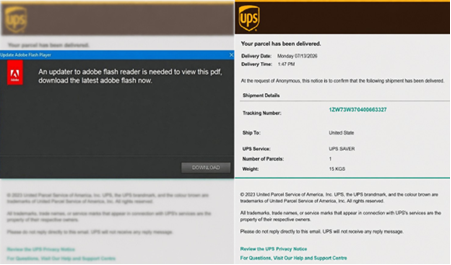
The NJCCIC observed a phishing campaign impersonating UPS delivery notifications. These messages use subject lines such as “Parcel Arrival Notification,” “Your Package Is Ready for Pickup,” and “Your Parcel Has Arrived” and are purported to be from the following sender(s):
“UPS Parcel Services” <contact[@]shipfasts[.]com> “UPS Delivery Support” <contact[@]learnstax[.]com>
Messages include an Adobe PDF attachment that uses UPS branding and the UPS logo to appear legitimate. They claim the user needs to update Adobe Flash Reader to view the file. Clicking the download button triggers a Visual Basic Script (VBScript) to download and run. The script executes a curl command to download the Microsoft Installer (MSI) package for installing ScreenConnect. This setup enables autorun at Windows startup. After installation, a benign PDF is displayed to the user.

Beware of Threat Actors Targeting IT Help Desk Staff

Information technology (IT) help desk staff are heavily targeted because they often possess privileged administrative rights and provide an entry point for account recovery, such as resetting passwords and bypassing multi-factor authentication (MFA). To identify high-value targets, threat actors perform reconnaissance on corporate websites, networking platforms such as LinkedIn, or social media websites. They pose as legitimate employees and use voice phishing (vishing) in their social engineering attacks to trick internal or outsourced IT help desk staff into bypassing controls. Vishing, which has surged significantly over the past several years, combined with publicly available information and artificial intelligence (AI), enables threat actors to increasingly impersonate legitimate employees, clone voices, and create audio deepfakes.
In IT help desk schemes, threat actors claim they were locked out of their account, could not access their authenticator, lost their phone, or damaged their laptop. They may also create urgent or stressful scenarios, such as a business meeting starting shortly or an employee traveling on business, and request immediate access to the account. Once threat actors convince the IT help desk staff to reset the password or disable the original MFA token, they can register their own device, granting them complete, legitimate access to the network. Prominent and aggressive threat actors, such as Scattered Spider and O-UNC-034, have posed as employees or traveling executives to initiate account takeovers. Their main goal is to infiltrate networks, establish persistence, move laterally to critical assets, access internal applications or cloud services, exfiltrate data, and deploy ransomware.
The NJCCIC received a report of threat actors impersonating an employee of a New Jersey organization and contacting the organization’s outsourced IT help desk to reset their password. The IT help desk staff bypassed established procedures, reset the password, and set up the corporate app on the device. The threat actors then accessed the account and changed the impersonated employee’s bank account information for direct deposit to a threat actor-controlled account.

Multiple Vulnerabilities in Google Chrome Could Allow for Arbitrary Code Execution – PATCH NOW

Multiple vulnerabilities have been discovered in Google Chrome, the most severe of which could allow for arbitrary code execution. Successful exploitation of the most severe of these vulnerabilities could allow for arbitrary code execution in the context of the logged on user. Depending on the privileges associated with the user an attacker could then install programs; view, change, or delete data; or create new accounts with full user rights. Users whose accounts are configured to have fewer user rights on the system could be less impacted than those who operate with administrative user rights.

THREAT INTELLIGENCE:
There are currently no reports of these vulnerabilities being exploited in the wild.

SYSTEMS AFFECTED:

  • Chrome prior to 151.0.7922.108/.109 for Windows and Mac
  • Chrome prior to 151.0.7922.108 for Linux


RISK:
Government:

  • Large and medium government entities: Medium
  • Small government entities: Medium


Businesses:

  • Large and medium business entities: Medium
  • Small business entities: Medium


Home users: Low

TECHNICAL SUMMARY:
Multiple vulnerabilities have been discovered in Google Chrome, the most severe of which could allow for arbitrary code execution. Details of these vulnerabilities are as follows:

Tactic: Initial Access (TA0001):
Technique: Drive-By Compromise (T1189):

  • Use after free in WebGL (CVE-2026-19137, CVE-2026-19170)
  • Use after free in Aura (CVE-2026-19149, CVE-2026-19147)
  • Use after free in Skia (CVE-2026-19154, CVE-2026-19176)
  • Out of bounds write in ANGLE (CVE-2026-19157)
  • Use after free in Views (CVE-2026-19172, CVE-2026-19142, CVE-2026-19158, CVE-2026-19159)
  • Insufficient validation of untrusted input in Contextual Tasks (CVE-2026-19169)
  • Inappropriate implementation in V8 (CVE-2026-19168, CVE-2026-19150)
  • Heap buffer overflow in CrashReporting (CVE-2026-19138)
  • Race in CredentialProvider (CVE-2026-19139)
  • Use after free in GPU (CVE-2026-19140)
  • Use after free in Resources (CVE-2026-19141)
  • Insufficient validation of untrusted input in WebAPKs (CVE-2026-19143)
  • Use after free in HTML (CVE-2026-19144)
  • Use after free in Translate (CVE-2026-19145)
  • Uninitialized Use in GPU (CVE-2026-19146)
  • Out of bounds write in GPU (CVE-2026-19148)
  • Use after free in V8 (CVE-2026-19151)
  • Inappropriate implementation in Navigation (CVE-2026-19152)
  • Insufficient validation of untrusted input in Workers (CVE-2026-19153)
  • Use after free in Payments (CVE-2026-19155, CVE-2026-19175)
  • Heap buffer overflow in Base (CVE-2026-19156)
  • Uninitialized Use in Skia (CVE-2026-19160, CVE-2026-19161)
  • Out of bounds write in V8 (CVE-2026-19162)
  • Use after free in Media (CVE-2026-19163, CVE-2026-19171)
  • Insufficient validation of untrusted input in Codecs (CVE-2026-19164)
  • Use after free in Extensions (CVE-2026-19165)
  • Use after free in Web Authentication (CVE-2026-19166)
  • Integer overflow in GPU (CVE-2026-19167)
  • Out of bounds write in Skia (CVE-2026-19173)
  • Integer overflow in V8 (CVE-2026-19174)
  • Insufficient validation of untrusted input in UI (CVE-2026-19177)


Successful exploitation of the most severe of these vulnerabilities could allow for arbitrary code execution in the context of the logged on user. Depending on the privileges associated with the user an attacker could then install programs; view, change, or delete data; or create new accounts with full user rights. Users whose accounts are configured to have fewer user rights on the system could be less impacted than those who operate with administrative user rights.

RECOMMENDATIONS:
We recommend the following actions be taken:

  • Apply appropriate updates provided by Google to vulnerable systems immediately after appropriate testing. (M1051: Update Software)
    • Safeguard 7.1: Establish and Maintain a Vulnerability Management Process: Establish and maintain a documented vulnerability management process for enterprise assets. Review and update documentation annually, or when significant enterprise changes occur that could impact this Safeguard.
    • Safeguard 7.4: Perform Automated Application Patch Management: Perform application updates on enterprise assets through automated patch management on a monthly, or more frequent, basis.
    • Safeguard 7.7: Remediate Detected Vulnerabilities: Remediate detected vulnerabilities in software through processes and tooling on a monthly, or more frequent, basis, based on the remediation process.
    • Safeguard 9.1: Ensure Use of Only Fully Supported Browsers and Email Clients: Ensure only fully supported browsers and email clients are allowed to execute in the enterprise, only using the latest version of browsers and email clients provided through the vendor.
  • Apply the Principle of Least Privilege to all systems and services. Run all software as a non-privileged user (one without administrative privileges) to diminish the effects of a successful attack. (M1026: Privileged Account Management)
    • Safeguard 4.7: Manage Default Accounts on Enterprise Assets and Software: Manage default accounts on enterprise assets and software, such as root, administrator, and other pre-configured vendor accounts. Example implementations can include: disabling default accounts or making them unusable.
    • Safeguard 5.4: Restrict Administrator Privileges to Dedicated Administrator Accounts: Restrict administrator privileges to dedicated administrator accounts on enterprise assets. Conduct general computing activities, such as internet browsing, email, and productivity suite use, from the user’s primary, non-privileged account.
  • Restrict execution of code to a virtual environment on or in transit to an endpoint system. (M1048: Application Isolation and Sandboxing)
  • Use capabilities to detect and block conditions that may lead to or be indicative of a software exploit occurring. (M1050: Exploit Protection)
    • Safeguard 10.5: Enable Anti-Exploitation Features: Enable anti-exploitation features on enterprise assets and software, where possible, such as Microsoft® Data Execution Prevention (DEP), Windows® Defender Exploit Guard (WDEG), or Apple® System Integrity Protection (SIP) and Gatekeeper™.
  • Restrict use of certain websites, block downloads/attachments, block Javascript, restrict browser extensions, etc. (M1021: Restrict Web-Based Content)
    • Safeguard 9.2: Use DNS Filtering Services: Use DNS filtering services on all enterprise assets to block access to known malicious domains.
    • Safeguard 9.3: Maintain and Enforce Network-Based URL Filters: Enforce and update network-based URL filters to limit an enterprise asset from connecting to potentially malicious or unapproved websites. Example implementations include category-based filtering, reputation-based filtering, or through the use of block lists. Enforce filters for all enterprise assets.
    • Safeguard 9.6: Block Unnecessary File Types: Block unnecessary file types attempting to enter the enterprise’s email gateway.
  • Inform and educate users regarding the threats posed by hypertext links contained in emails or attachments especially from un-trusted sources. Remind users not to visit un-trusted websites or follow links provided by unknown or un-trusted sources. (M1017: User Training)
    • Safeguard 14.1: Establish and Maintain a Security Awareness Program: Establish and maintain a security awareness program. The purpose of a security awareness program is to educate the enterprise’s workforce on how to interact with enterprise assets and data in a secure manner. Conduct training at hire and, at a minimum, annually. Review and update content annually, or when significant enterprise changes occur that could impact this Safeguard.
    • Safeguard 14.2: Train Workforce Members to Recognize Social Engineering Attacks: Train workforce members to recognize social engineering attacks, such as phishing, pre-texting, and tailgating.
      ​​​​


REFERENCES:

Google:
https://chromereleases.googleblog.com/2026/08/stable-channel-update-for-desktop_01193673229.html

CVE:
https://cve.mitre.org/cgi-bin/cvename.cgi?name=CVE-2026-19137
https://cve.mitre.org/cgi-bin/cvename.cgi?name=CVE-2026-19138
https://cve.mitre.org/cgi-bin/cvename.cgi?name=CVE-2026-19139
https://cve.mitre.org/cgi-bin/cvename.cgi?name=CVE-2026-19140
https://cve.mitre.org/cgi-bin/cvename.cgi?name=CVE-2026-19141
https://cve.mitre.org/cgi-bin/cvename.cgi?name=CVE-2026-19142
https://cve.mitre.org/cgi-bin/cvename.cgi?name=CVE-2026-19143
https://cve.mitre.org/cgi-bin/cvename.cgi?name=CVE-2026-19144
https://cve.mitre.org/cgi-bin/cvename.cgi?name=CVE-2026-19145
https://cve.mitre.org/cgi-bin/cvename.cgi?name=CVE-2026-19146
https://cve.mitre.org/cgi-bin/cvename.cgi?name=CVE-2026-19147
https://cve.mitre.org/cgi-bin/cvename.cgi?name=CVE-2026-19148
https://cve.mitre.org/cgi-bin/cvename.cgi?name=CVE-2026-19149
https://cve.mitre.org/cgi-bin/cvename.cgi?name=CVE-2026-19150
https://cve.mitre.org/cgi-bin/cvename.cgi?name=CVE-2026-19151
https://cve.mitre.org/cgi-bin/cvename.cgi?name=CVE-2026-19152
https://cve.mitre.org/cgi-bin/cvename.cgi?name=CVE-2026-19153
https://cve.mitre.org/cgi-bin/cvename.cgi?name=CVE-2026-19154
https://cve.mitre.org/cgi-bin/cvename.cgi?name=CVE-2026-19155
https://cve.mitre.org/cgi-bin/cvename.cgi?name=CVE-2026-19156
https://cve.mitre.org/cgi-bin/cvename.cgi?name=CVE-2026-19157
https://cve.mitre.org/cgi-bin/cvename.cgi?name=CVE-2026-19158
https://cve.mitre.org/cgi-bin/cvename.cgi?name=CVE-2026-19159
https://cve.mitre.org/cgi-bin/cvename.cgi?name=CVE-2026-19160
https://cve.mitre.org/cgi-bin/cvename.cgi?name=CVE-2026-19161
https://cve.mitre.org/cgi-bin/cvename.cgi?name=CVE-2026-19162
https://cve.mitre.org/cgi-bin/cvename.cgi?name=CVE-2026-19163
https://cve.mitre.org/cgi-bin/cvename.cgi?name=CVE-2026-19164
https://cve.mitre.org/cgi-bin/cvename.cgi?name=CVE-2026-19165
https://cve.mitre.org/cgi-bin/cvename.cgi?name=CVE-2026-19166
https://cve.mitre.org/cgi-bin/cvename.cgi?name=CVE-2026-19167
https://cve.mitre.org/cgi-bin/cvename.cgi?name=CVE-2026-19168
https://cve.mitre.org/cgi-bin/cvename.cgi?name=CVE-2026-19169
https://cve.mitre.org/cgi-bin/cvename.cgi?name=CVE-2026-19170
https://cve.mitre.org/cgi-bin/cvename.cgi?name=CVE-2026-19171
https://cve.mitre.org/cgi-bin/cvename.cgi?name=CVE-2026-19172
https://cve.mitre.org/cgi-bin/cvename.cgi?name=CVE-2026-19173
https://cve.mitre.org/cgi-bin/cvename.cgi?name=CVE-2026-19174
https://cve.mitre.org/cgi-bin/cvename.cgi?name=CVE-2026-19175
https://cve.mitre.org/cgi-bin/cvename.cgi?name=CVE-2026-19176
https://cve.mitre.org/cgi-bin/cvename.cgi?name=CVE-2026-19177