The “Smishing Triad” Campaign

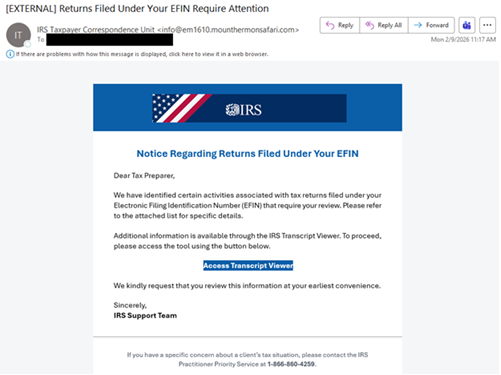
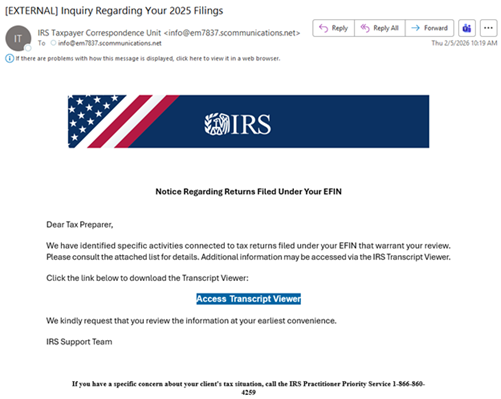
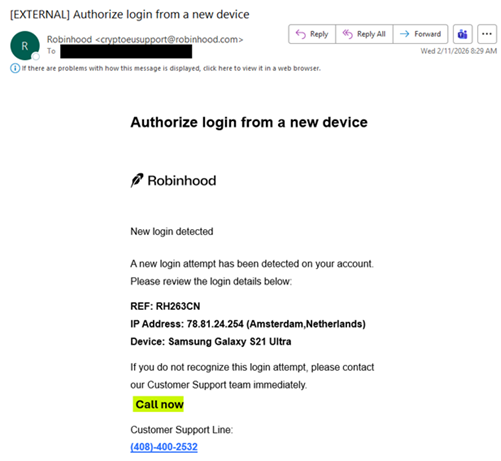
Have you received a text message regarding an unpaid toll or package misdelivery lately? You are not the only one. Researchers discoveredSMiShing (SMS text phishing) campaign attributed to the “Smishing Triad” that has been circulating since April 2024. A China-based threat actor has been impersonating a variety of international services within critical infrastructure, including banking, cryptocurrency, e-commerce, healthcare, law enforcement, and social media. The campaign places a significant focus on targeting US residents by impersonating organizations, such as commercial and state-owned mail and package delivery services, state vehicles and licensing agencies, and state and federal tax services or agencies. The “Smishing Triad” employs standard tactics by sending text messages that create urgency to trick victims into acting immediately. Once victims click on an included link, they are directed to a phishing page that captures sensitive information, including Social Security numbers, addresses, payment information, and login credentials.
This threat actor has been challenging to detect due to their operation and hosting infrastructure. Researchers have identified 194,000 malicious domains linked to the operation. The attack infrastructure is primarily hosted on popular US cloud services, despite the malicious domains being registered through a Hong Kong-based registrar and utilizing Chinese nameservers. A majority of the “Smishing Triad” root domains were created with a hyphenated series of strings followed by a top-level domain (TLD) (e.g., [string1]-[string2].[TLD]). For example, one of the domains linked to this threat actor is “ezpassnj[.]gov-mhmt[.]xin,” which could be mistaken for the legitimate ezpassnj.gov. Notably, this campaign is evolving to impersonate many types of services, as there has been a significant increase in the registration of “.gov” TLDs in the past three months.
Document Review Detours to Legitimate Jotform Platform

Jotform is used to create online forms and apps to collect data, process payments, and automate workflows without coding. It is a versatile tool for businesses and individuals in legitimate use cases. However, Jotform can also create opportunities for threat actors to exploit it for malicious purposes, such as phishing, information gathering, and malware distribution.

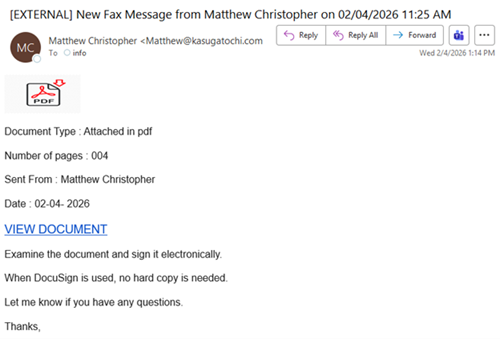
Threat actors compromised the user’s account and utilized the user’s signature and organization branding to send multiple phishing emails. The emails purport to be powered by Docusign and claim to be a document for review. Depending on the campaign, the subject line indicates a file transfer notification (which differs from the message content as shown in the above image) or a named document for review.

If the “Review Documents” button is clicked, the target is directed to the Jotform platform, which displays a fake form to convince users to “install” an app. Threat actors use the sender’s organization name from the compromised account to label the form title in the web browser’s tab and app, making it appear legitimate. Installing an app to view a document is typically a red flag, especially for popular Microsoft or Adobe products and services, as many businesses currently utilize them for work assets. If the “app” is installed, it is added to the home screen and claims to open and run safely in a focused window, offer quick access options such as pinning to the taskbar or start menu, and sync across multiple devices. Additionally, the user is prompted with a Cloudflare check to verify that they are human and “activate” safe browsing features.
A Microsoft phishing page is displayed, featuring stolen branding, to trick users into entering their account credentials to review the supposed document. Another red flag is the URL because it does not contain “Microsoft” in the domain name. Instead, it includes “document365s” and uses “.com” appended with a sneaky “.de” top-level domain (TLD) to appear legitimate.

Vulnerability in Microsoft Windows Server Update Services

This Multi-State Information Sharing and Analysis Center (MS-ISAC) Advisory is being provided to assist agencies and organizations in guarding against the persistent malicious actions of cybercriminals.
A vulnerability has been discovered in Microsoft Windows Server Update Services (WSUS) which could allow for remote code execution. WSUS is a tool that helps organizations manage and distribute Microsoft updates across multiple computers. Instead of every PC downloading updates from Microsoft’s servers, WSUS downloads the updates and stores them, then distributes them to all computers on the network that connect to it. Successful exploitation of the vulnerability could allow a threat actor to gain full control of the WSUS server and distribute malicious updates to client devices.
Threat Intelligence
Proof-of-concept exploit code was released according to open source reporting. Additionally, CISA added CVE-2025-59287 to the Known Exploited Vulnerabilities (KEV) catalog.
Systems Affected
Windows Server 2012 R2 versions prior to build 6.3.9600.22826 Windows Server 2012 versions prior to build 6.2.9200.25728 Windows Server 2016 versions prior to build 10.0.14393.8524 Windows Server 2025 versions prior to build 10.0.26100.6905 Windows Server 2022, 23H2 Edition (Server Core installation) versions prior to build 10.0.25398.1916 Windows Server 2022 versions prior to build 10.0.20348.4297 Windows Server 2019 versions prior to build 10.0.17763.7922
Risk
Government:
– Large and medium government entities: High
– Small government entities: Medium
Businesses:
– Large and medium business entities: High
– Small business entities: Medium
Home Users: Low
Recommendations
Apply appropriate updates provided by Microsoft or other vendors which use this software to vulnerable systems immediately after appropriate testing. Apply the Principle of Least Privilege to all systems and services. Run all software as a non-privileged user (one without administrative privileges) to diminish the effects of a successful attack. Use vulnerability scanning to find potentially exploitable software vulnerabilities to remediate them. Architect sections of the network to isolate critical systems, functions, or resources. Use physical and logical segmentation to prevent access to potentially sensitive systems and information. Use a DMZ to contain any internet-facing services that should not be exposed from the internal network. Configure separate virtual private cloud (VPC) instances to isolate critical cloud systems. Use capabilities to detect and block conditions that may lead to or be indicative of a software exploit occurring.
References
Microsoft:
https://msrc.microsoft.com/update-guide/vulnerability/CVE-2025-59287

HelpNetSecurity:
https://www.helpnetsecurity.com/2025/10/24/wsus-vulnerability-cve-2025-59287-exploited/

Oracle Quarterly Critical Patches

Multiple vulnerabilities have been discovered in Oracle products, the most severe of which could allow for remote code execution.
Threat Intelligence
Watchtowr reports CVE-2025-61882 and CVE-2025-61884 were exploited in the recent wave of Cl0p data theft attacks and subsequent extortion campaign.
Systems Affected
Risk
Government:
– Large and medium government entities: High
– Small government entities: High
Businesses:
– Large and medium business entities: High
– Small business entities: High
Home Users: Low
Recommendations
Apply appropriate patches or appropriate mitigations provided by Oracle to vulnerable systems immediately after appropriate testing. Use vulnerability scanning to find potentially exploitable software vulnerabilities to remediate them. Apply the Principle of Least Privilege to all systems and services and run all software as a non-privileged user (one without administrative rights) to diminish the effects of a successful attack. Remind all users not to visit untrusted websites or follow links/open files provided by unknown or untrusted sources. Use capabilities to prevent suspicious behavior patterns from occurring on endpoint systems, which could include suspicious process, file, API call, etc. behavior. Use capabilities to detect and block conditions that may lead to or be indicative of a software exploit occurring.
References
Oracle:
https://www.oracle.com/security-alerts/cpuoct2025.html
https://www.oracle.com/security-alerts/alert-cve-2025-61882.html
https://www.oracle.com/security-alerts/alert-cve-2025-61884.html

Vulnerability in Oracle E-Business SuiteCould Allow for Remote Code Execution

This Multi-State Information Sharing and Analysis Center (MS-ISAC) Advisory is being provided to assist agencies and organizations in guarding against the persistent malicious actions of cybercriminals.
A vulnerability has been discovered in Oracle E-Business Suite, which could allow for remote code execution. Oracle E-Business Suite (EBS) is a comprehensive suite of integrated business applications that runs core enterprise functions. Successful exploitation of this vulnerability could allow a threat actor to execute code in the context of the affected component. A threat actor could then install programs; view, change, or delete data; or create new accounts with full user rights.
Threat Intelligence
Oracle is aware that CVE-2025-61882 has been exploited in the wild.
Systems Affected
Oracle E-Business Suite, versions 12.2.3-12.2.14
Risk
Government:
– Large and medium government entities: High
– Small government entities: Medium
Businesses:
– Large and medium business entities: High
– Small business entities: Medium
Home Users: Low
Recommendations
Apply appropriate updates provided by Oracle or other vendors which use this software to vulnerable systems immediately after appropriate testing. Apply the Principle of Least Privilege to all systems and services. Run all software as a non-privileged user (one without administrative privileges) to diminish the effects of a successful attack. Use vulnerability scanning to find potentially exploitable software vulnerabilities to remediate them. Architect sections of the network to isolate critical systems, functions, or resources. Use physical and logical segmentation to prevent access to potentially sensitive systems and information. Use a DMZ to contain any internet-facing services that should not be exposed from the internal network. Configure separate virtual private cloud (VPC) instances to isolate critical cloud systems. Use capabilities to detect and block conditions that may lead to or be indicative of a software exploit occurring.
Reference
Oracle:
https://www.oracle.com/security-alerts/alert-cve-2025-61882.html

Ransomware Groups Continue to Push It to the Limit

Ransomware remains a persistent and ever-evolving threat to businesses of all sizes and sectors.  While the tactics, techniques, and procedures (TTPs) may vary, the end goal is often the same – a substantial payday.
After months of silence, LockBit recently reemerged with an announcement of its “LockBit 5.0 Affiliate Program,” which grants its affiliates the ability to target critical infrastructure usually off-limits under standard ransomware-as-a-service (RaaS) rules. Shortly after LockBit reentered the ransomware scene, three well-known groups—Qilin, LockBit, and DragonForce—announced they were forming an alliance. Their goal is to collaborate and share techniques, infrastructure, and resources.
Another cybercrime group known for deploying ransomware, Storm-1175, has been exploiting a vulnerability in GoAnywhere MFT. During their multi-stage attack, they exploited CVE-2025-10035, which enabled remote code execution. After gaining access, they installed remote device management tools, such as SimpleHelp and MeshAgent, to allow them to drop web shells and move laterally across networks using Windows utilities. In one attack, they were able to drop RClone and Medusa ransomware.
Ransomware attacks are typically opportunistic, and a wide range of businesses have become victims. Asahi Group Holdings, a Japanese brewery and food giant, recently experienced an attack on its manufacturing operations, with Qilin RaaS claiming responsibility for the incident. While Asahi immediately shut down operations and isolated affected systems, it is still working to fully restore its systems and get everything back online.

Salt Typhoon APT: A Strategic Threat Assessment

Salt Typhoon continues to target US critical infrastructure through sustained and coordinated cyber operations. The group, an advanced persistent threat (APT) linked to the People’s Republic of China (PRC), focuses much of its activity in communications, government, and defense. These intrusions enable the theft of sensitive national security information while advancing China’s efforts to expand its disruptive cyber capabilities. This access could be leveraged to impede the US military’s ability to respond effectively during a crisis or conflict. 
The NJCCIC has assessed that Salt Typhoon poses a high-risk threat to public and private infrastructure in the United States, including organizations in New Jersey. Our latest threat analysis report provides an in-depth Threat Actor Profile (TAP) that includes:
An overview of ongoing threat activity, targeting patterns, objectives, and key incidents. A risk assessment evaluating the likelihood and potential impact of attacks. An outline of the tactics, techniques, and procedures (TTPs) employed. Examples of real-world cyber intrusions and campaigns. Defensive guidance and resources for network administrators and critical infrastructure operators.

NYMJCSC 2025 – October 30th

The 2025 NY Metro Joint Cyber Security Conference is in the planning stage, celebrating our 12th year featuring keynotes, panels and sessions aimed at educating everyone on the various aspects of information security and technology. Workshops featuring in-depth extended classroom-style educational courses to expand your knowledge and foster security discussions will take place virtually post-conference.

We are pleased to announce our opening keynote Richard Greenberg, CISSP, a well-known Cyber Security Leader and Evangelist, CISO, Advisor, and ISSA Hall of Fame, Distinguished Fellow & Honor Roll.

Conference attendees are invited to our after-party graciously sponsored by The Cyber Breakfast Club.

Register NOW

New York Metro Joint Cyber Security Conference –

Vulnerabilities in F5 Devices

The Cybersecurity and Infrastructure Security Agency (CISA) issued Emergency Directive ED 26-01: Mitigate Vulnerabilities in F5 Devices to direct Federal Civilian Executive Branch agencies to inventory F5 BIG-IP products, evaluate if the networked management interfaces are accessible from the public internet, and apply newly released updates from F5.
A nation-state affiliated cyber threat actor has compromised F5 systems and exfiltrated data, including portions of the BIG-IP proprietary source code and vulnerability information, which provides the actor with a technical advantage to exploit F5 devices and software. This poses an imminent threat to federal networks using F5 devices and software.
Successful exploitation of the impacted F5 products could enable a threat actor to access embedded credentials and Application Programming Interface (API) keys, move laterally within an organization’s network, exfiltrate data, and establish persistent system access. This could potentially lead to a full compromise of target information systems.
Although ED 26-01 and the associated guidance are directed to federal agencies, all public and private sector organizations are urged to review the Emergency Directive and associated resources and take steps to mitigate these vulnerabilities.
Key Actions Required:
Inventory: Identify all instances of F5 BIG-IP hardware devices and F5OS, BIG-IP TMOS, Virtual Edition, BIG-IP Next, BIG-IP IQ software, and BNK / CNF. Harden Public-Facing Hardware and Software Appliances: Identify if physical or virtual BIG-IP devices exposed to the public internet provide public access to the networked management interface. Update Instances of BIG-IP Hardware and Software Applications: Apply the latest vendor updates by October 22, for the following products: F5OS, BIG-IP TMOS, BIG-IQ, and BNK / CNF— validate the F5 published MD5 checksums for its software image files and other F5 downloaded software. For other devices, update with the latest software release by October 31, and apply the latest F5-provided asset hardening guidance. Disconnect End of Support Devices: Disconnect all public-facing F5 devices that have reached their end-of-support date. Report mission-critical exceptions to CISA. Mitigate Against Cookie Leakage: If CISA notifies an agency of a BIG-IP cookie leakage vulnerability, the agency shall follow CISA’s accompanying mitigation instructions. Report: Submit a complete inventory of F5 products and actions taken to CISA by 11:59 p.m. EDT, October 29.

Multiple Vulnerabilities in Mozilla Products Could Allow for Arbitrary Code Execution – PATCH: NOW

Multiple vulnerabilities have been discovered in Mozilla products, the most severe of which could allow for arbitrary code execution.

  • Mozilla Firefox is a web browser used to access the Internet.
  • Mozilla Firefox ESR is a version of the web browser intended to be deployed in large organizations.
  • Mozilla Thunderbird is an email client.
  • Mozilla Thunderbird ESR is a version of the email client intended to be deployed in large organizations.

Successful exploitation of the most severe of these vulnerabilities could allow for arbitrary code execution. Depending on the privileges associated with the user an attacker could then install programs; view, change, or delete data; or create new accounts with full user rights. Users whose accounts are configured to have fewer user rights on the system could be less impacted than those who operate with administrative user rights.

THREAT INTELLIGENCE:
There are currently no reports of these vulnerabilities being exploited in the wild.

SYSTEMS AFFECTED:

  • Firefox versions prior to 144
  • Firefox ESR versions prior to 115.29
  • Firefox ESR versions prior to 140.4
  • Thunderbird versions prior to 144
  • Thunderbird versions prior to 140.4
  • Thunderbird ESR versions prior to 140.4

RISK:
Government:

  • Large and medium government entities: HIGH
  • Small government: MEDIUM

Businesses:

  • Large and medium business entities: HIGH
  • Small business entities: MEDIUM

Home Users: LOW 

TECHNICAL SUMMARY:
Multiple vulnerabilities have been discovered in Mozilla products, the most severe of which could allow for arbitrary code execution. Details of these vulnerabilities are as follows:

Tactic: Initial Access (TA0001):

Technique: Drive-by Compromise (T1189)

  • Use-after-free in MediaTrackGraphImpl. (CVE-2025-11708)
  • Out of bounds read/write in a privileged process triggered by WebGL textures. (CVE-2025-11709)
  • Cross-process information leaked due to malicious IPC messages. (CVE-2025-11710)
  • Some non-writable Object properties could be modified. (CVE-2025-11711)
  • Memory safety bugs fixed in Firefox ESR 115.29, Firefox ESR 140.4, Thunderbird ESR 140.4, Firefox 144 and Thunderbird 144. (CVE-2025-11714)
  • Memory safety bugs fixed in Firefox ESR 140.4, Thunderbird ESR 140.4, Firefox 144 and Thunderbird 144. (CVE-2025-11715)
  • Memory safety bug fixed in Firefox 144 and Thunderbird 144. (CVE-2025-11721) 

Additional lower severity vulnerabilities include:

  • Sandboxed iframes allowed links to open in external apps (Android only). (CVE-2025-11716)
  • The password edit screen was not hidden in Android card view. (CVE-2025-11717)
  • An OBJECT tag type attribute overrode browser behavior on web resources without a content-type. (CVE-2025-11712)
  • Address bar could be spoofed on Android using visibilitychange. (CVE-2025-11718)
  • Potential user-assisted code execution in “Copy as cURL” command. (CVE-2025-11713)
  • Use-after-free caused by the native messaging web extension API on Windows. (CVE-2025-11719)
  • Spoofing risk in Android custom tabs. (CVE-2025-11720) 

Successful exploitation of the most severe of these vulnerabilities could allow for arbitrary code execution. Depending on the privileges associated with the user an attacker could then install programs; view, change, or delete data; or create new accounts with full user rights. Users whose accounts are configured to have fewer user rights on the system could be less impacted than those who operate with administrative user rights.
​​​

RECOMMENDATIONS:
We recommend the following actions be taken:

  • Apply appropriate updates provided by Mozilla to vulnerable systems immediately after appropriate testing. (M1051:Update Software)
    • Safeguard 7.1: Establish and Maintain a Vulnerability Management Process: Establish and maintain a documented vulnerability management process for enterprise assets. Review and update documentation annually, or when significant enterprise changes occur that could impact this Safeguard.
    • Safeguard 7.4: Perform Automated Application Patch Management: Perform application updates on enterprise assets through automated patch management on a monthly, or more frequent, basis.
    • Safeguard 7.7: Remediate Detected Vulnerabilities: Remediate detected vulnerabilities in software through processes and tooling on a monthly, or more frequent, basis, based on the remediation process.
    • Safeguard 9.1: Ensure Use of Only Fully Supported Browsers and Email Clients: Ensure only fully supported browsers and email clients are allowed to execute in the enterprise, only using the latest version of browsers and email clients provided through the vendor.
  • Apply the Principle of Least Privilege to all systems and services. Run all software as a non-privileged user (one without administrative privileges) to diminish the effects of a successful attack. (M1026:Privileged Account Management)
    • Safeguard 4.7: Manage Default Accounts on Enterprise Assets and Software: Manage default accounts on enterprise assets and software, such as root, administrator, and other pre-configured vendor accounts. Example implementations can include: disabling default accounts or making them unusable.
    • Safeguard 5.4: Restrict Administrator Privileges to Dedicated Administrator Accounts: Restrict administrator privileges to dedicated administrator accounts on enterprise assets. Conduct general computing activities, such as internet browsing, email, and productivity suite use, from the user’s primary, non-privileged account.
  • Use capabilities to detect and block conditions that may lead to or be indicative of a software exploit occurring. (M1050:Exploit Protection)
    • Safeguard 10.5: Enable Anti-Exploitation Features: Enable anti-exploitation features on enterprise assets and software, where possible, such as Microsoft® Data Execution Prevention (DEP), Windows® Defender Exploit Guard (WDEG), or Apple® System Integrity Protection (SIP) and Gatekeeper™.
  • Restrict use of certain websites, block downloads/attachments, block JavaScript, restrict browser extensions, etc. (M1021:Restrict Web-Based Content)
    • Safeguard 9.2: Use DNS Filtering Services: Use DNS filtering services on all enterprise assets to block access to known malicious domains.
    • Safeguard 9.3: Maintain and Enforce Network-Based URL Filters: Enforce and update network-based URL filters to limit an enterprise asset from connecting to potentially malicious or unapproved websites. Example implementations include category-based filtering, reputation-based filtering, or through the use of block lists. Enforce filters for all enterprise assets.
    • Safeguard 9.6: Block Unnecessary File Types: Block unnecessary file types attempting to enter the enterprise’s email gateway.
  • Block execution of code on a system through application control, and/or script blocking. (M1038:Execution Prevention)
    • Safeguard 2.5: Allowlist Authorized Software: Use technical controls, such as application allowlisting, to ensure that only authorized software can execute or be accessed. Reassess bi-annually, or more frequently.
    • Safeguard 2.6: Allowlist Authorized Libraries: Use technical controls to ensure that only authorized software libraries, such as specific .dll, .ocx, .so, etc., files, are allowed to load into a system process. Block unauthorized libraries from loading into a system process. Reassess bi-annually, or more frequently.
    • Safeguard 2.7: Allowlist Authorized Scripts: Use technical controls, such as digital signatures and version control, to ensure that only authorized scripts, such as specific .ps1, .py, etc., files, are allowed to execute. Block unauthorized scripts from executing. Reassess bi-annually, or more frequently.
  • Use capabilities to prevent suspicious behavior patterns from occurring on endpoint systems. This could include suspicious process, file, API call, etc. behavior. (M1040:Behavior Prevention on Endpoint)
    • Safeguard 13.2: Deploy a Host-Based Intrusion Detection Solution: Deploy a host-based intrusion detection solution on enterprise assets, where appropriate and/or supported.
    • Safeguard 13.7: Deploy a Host-Based Intrusion Prevention Solution: Deploy a host-based intrusion prevention solution on enterprise assets, where appropriate and/or supported. Example implementations include use of an Endpoint Detection and Response (EDR) client or host-based IPS agent.
  • Inform and educate users regarding the threats posed by hypertext links contained in emails or attachments especially from un-trusted sources. Remind users not to visit un-trusted websites or follow links provided by unknown or un-trusted sources. (M1017:User Training)
    • Safeguard 14.1: Establish and Maintain a Security Awareness Program: Establish and maintain a security awareness program. The purpose of a security awareness program is to educate the enterprise’s workforce on how to interact with enterprise assets and data in a secure manner. Conduct training at hire and, at a minimum, annually. Review and update content annually, or when significant enterprise changes occur that could impact this Safeguard.
    • Safeguard 14.2: Train Workforce Members to Recognize Social Engineering Attacks: Train workforce members to recognize social engineering attacks, such as phishing, pre-texting, and tailgating.

REFERENCES:

CVE:
https://cve.mitre.org/cgi-bin/cvename.cgi?name=CVE-2025-11708
https://cve.mitre.org/cgi-bin/cvename.cgi?name=CVE-2025-11709
https://cve.mitre.org/cgi-bin/cvename.cgi?name=CVE-2025-11710
https://cve.mitre.org/cgi-bin/cvename.cgi?name=CVE-2025-11711
https://cve.mitre.org/cgi-bin/cvename.cgi?name=CVE-2025-11712
https://cve.mitre.org/cgi-bin/cvename.cgi?name=CVE-2025-11713
https://cve.mitre.org/cgi-bin/cvename.cgi?name=CVE-2025-11714
https://cve.mitre.org/cgi-bin/cvename.cgi?name=CVE-2025-11715
https://cve.mitre.org/cgi-bin/cvename.cgi?name=CVE-2025-11716
https://cve.mitre.org/cgi-bin/cvename.cgi?name=CVE-2025-11717
https://cve.mitre.org/cgi-bin/cvename.cgi?name=CVE-2025-11718
https://cve.mitre.org/cgi-bin/cvename.cgi?name=CVE-2025-11719
https://cve.mitre.org/cgi-bin/cvename.cgi?name=CVE-2025-11720
https://cve.mitre.org/cgi-bin/cvename.cgi?name=CVE-2025-11721 
 
Mozilla:
https://www.mozilla.org/en-US/security/advisories/
https://www.mozilla.org/en-US/security/advisories/mfsa2025-81/
https://www.mozilla.org/en-US/security/advisories/mfsa2025-82/
https://www.mozilla.org/en-US/security/advisories/mfsa2025-83/
https://www.mozilla.org/en-US/security/advisories/mfsa2025-84/
https://www.mozilla.org/en-US/security/advisories/mfsa2025-85/