NIST has released the final version of Special Publication (SP) 800-219 Revision 1, Automated Secure Configuration Guidance from the macOS Security Compliance Project (mSCP).It provides resources that system administrators, security professionals, security policy authors, information security officers, and auditors can leverage to secure and assess macOS desktop and laptop system security in an automated way.
This publication introduces the mSCP, describes use cases for leveraging the mSCP content, and introduces a new feature of the mSCP that allows organizations to customize security rules more easily. The publication also gives an overview of the resources available on the project’s GitHub site, which provides practical, actionable recommendations in the form of secure baselines and associated rules and is continuously updated to support each new release of macOS.
The Cybersecurity and Infrastructure Security Agency (CISA) released a Cybersecurity Advisory (CSA), Threat Actors Exploiting Citrix CVE-2023-3519 to Implant Webshells, to warn organizations about threat actors exploiting CVE-2023-3519, an unauthenticated remote code execution (RCE) vulnerability affecting NetScaler (formerly Citrix) Application Delivery Controller (ADC) and NetScaler Gateway. In June 2023, threat actors exploited this vulnerability as a zero-day to drop a webshell on a critical infrastructure organization’s NetScaler ADC appliance. The webshell enabled the actors to perform discovery on the victim’s active directory (AD) and collect and exfiltrate AD data. The actors attempted to move laterally to a domain controller but network-segmentation controls for the appliance blocked movement.
This CSA details tactics, techniques, and procedures (TTPs) shared with CISA by the victim.
We are very excited and pleased to announce this edition of the Ninja Training Series. We have compiled several videos, document guides, and other resources to aid users in mastering the Microsoft Priva Ninja training realm. Our goal is to get you the most current links to the community blogs, training videos, Interactive Guides, learning paths, and any other relevant documentation.
To make it easier for you to start and advance your knowledge gradually we split content for each Priva module, Risk Management and Subject Rights Requests, into three levels: beginner, intermediate, and advanced.
Introduction to Microsoft Priva
Privacy is top of mind for organizations and consumers today, and concerns about how personal data is handled are steadily increasing. Regulations and laws such as the European Union’s General Data Protection Regulation (GDPR) and the California Consumer Privacy Act (CCPA) impact people around the world, setting rules for how organizations store personal data and giving people rights to manage personal data collected by an organization.
To meet regulatory requirements and build customer trust, organizations need to take a “privacy by default” stance. Rather than manual processes and a patchwork of tools, organizations need a comprehensive solution to address common challenges such as:
Protecting the increasing amounts of unstructured data from privacy issues arising from human error
Helping employees adopt sound data handling practices and training them to spot and fix issues
Understanding the potential risks in the amount and type of personal data they store and share
Fulfilling data subject requests, or subject rights requests, efficiently and on-time
Microsoft Priva helps organizations meet these challenges so they can achieve their privacy goals.
Microsoft Priva provides a set of solutions that help companies safeguard personal data and build a privacy-resilient workplace by proactively identifying and protecting against privacy risks such as data hoarding, data transfers, and data oversharing, empowering information workers to make smart data handling decisions, and automating and managing subject requests at scale.
Identify critical privacy risks and conflicts: Gain visibility into your private data and associated risks with automated data discovery, user mapping intelligence, and correlated signals.
Automate privacy operations and response to subject rights requests: Effectively mitigate privacy risks with automated policies, built-in risk detection and remediation, and collaboration workflows, and automate and manage subject rights requests at scale.
Empower employees to make smart data handling decisions: Foster a proactive privacy culture by increasing awareness of and accountability towards privacy violations and risks without hindering employee productivity.
Privacy Risk Management in Microsoft Priva gives you the capability to set up policies that identify privacy risks in your Microsoft 365 environment and enable easy remediation. Privacy Risk Management policies are meant to be internal guides and can help you:
Detect overexposed personal data so that users can secure it.
Spot and limit transfers of personal data across departments or regional borders.
Help users identify and reduce the amount of unused personal data that you store.
Privacy Risk Management offers built-in templates for these scenarios to help you easily create policies. You can also fine-tune your approach by creating custom policies, using any of these templates as a starting point.
Figure 1: Templates for Custom Policies
When policy matches are found, admins can review alerts about the findings and make decisions about how to handle the data by creating issues for further action by your users. To learn more, see Investigate and remediate alerts in Privacy Risk Management. You can also configure email notifications and, for supported policy types, Teams notifications to notify your content owners directly about policy matches. They can take corrective action from these notifications and learn more about best practices for handling data with links you provide to your own training materials
Beginner Training
Getting started with Priva the below information includes perquisites, administrator roles and permissions, and settings
Now that you have advanced your learning on Priva Risk Management Module use the below interactive guide for practical application of your new Priva skills and knowledge
Several privacy regulations around the world grant individuals—or data subjects—the right to make requests to review or manage the personal data that companies have collected about them. These subject rights requests are also referred to as data subject requests (DSRs), data subject access requests (DSARs), or consumer rights requests.
For companies that store large amounts of information, finding the relevant data can be a formidable task. Fulfilling the requests, for most organizations, is a highly manual and time-consuming process.
The Microsoft Priva Subject Rights Requests solution is designed to help alleviate the complexity and length of time involved in responding to data subject inquires. It provides automation, insights, and workflows to help organizations fulfill requests more confidently and efficiently.
Now that you have advanced your learning on Priva Subject Rights Requests module use the below interactive guide for practical application of your new Priva skills and knowledge
Organizations often encounter significant challenges when attempting to gain a unified view of insider risks in their multicloud environments. Typically, this entails cross-checking multiple systems and manually correlating information to gain a comprehensive understanding of a specific user’s activities that could potentially lead to data security incidents.
As we announced in the previous blogpost, Microsoft Purview Insider Risk Management allows you to bring your own detections and create custom indicators. Admins with the appropriate permissions can incorporate detections from homegrown analytics or SIEM/UEBA platforms like Sentinel, as well as directly from non-Microsoft systems such as Salesforce and Dropbox. These detections can then be used in Insider Risk Management policies, to detect scenarios such as data theft and data leaks. By weaving a user’s risky activities across different environments into a unified timeline view, security teams can obtain a comprehensive understanding of potential security incidents across various applications.
In this blogpost, we will show you how you can automate the process to bring your own risk detections into Microsoft Purview Insider Risk Management, which correlates various signals to identify potential malicious or inadvertent insider risks, such as IP theft, data leakage, and security violations. Insider Risk Management enables customers to create policies to manage security and compliance. Built with privacy by design, users are pseudonymized by default, and role-based access controls and audit logs are in place to help ensure user-level privacy.
Automate the process of bringing in detections with Microsoft Sentinel
Here’s an example of automating the process to bring detections into Microsoft Purview Insider Risk Management through Microsoft Sentinel and Azure Logic Apps:
The Contoso organization has discovered instances in which GitHub privileged administrators or repository owners exposed confidential source code files to the public, leading to leakage of intellectual property. The Contoso security team aims to investigate these incidents and develop strategies to identify potential risky activities on GitHub before they escalate into full-blown data security incidents.
To achieve the above objectives, the team can utilize Analytics in Microsoft Sentinel to create rules that define risky activities that may lead to a data security incident by GitHub users in their organization. They can then leverage the bring-your-own-detections capability and Azure Logic Apps to automatically bring the detected risky activities into Microsoft Purview Insider Risk Management, a purpose-built solution that is designed for managing and mitigating insider risks. This approach enables Contoso to consolidate risky user activity signals across various workloads, including GitHub, Microsoft 365, endpoints, and other cloud services and apps, and conduct a holistic assessment of users’ risk levels.
Here are the four steps that the Contoso security team can follow:
Author Analytics rules in Microsoft Sentinel to detect risky user activities that may potentially lead to data security incidents in GitHub
Stream risk detections from Microsoft Sentinel to Microsoft Purview Insider Risk Management through the Insider risk indicators connector
Create Custom Indicators in Microsoft Purview Insider Risk Management and use them in a Data leak policy
Conduct in-depth investigations of risky user activities that have the potential to result in data security incidents across environments
In the following sections, we will provide detailed explanations of each step, accompanied by screenshots as illustrative examples.
Step 1: Author Analytics rules in Microsoft Sentinel to detect risky user activities that may potentially lead to data security incidents in GitHub
Before incorporating detections into Microsoft Purview Insider Risk Management, it is essential to process activity logs to identify risky events that should be included. Step 1 guides you through connecting the log data to Microsoft Sentinel and curating them into the relevant risky activities you want to bring into Microsoft Purview Insider Risk Management.
To begin, an admin can create a Microsoft Sentinel workspace and establish a connection with their enterprise GitHub account using the GitHub Enterprise Audit Log connector. Microsoft Sentinel provides data connectors for over 240 SaaS/PaaS workloads, enabling administrators to perform this process for any application relevant to their organization, in addition to GitHub.
Figure 1 Admin leverages GitHub Enterprise Audit Log connector to pull GitHub audit logs and ingest them into Sentinel
Once connected, users’ GitHub activities, including repo creation, deletion, making a repo private, and adding external users, will be captured in the GitHubAuditData table within the Sentinel Logs. Security teams can leverage these logs to enhance visibility into their organization’s GitHub repositories, formulate queries, and detect potential security incidents.
Figure 2 User actions in GitHub are collected and captured in Microsoft Sentinel Logs
After establishing the GitHub connection in Microsoft Sentinel, admins can proceed to create custom Analytics rules that aid in identifying risks and detecting anomalous activities. These Analytics rules are designed to search for specific events or event patterns across your environment. Once certain event thresholds or conditions are met, Microsoft Sentinel would trigger alerts, generating incidents that security teams can then triage and investigate.
For instance, in this particular scenario, admins can develop Analytics rules that target risky source code activities, such as GitHub repository switched from private to public or adding external users to a source code project.
Figure 3 Admins create a Microsoft Sentinel Analytics rule to detect risky activity, GitHub repo switched from private to public
Figure 4 Admins define the logic of the Analytics rule to detect risky activity, GitHub repo switched from private to public
Once the Analytics rule is created, admins can see alerts in Microsoft Sentinel Incidents when users perform activities that match the Analytics rules.
Figure 5 Admins can view the incidents and alerts corresponding to the Analytics rules configured
Figure 6 Incident details are also captured in Microsoft Sentinel Logs
Step 2: Stream risk detections from Microsoft Sentinel to Microsoft Purview Insider Risk Management through the Insider risk indicators connector
Security teams can use Microsoft Sentinel for their general security operations. However, when it comes to managing insider risks, organizations need to use Microsoft Purview Insider Risk Management. In Step 2, we will show you how to automate the workflows to constantly bring the detected risky activities into Insider Risk Management.
Admins with appropriate permissions can create an Insider risk indicators connector within the Data Connectors page of the Microsoft Purview Compliance portal. Firstly, they can upload a sample file containing the Sentinel detections, which assists in defining the data type and mapping of the detected activities they wish to bring in.
Figure 7 Admins define the data type and mapping that will be available to review in insider risk alerts
To automate the import of detections, an admin can create an Azure Logic App that queries Sentinel Logs periodically and streams the detections into Insider Risk Management automatically. This approach saves time by eliminating the need for manual imports and streamlines the process to bring in risk detections. For guidance on creating an Azure Logic App using the provided JSON template, please refer to the article “How to import an existing Logic App template.”
Figure 8 Admins use Azure Logic Apps to automate the bring-your-own-detections process
Step 3: Create custom indicators in Microsoft Purview Insider Risk Management and use them in a Data leak policy
Once the detections have been imported into Microsoft Purview Insider Risk Management, you can begin incorporating them into your insider risk policies, which then can generate alerts that are derived from risk insights across environments. To achieve this, admins need to define indicators for the imported detections.
Admins with appropriate permissions can navigate to the Insider risk settings and create custom indicators. By selecting the relevant element and value from the detections imported through the connector established in Step 2, administrators can define these custom indicators and how to use them.
Figure 9 Admins create a new custom indicator, Source code theft indicator from GitHub, as an indicator or policy trigger
Figure 10 Admins use custom indicators as insider risk policy triggers, which will initiate risk score assignments to users who match the condition.
Figure 11 Admins use custom indicators as policy indicators, which are used to generate alerts.
After the custom indicator is created, it can be used within Insider Risk Management policies, such as data leaks and data theft by departing users. The policies will then incorporate custom indicators when generating alerts and calculating risk scores.
Step 4: Conduct in-depth investigations of risky user activities that have the potential to result in data security incidents across environments
When alerts are generated based on the user activities that may lead to data security incidents, the custom indicators are integrated into the user activity timeline. This capability allows insider risk investigators to access all the insights and underlying activity in a single location, providing a comprehensive understanding of the impact and scope of a potential data security incident. By weaving together the custom indicators and other native user activity signals, the investigator gains a holistic view of a potential incident and its possible ramifications.
Figure 12 Insider risk indicators are presented in one comprehensive view for investigators to have a holistic understanding of the potential data security incident.
Explore more Insider Risk Management resources
This new feature is currently in public preview, and we eagerly await your feedback. To help you learn more about Microsoft Purview Insider Risk Management, here are some additional resources for your reference:
Insider Risk Management is part of the Microsoft Purview suite of solutions designed to help organizations manage, govern and protect their data. If you are an organization using Microsoft 365 E3 and would like to experience Insider Risk and other Purview solutions for yourself, check out our E5 Purview trial.
If you own Insider Risk Management and are interested in learning more about Insider Risk Management, leveraging Insider Risk Management to understand your environment, or building policies for your organization or investigate potential risky user actions, check out the resources available on our “Become an Insider Risk Management Ninja” resource page.
Did you know that 88% of organizations lack the confidence to prevent sensitive data loss?1 Discovery and classification of sensitive data is important for organizations who want to better protect sensitive personally identifiable information (PII) and corporate intellectual property. When these sensitive labeled files are used in business intelligence and analytics solutions, it’s important they remain protected and are shared and accessed only by authorized individuals.
With Microsoft Purview Information Protection, we provide a built-in, intelligent, unified, and extensible solution to protect sensitive data across your digital estate. This includes Microsoft clouds such as Microsoft 365 and Azure, as well as on-premises, hybrid and third-party clouds, and SaaS applications.
In addition, to ensure the security of your organization’s data, it’s imperative to also enable governance over your organization’s data estate. We are pleased to announce new capabilities in both Microsoft Fabric and Power BI.
With Fabric, Microsoft provides centralized visibility into what’s happening with your data, gives insights into usage and adoption, and enables organizations to secure and govern data end to end with a single central data repository. Fabric provides a unified intelligent data foundation for all first-party analytics workloads and integrates Power BI, Data Factory, and the next generation of Synapse to offer customers an easy –to use and powerful modern analytics solution.
Figure 1: Microsoft Fabric key components
Today we are announcing the following Microsoft Purview capabilities in Fabric, all in public preview:
Integration with Information Protection sensitivity labels
Microsoft Purview Hub support
Audit logs support
Fabric natively integrates the same familiar unified Information Protection sensitivity labels that are used in Microsoft 365, so users can easily see if a file or email is confidential and whether they are blocked from exporting the file. Data owners can apply a sensitivity label to a lakehouse or any other Fabric item, and the label will flow with the data to all downstream items in Fabric. These labels and their protection settings are also automatically applied to Microsoft 365 files that are exported from Fabric. Learn more about Information protection in Fabric.
Figure 2: Using Information Protection sensitivity labels in Fabric.
Fabric admins can also use the Microsoft Purview hub, which contains insights about sensitive data as well as certified and promoted items. It also serves as a gateway to advanced capabilities in Microsoft Purview and analytics information showing labeled versus unlabeled files containing sensitive data that need to be addressed.
.
Figure 3: Microsoft Purview hub portal view
In addition, Fabric is also integrated with Microsoft Purview audit, which provides Fabric and compliance admins with comprehensive logs of Fabric activities. All user and system operations are captured in the audit logs and made available in the Microsoft Purview compliance portal. Learn more about audit logs in Fabric.
Finally, we are also pleased to announce the following capabilities in Power BI now in general availability:
Inheritance of sensitivity labels from connected data sources in Power BI
Data Loss Prevention support for Power BI
Power BI datasets that connect to sensitivity-labeled data in Azure Synapse Analytics Azure SQL Database andExcel files stored in OneDrive or SharePoint Online can automatically inherit those labels, so that the data remains classified and secure when brought into Power BI. Power BI is also supported as a workload in Data Loss Prevention policies, so that sensitive data can be automatically detected and prevented from data exfiltration. Learn more about DLP policies in Power BI.
An example of downstream inheritance and inheritance from data sources is illustrated below. At the top, we see the Excel file RegionalSales, that is labeled as Highly Confidential. Below that in lineage view we see the Excel file as an external data source, and how its sensitivity label filters down and gets applied to the dataset and its downstream content, which in the image below are the reports built from the dataset.
Figure 4: Screenshot of lineage view that illustrates label inheritance from data sources and downstream inheritance
Along with inheritance from data sources, inheritance upon creation of new content, inheritance upon export to file (e.g., Excel), and other capabilities for applying sensitivity labels, downstream inheritance helps ensure that sensitive data remains protected throughout its journey in Power BI, from data source to point of consumption. Confidential and highly sensitive data that is labeled and protected by Microsoft Purview Information Protection can continue to be protected in Power BI datasets and reports throughout its lifecycle. This provides organizations with more comprehensive visibility, manual or automated protection of sensitive information, and end-to-end information protection within Power BI. Learn more about how to apply sensitivity labels in Power BI here.
Get access to Microsoft Purview solutions directly in the Microsoft Purview compliance portal with a trial. By enabling the trial in the Purview compliance portal, you can quickly access these advanced classifiers. Visit your Microsoft Purview compliance portal for more details or check out the Microsoft Purview solutions trial.
Synopsis As the United States moves to establish space as an operational domain and seeks to support a space economy, there are corresponding challenges to addressing cybersecurity vulnerabilities and threats to the sector. While many existing cybersecurity principles and practices remain applicable to space as an emerging commercial critical infrastructure sector, there are many nuances and specialties that will require augmenting existing cybersecurity education and training content and learning experiences, and requirements for new work roles or competency areas are likely to emerge. Register Today
Today, the National Security Agency (NSA) and CISA published 5G Network Slicing: Security Considerations for Design, Deployment, and Maintenance. This guidance—created by the Enduring Security Framework (ESF), a public-private cross-sector working group led by the NSA and CISA—presents recommendations to address some identified threats to 5G standalone network slicing, and provides industry recognized practices for the design, deployment, operation, and maintenance of a hardened 5G standalone network slice(s). This guidance builds upon the 2022 ESF guidance Potential Threats to 5G Network Slicing.
CISA encourages 5G providers, integrators, and network operators to review this guidance and implement the recommended actions. For additional 5G guidance, visit CISA.gov/5G-library.
CISA has developed and published a factsheet, Free Tools for Cloud Environments, to help businesses transitioning into a cloud environment identify proper tools and techniques necessary for the protection of critical assets and data security. Free Tools for Cloud Environments provides network defenders and incident response/analysts open-source tools, methods, and guidance for identifying, mitigating, and detecting cyber threats, known vulnerabilities, and anomalies while operating a cloud or hybrid environment.
Cloud service platforms and cloud service providers (CSPs) have developed built-in security capabilities for organizations to enhance security capabilities while operating in cloud environments. Organizations are encouraged to use the built-in security features from CSPs and to take advantage of free CISA- and partner-developed tools/applications to fill security gaps and complement existing security features. Publicly available PowerShell tools exist to all network defenders for investigation and aid of an organization’s security posture, including:
Note: These tools are highlighted and explained to assist with on-site investigation and remediation in cloud environments but are not all-encompassing and are provided for informational purposes only. CISA does not endorse any commercial product or service, including any subjects of analysis.
CISA encourages network defenders to take the measures above and consult the Free Tools for Cloud Environments factsheet to reduce the likelihood of a damaging cyber incident, detect malicious activity, respond to confirmed incidents, and strengthen resilience.
Adobe has released security updates to address a critical vulnerability (CVE-2023-38203) affecting ColdFusion. An attacker can exploit some of these vulnerabilities to take control of an affected system.
CISA encourages users and administrators to review the Adobe security release APSB23-41 and apply the necessary updates.
This Cybersecurity Framework Profile (Profile) has been developed for the Electric Vehicle Extreme Fast Charging (EV/XFC) ecosystem and the subsidiary functions that support each of the four domains: (i) Electric Vehicles (EV); (ii) Extreme Fast Charging (XFC); (iii) XFC Cloud or Third-Party Operations; (iv) and Utility and Building Networks. The document provides a foundation that relevant parties may use to develop profiles specific to their organization to assess their cybersecurity posture as a part of their risk management process. This non-regulatory, voluntary profile is intended to supplement, not replace, an existing risk management program or the current cybersecurity standards, regulations, and industry guidelines that are in current use by the EV/XFC industry.
Purpose
The EV/XFC Cybersecurity Framework Profile is designed to be part of an enterprise risk management program to aid organizations in managing threats to systems, networks, and assets within the EV/XFC ecosystem. The EV/XFC Cybersecurity Framework Profile is not intended to serve as a solution or compliance checklist. Users of this profile will understand that its application cannot eliminate the likelihood of disruption or guarantee some level of assurance.
Use of the Profile will help organizations:
Identify key assets and interfaces in each of the ecosystem domains.
Address cybersecurity risk in the management and use of EV/XFC services.
Identify the threats, vulnerabilities, and associated risks to EV/XFC services, equipment, and data.
Apply protection mechanisms to reduce risk to manageable levels.
Detect disruptions and manipulation of EV/XFC services.
Respond to and recover from EV/XFC service anomalies in a timely, effective, and resilient manner.
Submit Comments
The public comment period closes at 11:59 p.m. EDT on Monday, August 28, 2023. Please email all draft comments to evxfc-nccoe@nist.gov. We encourage you to submit all feedback using the comment template found on our project page.
Join the Community of Interest
If you have expertise in EV/XFC and/or cybersecurity, consider joining the Community of Interest (COI) to receive the latest project news and announcements. Email the team at evxfc-nccoe@nist.gov declaring your interest or complete the sign-up form on our project page.Learn More
 Figure 1: Templates for Custom Policies
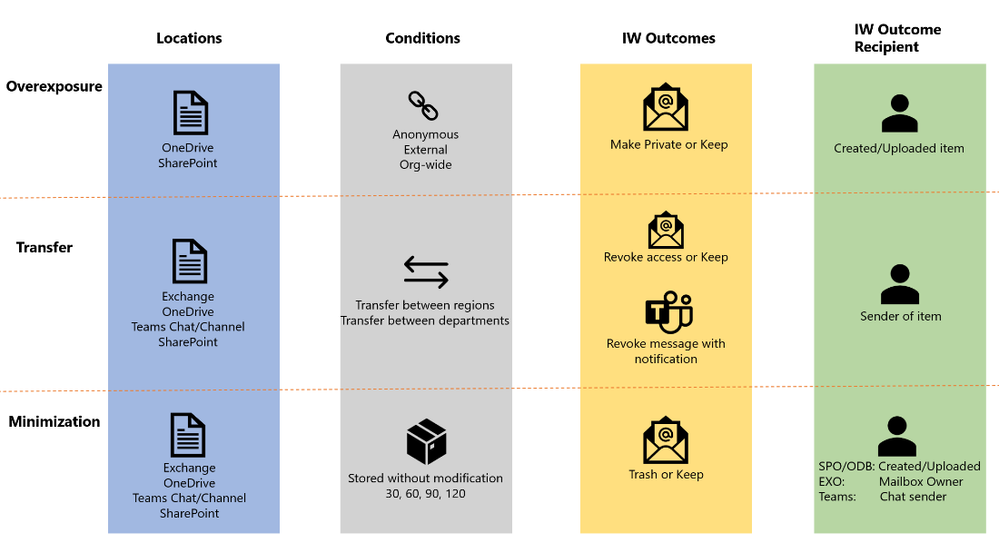 Figure 2: IW Digest Matrix
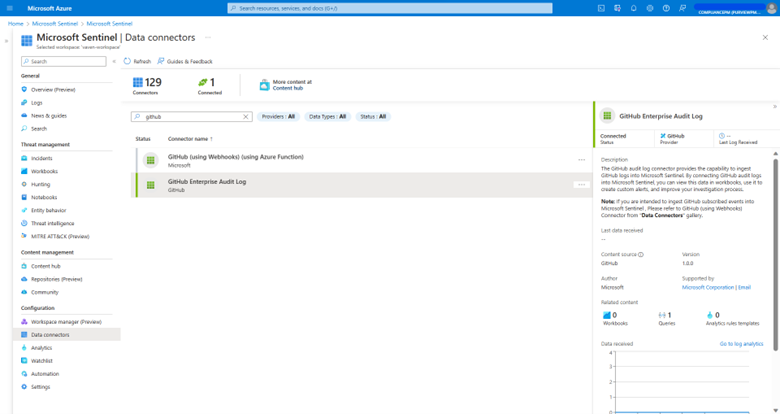 Figure 1 Admin leverages GitHub Enterprise Audit Log connector to pull GitHub audit logs and ingest them into Sentinel
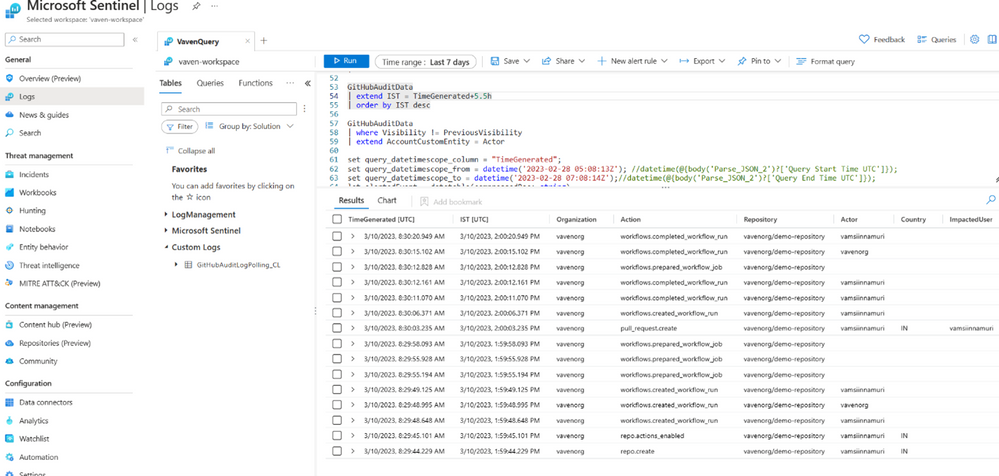 Figure 2 User actions in GitHub are collected and captured in Microsoft Sentinel Logs
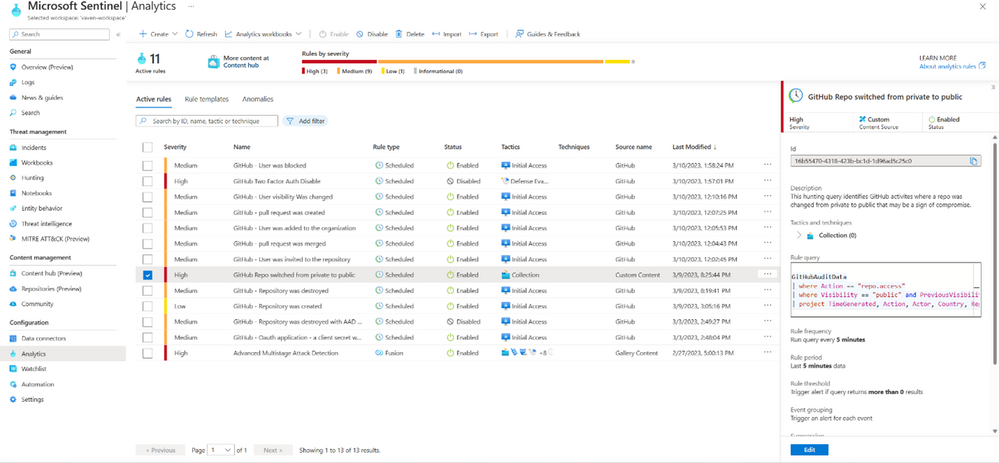 Figure 3 Admins create a Microsoft Sentinel Analytics rule to detect risky activity, GitHub repo switched from private to public
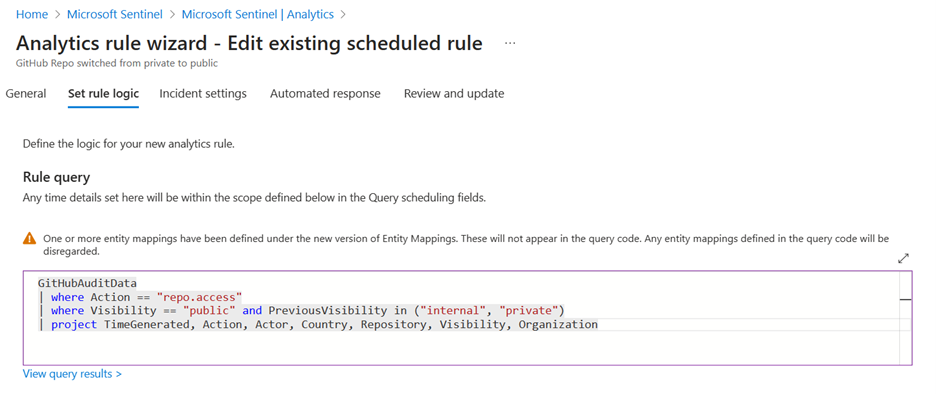 Figure 4 Admins define the logic of the Analytics rule to detect risky activity, GitHub repo switched from private to public
 Figure 5 Admins can view the incidents and alerts corresponding to the Analytics rules configured
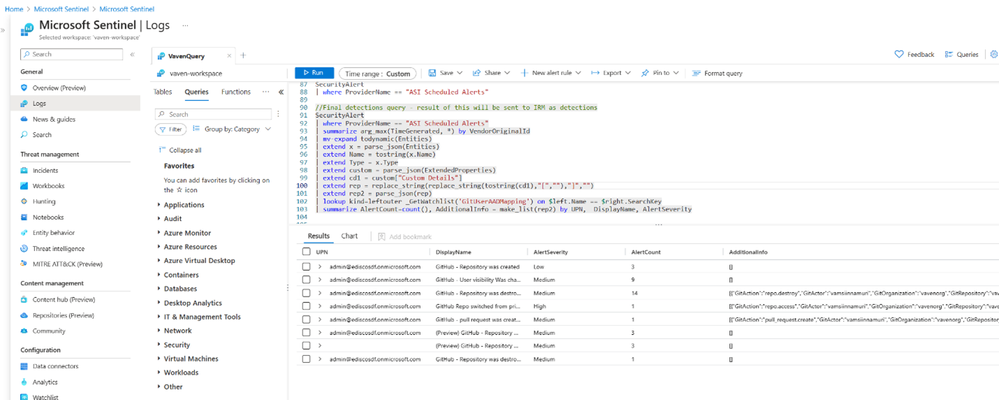 Figure 6 Incident details are also captured in Microsoft Sentinel Logs
 Figure 7 Admins define the data type and mapping that will be available to review in insider risk alerts
 Figure 8 Admins use Azure Logic Apps to automate the bring-your-own-detections process
 Figure 9 Admins create a new custom indicator, Source code theft indicator from GitHub, as an indicator or policy trigger
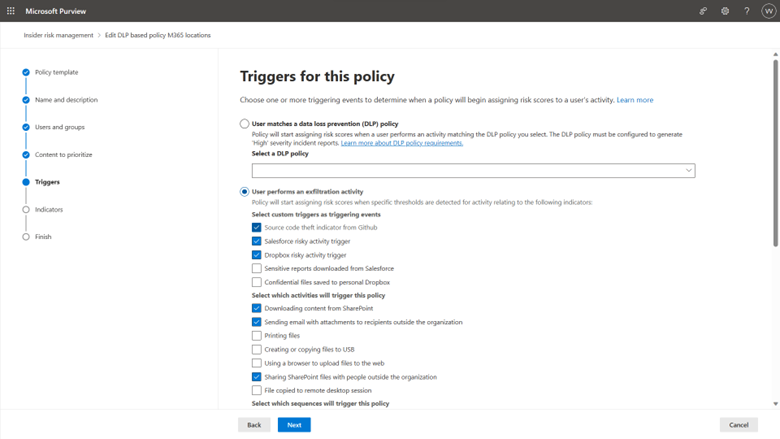 Figure 10 Admins use custom indicators as insider risk policy triggers, which will initiate risk score assignments to users who match the condition.
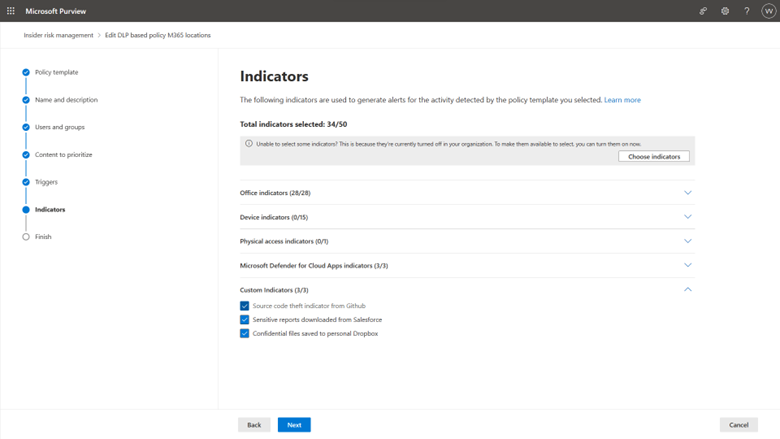 Figure 11 Admins use custom indicators as policy indicators, which are used to generate alerts.
 Figure 12 Insider risk indicators are presented in one comprehensive view for investigators to have a holistic understanding of the potential data security incident.
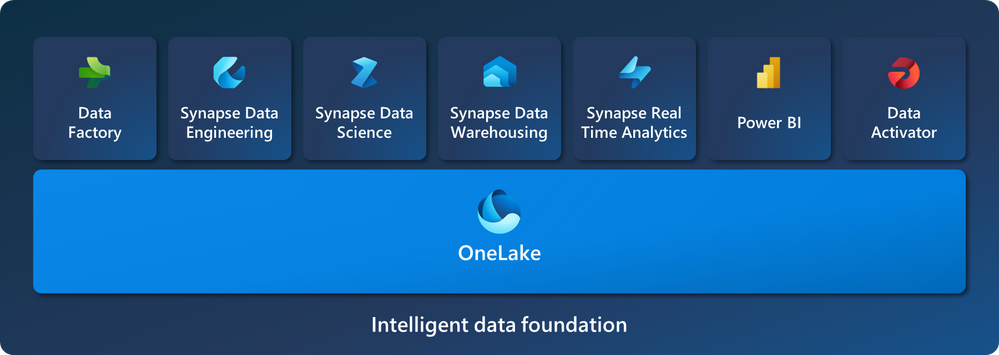 Figure 1: Microsoft Fabric key components
 Figure 2: Using Information Protection sensitivity labels in Fabric.
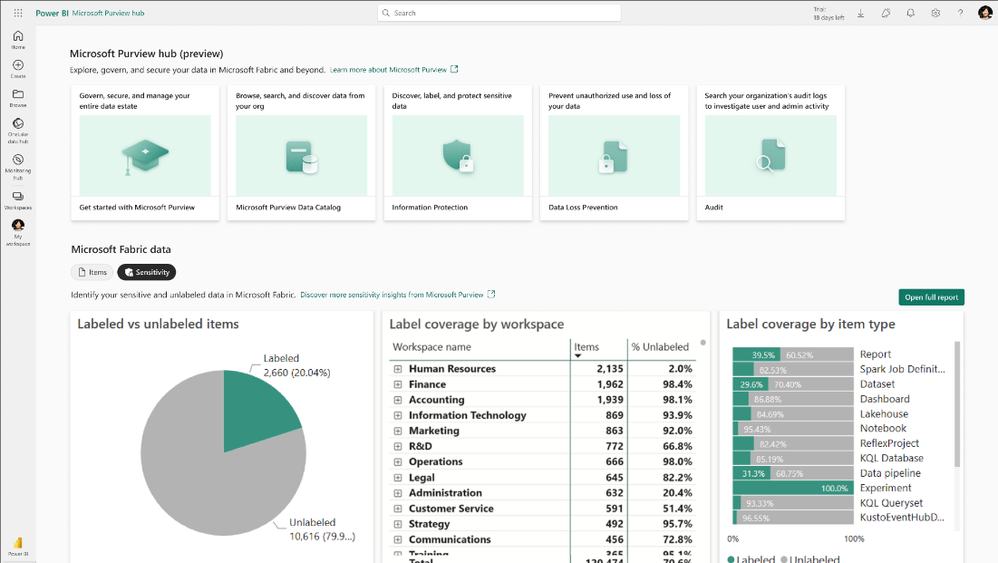 Figure 3: Microsoft Purview hub portal view
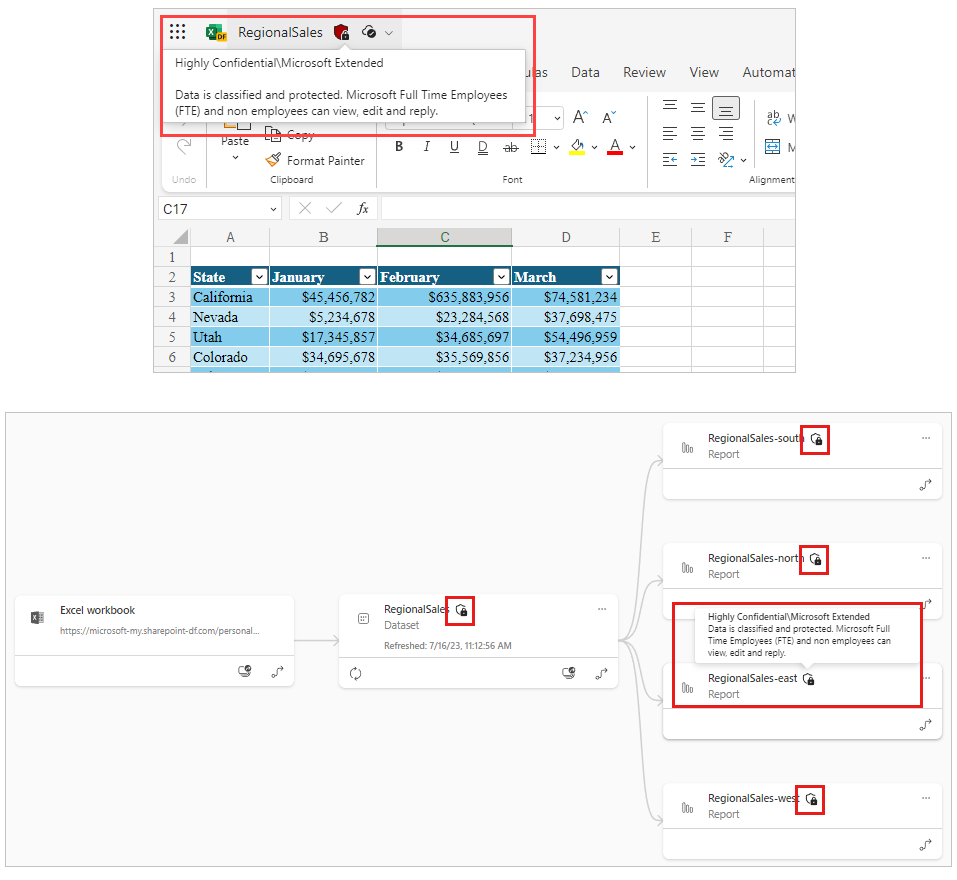 Figure 4: Screenshot of lineage view that illustrates label inheritance from data sources and downstream inheritance