Guidance on Secure Connectivity Principles for Operational Technology

The Cybersecurity and Infrastructure Security Agency (CISA) and the UK National Cyber Security Centre, in collaboration with other federal and international partners, have released Secure Connectivity Principles for Operational Technology guidance to help asset owners address increasing business and regulatory pressures for connectivity into operational technology networks.
Operational technology (OT) environments – which have long been centered on safety, uptime, and operational continuity – are now more interconnected than ever. Driven by the need for increased efficiency, agility, and integration, these advancements offer significant operational benefits (such as real-time analytics, predictive maintenance and remote monitoring & administration), but they also introduce risks.
Organizations deploying or operating OT systems often face challenges in prioritizing cyber security due to operational constraints, such as dependence on legacy technologies that were never designed for modern connectivity or security requirements. These challenges are compounded by the increasing use of third-party vendors, remote access solutions and supply chain integrations, all of which expand the potential attack surface. In an OT environment, risks are elevated since a cyber intrusion can lead to physical harm, environmental impact, or potentially the disruption of an operator of essential service (OES).
Exposed and insecure OT connectivity is known to be targeted by both opportunistic and highly capable threat actors. This activity includes state-sponsored actors actively targeting critical national infrastructure (CNI) networks. The threat is not just limited to state-sponsored actors with recent incidents showing how exposed OT infrastructure is opportunistically targeted by hacktivists. Strengthening the cyber security of CNI, including securing OT connections, can challenge attackers’ efforts and raise the threshold necessary to cause physical harm, environmental impact, and disruption.
System owners should use the listed principles as a framework to design, implement, and manage secure OT connectivity, for both new and existing OT systems. These principles are particularly critical for operators of essential services.

Upcoming NIST Webinar: Resources for Ransomware Risk Management

Date: January 28, 2026

Time: 2:00-3:00PM ET

Ransomware is a persistent risk to organizations of all sizes and sectors, and addressing this risk requires collaboration across the public and private sectors to develop practical resources for organizations to reduce their ransomware risks.

Speakers from the National Institute of Standards and Technology (NIST), the Center for Internet Security (CIS), and the Institute for Security and Technology (IST) will provide an overview of available ransomware risk management resources that help organizations get started with ransomware risk management by establishing foundational safeguards and building from there. Two resources that will be featured include:  

  • NIST Ransomware Risk Management CSF 2.0 Community Profile—published as an Initial Public Draft on January 13, 2025, reflects changes made to the Cybersecurity Framework (CSF) from CSF 1.1 to CSF 2.0 which identifies security objectives that support managing, detecting, responding to, and recovering from ransomware events. The publication can be used to gauge an organization’s readiness to counter ransomware threats, mitigate potential consequences of a ransomware event, and to develop a ransomware countermeasure playbook.
  • The IST and the Ransomware Task Force Blueprint for Ransomware Defense—which provides small to medium-sized enterprises (SMEs) with an actionable framework to defend against the most common attacks. It is comprised of a subset of Implementation Group 1 (IG1) Safeguards from the CIS Critical Security Controls (CIS Controls) v8 and aligned with NIST’s Cybersecurity Framework 2.0, to help SMEs understand where they can get started with establishing a ransomware risk management strategy.

Speakers will provide an overview of the resources above, including how they were developed collaboratively, and will also discuss current and future efforts to address ransomware risk management.  Ample time will be saved audience questions, ideas, and discussion.

Speakers:

  • Bill Fisher, Security Engineer, NIST
  • Valecia Stocchetti, Senior Cybersecurity Engineer, CIS Critical Security Controls
  • Michael Klein, Senior Director for Preparedness and Response, Institute for Security and Technology (IST)
  • Moderator: Daniel Eliot, Lead for Small Business Engagement, NIST
Register Here

Phishing for Crypto

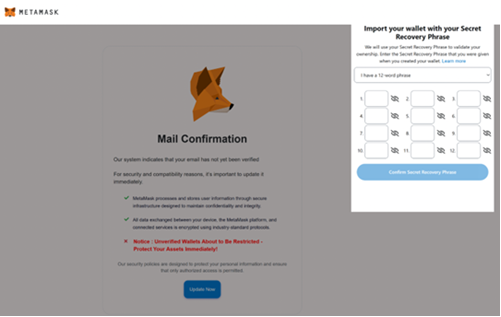
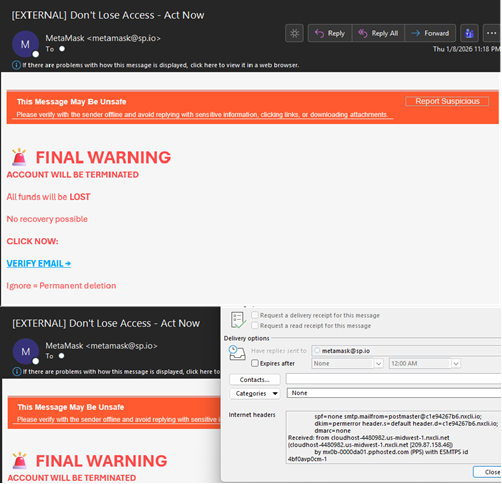
The NJCCIC observed a phishing campaign targeting MetaMask cryptocurrency wallets. The message appears to come from MetaMask, but the actual originating email address can be found in the header information. The threat actor also uses Punycode in the “From” field, likely to evade word-based detection in email protection systems. To prompt quick action, the messages state that funds will be lost if no action is taken, and the subject lines sound urgent, such as:
Don’t Lose Access – Act Now ⚠️ FINAL WARNING: account deletion & permanent fund loss Account On HOLD Final Notice: Review Required
The messages include a URL that directs users to a CAPTCHA-protected fake MetaMask page. When the “Update Now” button is clicked, a prompt requests the user’s recovery phrase to confirm account ownership. If the recovery phrase is shared, the threat actor gains full control of the associated wallet.

Docusign Phishing Installs LogMeIn Resolve RMM Tool

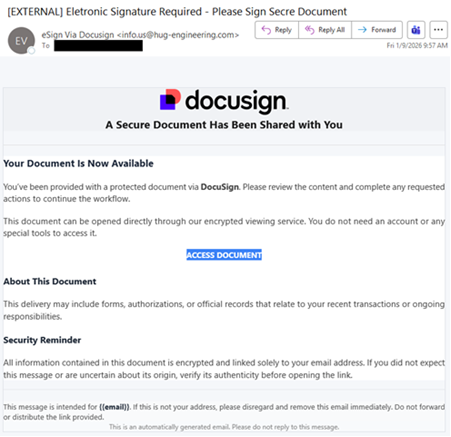
The NJCCIC observed a phishing campaign that abused the legitimate Docusign, leading to the installation of the LogMeIn Resolve remote monitoring and management (RMM) tool. The email is not sent from a legitimate Docusign domain, such as docusign[.]com or docusign[.]net. Additionally, it is not valid because a legitimate Docusign email notification contains an alternate signing method  with a unique security code at the bottom of the email. The subject line contains misspellings, and the impersonalized email includes an “ACCESS DOCUMENT” link to review a secure document, supposedly without requiring an account or special tools.
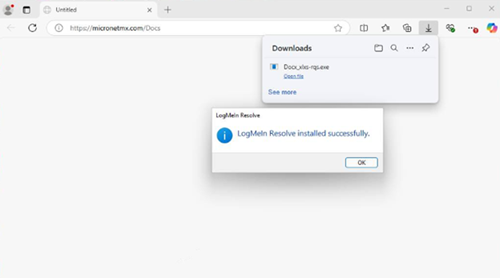
If the link is clicked, the target is directed to a malicious website, hxxps://micronetmx[.]com/Docs, that automatically downloads an executable called “Docx_xlxs-rqs[.]exe.” Clicking on the “Open file” link installs the LogMeIn Resolve RMM tool, allowing threat actors to remotely control the compromised device. Further analysis reveals that the executable file performs various tasks, including establishing persistence, checking the BIOS and system information in the registry, reviewing the system for installed applications, and dropping files into the System32 directory. The malicious use of RMM tools and weak organizational IT policies can lead to unauthorized access, persistent backdoor access, lateral movement to critical systems and cloud accounts, the deployment of other malware and ransomware, and data leakage.
Recommendations
Exercise caution with communications from known senders or legitimate platforms.

Confirm requests from senders via contact information obtained from verified and official sources before taking action, such as clicking on links or opening attachments.

Navigate directly to legitimate websites and verify before submitting account credentials, providing personal or financial information, or downloading files.

Enable multi-factor authentication (MFA) and keep systems and browsers up to date.

If victimized, disconnect from the internet and run anti-virus/anti-malware scans.

If sensitive information was entered, change passwords for compromised accounts, monitor for unauthorized activity, and review the Identity Theft and Compromised PII NJCCIC Informational Report for additional recommendations and resources, including credit freezes and enabling MFA on accounts.

Review Docusign’s webpage for additional security concerns, recommendations, and reporting. Report malicious cyber activity to the NJCCIC and the FBI’s IC3.

Register Now: NIST Cyber AI Workshop #2

Date/Time: January 14, 2026 | 9:00 a.m. – 5:00 p.m. EST

Location: The MITRE Corporation, 7525 Colshire Drive, McLean, VA, 22102

Join the NIST National Cybersecurity Center of Excellence (NCCoE) on January 14, 2026 for a hybrid workshop to discuss the preliminary draft NIST IR 8596, Cybersecurity Framework Profile for Artificial Intelligence (Cyber AI Profile) and hear updates regarding the SP 800-53 Control Overlays for Securing AI Systems (COSAiS).

Register now to attend in-person or virtually and influence the development of the NIST Cyber AI Profile.

Background

Working with the cybersecurity and AI communities, the NCCoE has published a preliminary Cyber AI Profile to help organizations strategically adopt AI while addressing and prioritizing cybersecurity risks stemming from its advancements.

Workshop Details

This workshop will feature presentations in the morning, followed by breakout sessions in the afternoon. The breakout sessions will allow in-person attendees to engage with the NIST Cyber AI Profile team and discuss the preliminary draft of the Profile more in-depth. Note: The virtual portion of this workshop will conclude after the morning presentations.

We encourage you to review the Profile in advance of this workshop – your feedback is crucial in shaping the next and final version of this publication. For more information regarding the workshop and breakout session discussion topics, please visit the event page.

The comment period for the Cyber AI Profile is open through January 30, 2026.

Visit the NCCoE project page for more information on how to submit comments.

Register Now!
Threat Actors Want You to Hop on a Call

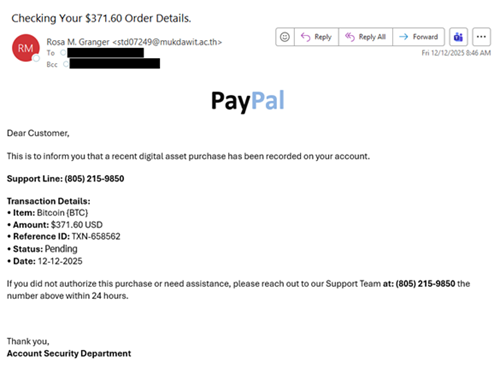
The NJCCIC detected a new telephone-oriented attack delivery (TOAD) campaign. Unlike most phishing attempts, TOAD attacks do not include malicious attachments or URLs in their initial messages. The aim of the message is to trick an unwary user into calling the provided number. Upon receiving a call, threat actors employ further social engineering tactics to convince a target to install malware, grant full remote control, or enter credentials on a malicious webpage.
The threat actors behind this campaign impersonate PayPal order receipts for Bitcoin, using the PayPal logo and transaction details to make the email appear legitimate. Currently, they make no attempts to obfuscate the sender’s email address, which is a red flag for malicious emails. Finally, the email includes a contact phone number and a 24-hour deadline to dispute the transaction, creating a sense of urgency to prevent victims from realizing that something is amiss.
Recommendations
Facilitate user awareness training to include these types of phishing-based techniques.
Confirm requests from senders via contact information obtained from verified and official sources.
Review the Don’t Take the Bait! Phishing and Other Social Engineering Attacks NJCCIC product for more information on common phishing and social engineering attacks.
Ensure multi-factor authentication (MFA) is enabled for all online accounts.
If you suspect an account has been compromised, change the account’s password immediately and add a secondary authentication method.
Report other malicious cyber activity to the NJCCIC and the FBI’s IC3.

Action Not Required: The IT Help Desk Scam

Threat actors often impersonate IT support to deceive their targets into disclosing account credentials and installing malware. They usually lure with urgent emails related to account issues, such as expired passwords, full mailboxes, and security alerts. Threat actors send emails containing fraudulent links, malicious attachments, or fake phone numbers to initiate data theft or gain remote access to compromise systems and networks. Key red flags include urgent threats, generic greetings, mismatched senders, and requests for sensitive information

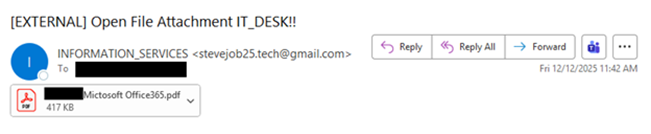
The NJCCIC observed an IT help desk scam targeting New Jersey public sector organizations, including New Jersey State employees and educational institutions. The phishing email’s display name shows “INFORMATION_SERVICES,” implying an internal communication. However, the email is marked with an external tag and comes from a generic Gmail email address that references Steve Jobs and tech. The subject line invites the target to open a file attachment supposedly from the IT (help) desk, and the email contains a misspelled “[impersonated organization name] Mictosoft Office365.pdf” attachment.
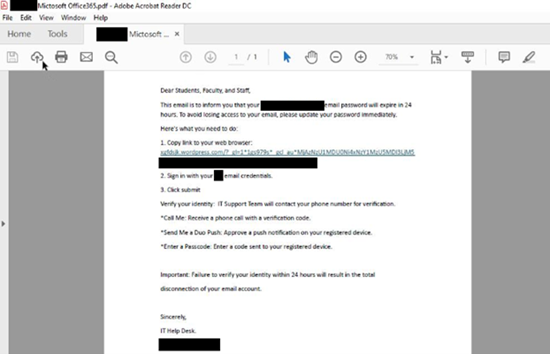
If the attachment is opened, the content displays urgent messaging from the impersonated organization’s IT Help Desk, claiming that the target’s password will expire in 24 hours, and they will lose access to their email if they do not follow the instructions. The threat actors instruct the target to update their password immediately by copying the link to their web browser, signing in, and verifying their identity.
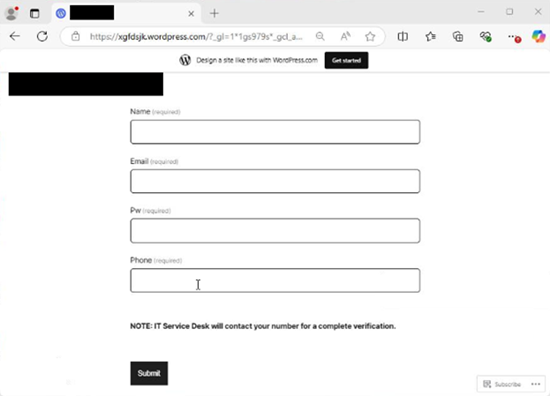
If the target copies the link to their browser, a WordPress phishing page is displayed, prompting them to enter their name, email address, password, and phone number. If submitted, the threat actors capture and steal the account credentials in the background. To bypass multi-factor authentication (MFA) and compromise the account, the threat actors initiate the “verification process” by calling the target and claiming they need to verify their identity. In the background, the threat actors submit the stolen credentials on the official organization’s website or application, which then prompts the MFA code to be sent via phone call or a message to the target’s registered device, or an MFA push notification to be sent for approval. Once the target reveals the code or approves the notification, the threat actors can access the account. This “verification process” is not initiated by the target and is considered a red flag. Legitimate IT help desks will never initiate contact with users via email or over the phone to request or demand sensitive information, passwords, MFA codes, or MFA push notification approvals.
Additionally, impersonation and branding are utilized throughout this campaign, but may not be consistent, possibly due to an error by the threat actors. For some emails, the spoofed organization is not associated with the target’s own organization, logos, IT help desk, or domain name. For example, threat actors spoofed one organization in the attachment, but a different organization appeared on the phishing page.
Recommendations
Exercise caution with unsolicited communications from known senders. Confirm requests from senders by verifying their contact information obtained from trusted and official sources before taking action, such as opening attachments or clicking on links. Hover over links in emails or attachments to view the actual destination URL before clicking. Type official website URLs into browsers manually and only submit sensitive information on official websites. If you receive password resets, MFA codes, or MFA push notifications without initiating the request, ignore the code or deny the request and change the account password immediately via the official organization’s website or application to prevent further login attempts and MFA push notification requests. For organizations, implement monitoring and warning mechanisms to detect suspicious MFA prompt activity. Limit the number of MFA authentication requests per user within a specified time period, if this option is available. If thresholds are exceeded, temporarily lock the account and alert the domain administrator. Keep systems and browsers up to date. Report malicious cyber activity to the NJCCIC and the FBI’s IC3.

Vulnerability in Cisco AsyncOSCould Allow for Remote Code Execution

This Multi-State Information Sharing and Analysis Center (MS-ISAC) Advisory is being provided to assist agencies and organizations in guarding against the persistent malicious actions of cybercriminals.
A vulnerability has been discovered in Cisco AsyncOS, which could allow for remote code execution. AsyncOS is the operating system used by Cisco Secure Email Gateway and Cisco Secure Email and Web Manager. Successful exploitation of this vulnerability could allow an attacker to execute arbitrary commands with root-level privileges on the underlying operating system.
Threat Intelligence
Cisco confirmed active exploitation of a previously unknown, maximum-severity vulnerability affecting Cisco Secure Email Gateway and Cisco Secure Email and Web Manager appliances running AsyncOS. The flaw, tracked as CVE-2025-20393, is already being abused in real-world attacks and allows threat actors to gain deep control over affected systems. The Cybersecurity and Infrastructure Security Agency added CVE-2025-20393 to its Known Exploited Vulnerabilities catalog.
Systems Affected
All releases of Cisco AsyncOS Software are affected when both of the following conditions are met: The appliance is configured with the Spam Quarantine feature. The Spam Quarantine feature is exposed to and reachable from the internet. The Spam Quarantine feature is not enabled by default. Deployment guides for these products do not require this port to be directly exposed to the Internet.
Risk
Government:
– Large and medium government entities: High
– Small government entities: Medium
Businesses:
– Large and medium business entities: High
– Small business entities: Medium
Home Users: Low
Recommendations
Once available, apply appropriate workarounds provided by Cisco to vulnerable systems immediately after appropriate testing. Apply the Principle of Least Privilege to all systems and services. Run all software as a non-privileged user (one without administrative privileges) to diminish the effects of a successful attack. Use vulnerability scanning to find potentially exploitable software vulnerabilities to remediate them. Architect sections of the network to isolate critical systems, functions, or resources. Use physical and logical segmentation to prevent access to potentially sensitive systems and information. Use a DMZ to contain any internet-facing services that should not be exposed from the internal network. Configure separate virtual private cloud (VPC) instances to isolate critical cloud systems. Use capabilities to detect and block conditions that may lead to or be indicative of a software exploit occurring.
Reference
Cisco:
https://sec.cloudapps.cisco.com/security/center/content/CiscoSecurityAdvisory/cisco-sa-sma-attack-N9bf4#Recommendations

Proposed NICE Framework Component Updates For Public Comment

NIST View as a Web Page   NICE | advancing cybersecurity education and workforce   news and updates   December 18, 2025   PROPOSED NICE FRAMEWORK UPDATES FOR PUBLIC COMMENT   The NICE Program Office of the National Institute of Standards and Technology (NIST) is pleased to publish three proposed Work Roles and updates to two Competency Areas of the NICE Workforce Framework for Cybersecurity (NICE Framework).

We welcome and encourage comments from all interested stakeholders. The proposals include: Cybersecurity Supply Chain Risk Management Work Role (new OG-WRL-017) Risk Management Work Role (new OG-WRL-018) Learning Program Management Work Role (new OG-WRL-019) Cryptography Competency Area (NF-COM-006) DevSecOps Competency Area (NF-COM-008)

These proposed updates reflect the NICE Program Office’s commitment to maintaining the NICE Framework’s relevance to current cybersecurity practices through the active input of subject matter experts as well as the broader community of cybersecurity practitioners and educators.  

WE WANT TO HEAR FROM YOU!   NICE welcomes comments on the proposed updates from all interested parties. Comments received by the February 2, 2026 deadline will be acknowledged by email. Comments will be reviewed and adjudicated, and feedback received during this comment period will be used to inform any necessary updates to the relevant proposed Components.

Final updates will be incorporated in the next release of the NICE Framework Components. Take the following steps to share your feedback:

Visit the NICE Framework Resource Center Public Comments page to access and review the proposed update spreadsheets

Submit comments to NICEFramework@nist.gov by 11:59 pm ET on Monday, February 2, 2026 Join the NICE Framework Users Group to participate in community discussions!

NIST Publishes CSWP 39: Considerations for Achieving Crypto Agility

Cryptographic (crypto) agility refers to the capabilities needed to replace and adapt cryptographic algorithms in protocols, applications, software, hardware, firmware, and infrastructures while preserving security and ongoing operations. The transition to post-quantum cryptography (PQC) has highlighted significant challenges to adapting applications to new algorithms.

This final version of Cybersecurity White Paper (CSWP) 39, Considerations for Achieving Crypto Agility: Strategies and Practices, describes current approaches to operational mechanisms for crypto agility, challenges, trade-offs, and working areas for future consideration. The invaluable comments received on the initial and second public drafts helped improve many aspects of this document. Additionally, stakeholder discussions during the Crypto Agility Workshop in April 2025 helped identify strategies, frameworks, requirements, and metrics for various sectors and environments.

This publication is intended to be a new starting point to pursue crypto agility by developing environment-specific and actionable mechanisms. NIST remains committed to supporting collaboration and continued progress in this space.

Read More