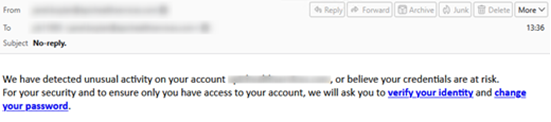
The NJCCIC observed a significant increase in phishing campaigns impersonating security alerts about unusual account activity, including warnings about credential loss and account access. These emails use a subject line of “No Reply” and spoofed addresses, which makes the message appear to be sent from the recipient’s email address. Two links are provided in the body of the email, prompting the user to either verify their identity or change their password.
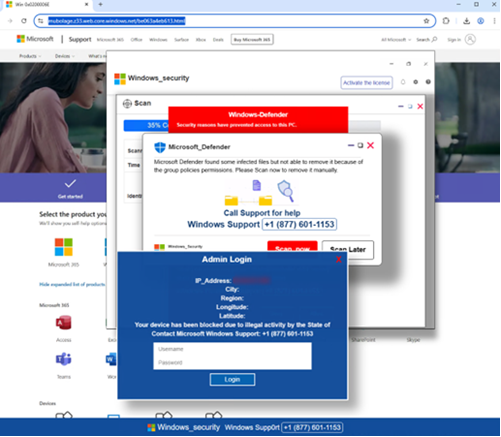
| When a link is clicked, users are directed to a phishing website that resembles a Microsoft support page and displays pop-up notifications mimicking a Microsoft Defender security alert. This “security alert” claims that infected files were found on the system and cannot be removed due to group policy permissions. The pop-up notification offers the option to scan the system now or call the provided phone number. Calling the number connects the user with the threat actors behind the campaign. They may attempt to persuade the user to install malicious software, provide their credentials, or grant remote access. The social engineering tactics used in this phishing campaign are a common way for attackers to gain their targets’ trust. |
| Recommendations |
| Exercise caution with unsolicited communications from known senders. Confirm requests from senders by verifying their contact information obtained from trusted and official sources before taking action, such as opening attachments or clicking links. Hover over links in emails or attachments to view the actual destination URL before clicking. Type official website URLs into browsers manually and only submit sensitive information on official websites. If you suspect an account has been compromised, change the account’s password immediately and add a secondary authentication method. Review the Don’t Take the Bait! Phishing and Other Social Engineering Attacks NJCCIC product for more information on common phishing and social engineering attacks. Enable multi-factor authentication (MFA) and keep systems and browsers up to date. Report malicious cyber activity to the NJCCIC and the FBI’s IC3. |