Multiple Vulnerabilities in Adobe Products Could Allow for Arbitrary Code Execution – PATCH: NOW

Multiple vulnerabilities have been discovered in Adobe products, the most severe of which could allow for arbitrary code execution.

  • Adobe After Effects is a digital effects, motion graphics, and compositing application
  • Adobe Audition is a comprehensive toolset that includes multitrack, waveform, and spectral display for creating, mixing, editing, and restoring audio content.
  • Adobe Bridge is a creative asset manager that lets you preview, organize, edit, and publish multiple creative assets quickly and easily.
  • Adobe DNG Software Development Kit (SDK) is a free set of tools and code that helps developers add support for Adobe’s Digital Negative (DNG) universal RAW file format into their own applications and cameras.
  • Adobe InDesign is a professional page layout and desktop publishing software used for designing and publishing content for both print and digital media.
  • Adobe Lightroom is a cloud-based photo editing and management software designed for photographers to organize, edit, store, and share images across desktop, mobile, and web.
  • Adobe Substance 3D is a suite of tools for creating 3D content, including modeling, texturing, and rendering.

Successful exploitation of the most severe of these vulnerabilities could allow for arbitrary code execution in the context of the logged on user. Depending on the privileges associated with the user, an attacker could then install programs; view, change, or delete data; or create new accounts with full user rights. Users whose accounts are configured to have fewer user rights on the system could be less impacted than those who operate with administrative user rights.

THREAT INTELLIGENCE:
There are currently no reports of these vulnerabilities being exploited in the wild.

SYSTEMS AFFECTED:

  • Adobe After Effects 25.6 and earlier versions
  • Adobe Audition 25.3 and earlier versions
  • Adobe Bridge 15.1.3 (LTS) and earlier versions
  • Adobe Bridge 16.0.1 and earlier versions
  • Adobe DNG Software Development Kit (SDK) DNG SDK 1.7.1 build 2410 and earlier versions
  • Adobe InDesign ID20.5.1 and earlier versions
  • Adobe InDesign ID21.1 and earlier versions
  • Adobe Lightroom Classic 15.1 and earlier versions
  • Adobe Substance 3D Designer 15.1.0 and earlier versions
  • Adobe Substance 3D Modeler 1.22.5 and earlier versions
  • Adobe Substance 3D Stager 3.1.6 and earlier versions

RISK:
Government:

  • Large and medium government entities: Medium
  • Small government entities: Medium

Businesses:

  • Large and medium business entities: Medium
  • Small business entities: Medium

Home users: Low

TECHNICAL SUMMARY:
Multiple vulnerabilities have been discovered in Adobe products, the most severe of which could allow for arbitrary code execution. Details of these vulnerabilities are as follows:

Tactic: Execution (TA0002)
Technique: Exploitation for Client Execution (T1203):

Adobe After Effects:

  • Out-of-bounds Write (CVE-2026-21318, CVE-2026-21327, CVE-2026-21328)
  • Use After Free (CVE-2026-21320, CVE-2026-21323, CVE-2026-21326, CVE-2026-21329, CVE-2026-21351)
  • Integer Overflow or Wraparound (CVE-2026-21321)
  • Out-of-bounds Read (CVE-2026-21322, CVE-2026-21324, CVE-2026-21325, CVE-2026-21319)
  • Access of Resource Using Incompatible Type (‘Type Confusion’) (CVE-2026-21330)
  • NULL Pointer Dereference (CVE-2026-21350)

Adobe Audition:

  • Out-of-bounds Write (CVE-2026-21312)
  • Out-of-bounds Read (CVE-2026-21313, CVE-2026-21314, CVE-2026-21315, CVE-2026-21317)
  • Access of Memory Location After End of Buffer (CVE-2026-21316)

Adobe Bridge:

  • Out-of-bounds Write (CVE-2026-21346)
  • Integer Overflow or Wraparound (CVE-2026-21347)

Adobe DNG Software Development Kit (SDK):

  • Out-of-bounds Write (CVE-2026-21352)
  • Integer Overflow or Wraparound (CVE-2026-21353)
  • Out-of-bounds Read (CVE-2026-21354, CVE-2026-21355)

Adobe InDesign:

  • Heap-based Buffer Overflow (CVE-2026-21357, CVE-2026-21358)
  • Out-of-bounds Read (CVE-2026-21332)

Adobe Lightroom Classic:

  • Out-of-bounds Write (CVE-2026-21349)

Substance 3D Designer:

  • Out-of-bounds Write (CVE-2026-21334, CVE-2026-21335)
  • NULL Pointer Dereference (CVE-2026-21336, CVE-2026-21338)
  • Out-of-bounds Read (CVE-2026-21337, CVE-2026-21339, CVE-2026-21340)

Substance 3D Modeler:

  • Out-of-bounds Read (CVE-2026-21348)

Substance 3D Stager:

  • Out-of-bounds Write (CVE-2026-21341, CVE-2026-21342)
  • Out-of-bounds Read (CVE-2026-21343, CVE-2026-21344, CVE-2026-21345)

Successful exploitation of the most severe of these vulnerabilities could allow for arbitrary code execution in the context of the logged on user. Depending on the privileges associated with the user, an attacker could then install programs; view, change, or delete data; or create new accounts with full user rights. Users whose accounts are configured to have fewer user rights on the system could be less impacted than those who operate with administrative user rights.

RECOMMENDATIONS:
We recommend the following actions be taken:

  • Apply the stable channel update provided by Adobe to vulnerable systems immediately after appropriate testing. (M1051: Update Software)
    • Safeguard 7.1: Establish and Maintain a Vulnerability Management Process: Establish and maintain a documented vulnerability management process for enterprise assets. Review and update documentation annually, or when significant enterprise changes occur that could impact this Safeguard.
    • Safeguard 7.2: Establish and Maintain a Remediation Process: Establish and maintain a risk-based remediation strategy documented in a remediation process, with monthly, or more frequent, reviews.
    • Safeguard 7.6: Perform Automated Vulnerability Scans of Externally-Exposed Enterprise Assets: Perform automated vulnerability scans of externally-exposed enterprise assets using a SCAP-compliant vulnerability scanning tool. Perform scans on a monthly, or more frequent, basis.
    • Safeguard 7.7: Remediate Detected Vulnerabilities: Remediate detected vulnerabilities in software through processes and tooling on a monthly, or more frequent, basis, based on the remediation process.
    • Safeguard 16.13: Conduct Application Penetration Testing: Conduct application penetration testing. For critical applications, authenticated penetration testing is better suited to finding business logic vulnerabilities than code scanning and automated security testing. Penetration testing relies on the skill of the tester to manually manipulate an application as an authenticated and unauthenticated user.
    • Safeguard 18.1: Establish and Maintain a Penetration Testing Program: Establish and maintain a penetration testing program appropriate to the size, complexity, and maturity of the enterprise. Penetration testing program characteristics include scope, such as network, web application, Application Programming Interface (API), hosted services, and physical premise controls; frequency; limitations, such as acceptable hours, and excluded attack types; point of contact information; remediation, such as how findings will be routed internally; and retrospective requirements.
    • Safeguard 18.2: Perform Periodic External Penetration Tests: Perform periodic external penetration tests based on program requirements, no less than annually. External penetration testing must include enterprise and environmental reconnaissance to detect exploitable information. Penetration testing requires specialized skills and experience and must be conducted through a qualified party. The testing may be clear box or opaque box.
    • Safeguard 18.3: Remediate Penetration Test Findings: Remediate penetration test findings based on the enterprise’s policy for remediation scope and prioritization.
  • Apply the Principle of Least Privilege to all systems and services. Run all software as a non-privileged user (one without administrative privileges) to diminish the effects of a successful attack. (M1026: Privileged Account Management)
    • Safeguard 4.7: Manage Default Accounts on Enterprise Assets and Software: Manage default accounts on enterprise assets and software, such as root, administrator, and other pre-configured vendor accounts. Example implementations can include: disabling default accounts or making them unusable.
    • Safeguard 5.4: Restrict Administrator Privileges to Dedicated Administrator Accounts: Restrict administrator privileges to dedicated administrator accounts on enterprise assets. Conduct general computing activities, such as internet browsing, email, and productivity suite use, from the user’s primary, non-privileged account.
  • Restrict use of certain websites, block downloads/attachments, block Javascript, restrict browser extensions, etc. (M1021: Restrict Web-Based Content)
    • Safeguard 2.3: Address Unauthorized Software: Ensure that unauthorized software is either removed from use on enterprise assets or receives a documented exception. Review monthly, or more frequently.
    • Safeguard 2.7: Allowlist Authorized Scripts: Use technical controls, such as digital signatures and version control, to ensure that only authorized scripts, such as specific .ps1, .py, etc., files, are allowed to execute. Block unauthorized scripts from executing. Reassess bi-annually, or more frequently.
    • Safeguard 9.3: Maintain and Enforce Network-Based URL Filters: Enforce and update network-based URL filters to limit an enterprise asset from connecting to potentially malicious or unapproved websites. Example implementations include category-based filtering, reputation-based filtering, or through the use of block lists. Enforce filters for all enterprise assets.
    • Safeguard 9.6: Block Unnecessary File Types: Block unnecessary file types attempting to enter the enterprise’s email gateway.
  • Use capabilities to detect and block conditions that may lead to or be indicative of a software exploit occurring. (M1050: Exploit Protection)
    • Safeguard 10.5: Enable Anti-Exploitation Features: Enable anti-exploitation features on enterprise assets and software, where possible, such as Microsoft? Data Execution Prevention (DEP), Windows? Defender Exploit Guard (WDEG), or Apple? System Integrity Protection (SIP) and Gatekeeper™.
  • Block execution of code on a system through application control, and/or script blocking. (M1038:Execution Prevention)
    • Safeguard 2.5: Allowlist Authorized Software: Use technical controls, such as application allowlisting, to ensure that only authorized software can execute or be accessed. Reassess bi-annually, or more frequently.
    • Safeguard 2.6: Allowlist Authorized Libraries: Use technical controls to ensure that only authorized software libraries, such as specific .dll, .ocx, .so, etc., files, are allowed to load into a system process. Block unauthorized libraries from loading into a system process. Reassess bi-annually, or more frequently.
    • Safeguard 2.7: Allowlist Authorized Scripts: Use technical controls, such as digital signatures and version control, to ensure that only authorized scripts, such as specific .ps1, .py, etc., files, are allowed to execute. Block unauthorized scripts from executing. Reassess bi-annually, or more frequently.
  • Use capabilities to prevent suspicious behavior patterns from occurring on endpoint systems. This could include suspicious process, file, API call, etc. behavior. (M1040: Behavior Prevention on Endpoint)
    • Safeguard 13.2: Deploy a Host-Based Intrusion Detection Solution: Deploy a host-based intrusion detection solution on enterprise assets, where appropriate and/or supported.
    • Safeguard 13.7: Deploy a Host-Based Intrusion Prevention Solution: Deploy a host-based intrusion prevention solution on enterprise assets, where appropriate and/or supported. Example implementations include use of an Endpoint Detection and Response (EDR) client or host-based IPS agent.

REFERENCES:Adobe:
https://helpx.adobe.com/security/Home.html
https://helpx.adobe.com/security/products/dng-sdk/apsb26-23.html
https://helpx.adobe.com/security/products/lightroom/apsb26-06.html
https://helpx.adobe.com/security/products/substance3d-modeler/apsb26-22.html
https://helpx.adobe.com/security/products/bridge/apsb26-21.html
https://helpx.adobe.com/security/products/substance3d_stager/apsb26-20.html
https://helpx.adobe.com/security/products/substance3d_designer/apsb26-19.html
https://helpx.adobe.com/security/products/indesign/apsb26-17.html
https://helpx.adobe.com/security/products/after_effects/apsb26-15.html
https://helpx.adobe.com/security/products/audition/apsb26-14.html

CVE:
https://cve.mitre.org/cgi-bin/cvename.cgi?name=CVE-2026-21312
https://cve.mitre.org/cgi-bin/cvename.cgi?name=CVE-2026-21313
https://cve.mitre.org/cgi-bin/cvename.cgi?name=CVE-2026-21314
https://cve.mitre.org/cgi-bin/cvename.cgi?name=CVE-2026-21315
https://cve.mitre.org/cgi-bin/cvename.cgi?name=CVE-2026-21316
https://cve.mitre.org/cgi-bin/cvename.cgi?name=CVE-2026-21317
https://cve.mitre.org/cgi-bin/cvename.cgi?name=CVE-2026-21318
https://cve.mitre.org/cgi-bin/cvename.cgi?name=CVE-2026-21319
https://cve.mitre.org/cgi-bin/cvename.cgi?name=CVE-2026-21320
https://cve.mitre.org/cgi-bin/cvename.cgi?name=CVE-2026-21321
https://cve.mitre.org/cgi-bin/cvename.cgi?name=CVE-2026-21322
https://cve.mitre.org/cgi-bin/cvename.cgi?name=CVE-2026-21323
https://cve.mitre.org/cgi-bin/cvename.cgi?name=CVE-2026-21324
https://cve.mitre.org/cgi-bin/cvename.cgi?name=CVE-2026-21325
https://cve.mitre.org/cgi-bin/cvename.cgi?name=CVE-2026-21326
https://cve.mitre.org/cgi-bin/cvename.cgi?name=CVE-2026-21327
https://cve.mitre.org/cgi-bin/cvename.cgi?name=CVE-2026-21328
https://cve.mitre.org/cgi-bin/cvename.cgi?name=CVE-2026-21329
https://cve.mitre.org/cgi-bin/cvename.cgi?name=CVE-2026-21330
https://cve.mitre.org/cgi-bin/cvename.cgi?name=CVE-2026-21332
https://cve.mitre.org/cgi-bin/cvename.cgi?name=CVE-2026-21334
https://cve.mitre.org/cgi-bin/cvename.cgi?name=CVE-2026-21335
https://cve.mitre.org/cgi-bin/cvename.cgi?name=CVE-2026-21336
https://cve.mitre.org/cgi-bin/cvename.cgi?name=CVE-2026-21337
https://cve.mitre.org/cgi-bin/cvename.cgi?name=CVE-2026-21338
https://cve.mitre.org/cgi-bin/cvename.cgi?name=CVE-2026-21339
https://cve.mitre.org/cgi-bin/cvename.cgi?name=CVE-2026-21340
https://cve.mitre.org/cgi-bin/cvename.cgi?name=CVE-2026-21341
https://cve.mitre.org/cgi-bin/cvename.cgi?name=CVE-2026-21342
https://cve.mitre.org/cgi-bin/cvename.cgi?name=CVE-2026-21343
https://cve.mitre.org/cgi-bin/cvename.cgi?name=CVE-2026-21344
https://cve.mitre.org/cgi-bin/cvename.cgi?name=CVE-2026-21345
https://cve.mitre.org/cgi-bin/cvename.cgi?name=CVE-2026-21346
https://cve.mitre.org/cgi-bin/cvename.cgi?name=CVE-2026-21347
https://cve.mitre.org/cgi-bin/cvename.cgi?name=CVE-2026-21348
https://cve.mitre.org/cgi-bin/cvename.cgi?name=CVE-2026-21349
https://cve.mitre.org/cgi-bin/cvename.cgi?name=CVE-2026-21350
https://cve.mitre.org/cgi-bin/cvename.cgi?name=CVE-2026-21351
https://cve.mitre.org/cgi-bin/cvename.cgi?name=CVE-2026-21352
https://cve.mitre.org/cgi-bin/cvename.cgi?name=CVE-2026-21353
https://cve.mitre.org/cgi-bin/cvename.cgi?name=CVE-2026-21354
https://cve.mitre.org/cgi-bin/cvename.cgi?name=CVE-2026-21355
https://cve.mitre.org/cgi-bin/cvename.cgi?name=CVE-2026-21357
https://cve.mitre.org/cgi-bin/cvename.cgi?name=CVE-2026-21358

Critical Patches Issued for Microsoft Products, February 10, 2026 – PATCH NOW

Multiple vulnerabilities have been discovered in Microsoft products, the most severe of which could allow for remote code execution. Successful exploitation of the most severe of these vulnerabilities could result in an attacker gaining the same privileges as the logged-on user. Depending on the privileges associated with the user, an attacker could then install programs; view, change, or delete data; or create new accounts with full user rights. Users whose accounts are configured to have fewer user rights on the system could be less impacted than those who operate with administrative user rights. 

THREAT INTELLIGENCE:
There are currently no reports of these vulnerabilities being exploited in the wild. 

SYSTEMS AFFECTED:

  • Microsoft Edge for Android
  • Windows Notepad App
  • Windows GDI+
  • .NET and Visual Studio
  • Windows Kernel
  • Azure Local
  • Power BI
  • Windows HTTP.sys
  • Windows Connected Devices Platform Service
  • Microsoft Graphics Component
  • Windows Ancillary Function Driver for WinSock
  • Windows Subsystem for Linux
  • Windows LDAP – Lightweight Directory Access Protocol
  • Role: Windows Hyper-V
  • Windows NTLM
  • Windows Cluster Client Failover
  • Mailslot File System
  • GitHub Copilot and Visual Studio
  • Microsoft Office Excel
  • Microsoft Office Word
  • Windows Storage
  • Windows Shell
  • Microsoft Office Outlook
  • Azure DevOps Server
  • Internet Explorer
  • Github Copilot
  • Windows App for Mac
  • .NET
  • Desktop Window Manager
  • Azure Compute Gallery
  • Windows Remote Access Connection Manager
  • Microsoft Exchange Server
  • Azure IoT SDK
  • Azure HDInsights
  • Azure SDK
  • Azure Function
  • Windows Remote Desktop
  • Microsoft Defender for Linux
  • Azure Front Door (AFD)
  • Azure Arc

RISK:
Government:

  • Large and medium government entities: High
  • Small government entities: Medium

Businesses:

  • Large and medium business entities: High
  • Small business entities: Medium 

Home users: Low

TECHNICAL SUMMARY:
Multiple vulnerabilities have been discovered in Microsoft products, the most severe of which could allow for remote code execution.  

A full list of all vulnerabilities can be found in the Microsoft link in the Reference section. 

Successful exploitation of the most severe of these vulnerabilities could result in an attacker gaining the same privileges as the logged-on user. Depending on the privileges associated with the user, an attacker could then install programs; view, change, or delete data; or create new accounts with full user rights. Users whose accounts are configured to have fewer user rights on the system could be less impacted than those who operate with administrative user rights. 

RECOMMENDATIONS:
We recommend the following actions be taken:

  • Apply appropriate updates provided by Microsoft to vulnerable systems immediately after appropriate testing. (M1051: Update Software)
    • Safeguard 7.1 : Establish and Maintain a Vulnerability Management Process: Establish and maintain a documented vulnerability management process for enterprise assets. Review and update documentation annually, or when significant enterprise changes occur that could impact this Safeguard.
    • Safeguard 7.2: Establish and Maintain a Remediation Process: Establish and maintain a risk-based remediation strategy documented in a remediation process, with monthly, or more frequent, reviews.
    • Safeguard 7.4: Perform Automated Application Patch Management: Perform application updates on enterprise assets through automated patch management on a monthly, or more frequent, basis.
    • Safeguard 7.5 : Perform Automated Vulnerability Scans of Internal Enterprise Assets: Perform automated vulnerability scans of internal enterprise assets on a quarterly, or more frequent, basis. Conduct both authenticated and unauthenticated scans, using a SCAP-compliant vulnerability scanning tool.
    • Safeguard 7.7: Remediate Detected Vulnerabilities: Remediate detected vulnerabilities in software through processes and tooling on a monthly, or more frequent, basis, based on the remediation process.
    • Safeguard 12.1: Ensure Network Infrastructure is Up-to-Date: Ensure network infrastructure is kept up-to-date. Example implementations include running the latest stable release of software and/or using currently supported network-as-a-service (NaaS) offerings. Review software versions monthly, or more frequently, to verify software support.
    • Safeguard 18.1: Establish and Maintain a Penetration Testing Program: Establish and maintain a penetration testing program appropriate to the size, complexity, and maturity of the enterprise. Penetration testing program characteristics include scope, such as network, web application, Application Programming Interface (API), hosted services, and physical premise controls; frequency; limitations, such as acceptable hours, and excluded attack types; point of contact information; remediation, such as how findings will be routed internally; and retrospective requirements.
    • Safeguard 18.2: Perform Periodic External Penetration Tests: Perform periodic external penetration tests based on program requirements, no less than annually. External penetration testing must include enterprise and environmental reconnaissance to detect exploitable information. Penetration testing requires specialized skills and experience and must be conducted through a qualified party. The testing may be clear box or opaque box.
    • Safeguard 18.3: Remediate Penetration Test Findings: Remediate penetration test findings based on the enterprise’s policy for remediation scope and prioritization.
  • Apply the Principle of Least Privilege to all systems and services. Run all software as a non-privileged user (one without administrative privileges) to diminish the effects of a successful attack. (M1026: Privileged Account Management)
    • Safeguard 4.7: Manage Default Accounts on Enterprise Assets and Software: Manage default accounts on enterprise assets and software, such as root, administrator, and other pre-configured vendor accounts. Example implementations can include: disabling default accounts or making them unusable.
    • Safeguard 5.5: Establish and Maintain an Inventory of Service Accounts: Establish and maintain an inventory of service accounts. The inventory, at a minimum, must contain department owner, review date, and purpose. Perform service account reviews to validate that all active accounts are authorized, on a recurring schedule at a minimum quarterly, or more frequently.
  • Vulnerability scanning is used to find potentially exploitable software vulnerabilities to remediate them. (M1016: Vulnerability Scanning)
    • Safeguard 16.13: Conduct Application Penetration Testing: Conduct application penetration testing. For critical applications, authenticated penetration testing is better suited to finding business logic vulnerabilities than code scanning and automated security testing. Penetration testing relies on the skill of the tester to manually manipulate an application as an authenticated and unauthenticated user.
  • Architect sections of the network to isolate critical systems, functions, or resources. Use physical and logical segmentation to prevent access to potentially sensitive systems and information. Use a DMZ to contain any internet-facing services that should not be exposed from the internal network. Configure separate virtual private cloud (VPC) instances to isolate critical cloud systems. (M1030: Network Segmentation)
    • Safeguard 12.2: Establish and Maintain a Secure Network Architecture: Establish and maintain a secure network architecture. A secure network architecture must address segmentation, least privilege, and availability, at a minimum.
  • Use capabilities to detect and block conditions that may lead to or be indicative of a software exploit occurring. (M1050: Exploit Protection)
    • Safeguard 10.5:  Enable Anti-Exploitation Features: Enable anti-exploitation features on enterprise assets and software, where possible, such as Microsoft? Data Execution Prevention (DEP), Windows? Defender Exploit Guard (WDEG), or Apple? System Integrity Protection (SIP) and Gatekeeper™.

REFERENCES:

Microsoft:
https://msrc.microsoft.com/update-guide/en-us
https://msrc.microsoft.com/update-guide/releaseNote/2026-Feb

Multiple Vulnerabilities in Fortinet Products Could Allow for Arbitrary Code Execution – PATCH NOW

Multiple vulnerabilities have been discovered in Fortinet products, the most severe of which could allow for arbitrary code execution.

  • FortiAuthenticator is a centralized identity and access management (IAM) solution that secures network access by managing user identities, Multi-Factor Authentication (MFA), and certificate management.
  • FortiClientEMS is a centralized management platform for deploying, configuring, monitoring, and enforcing security policies across numerous endpoints (computers) running the FortiClient agent.
  • FortiClient is a Fabric Agent that delivers protection, compliance, and secure access in a single, modular lightweight client.
  • FortiOS is the Fortinet’s proprietary Operation System which is utilized across multiple product lines.
  • FortiSandbox is an advanced threat detection solution from Fortinet that uses sandboxing to analyze suspicious files and network traffic for advanced threats like zero-day malware and ransomware.

Successful exploitation of the most severe of these vulnerabilities could allow for arbitrary code execution in the context of the affected service account. Depending on the privileges associated with the service account an attacker could then install programs; view, change, or delete data; or create new accounts with full user rights. Service accounts that are configured to have fewer user rights on the system could be less impacted than those who operate with administrative user rights.

THREAT INTELLIGENCE:
There are currently no reports of these vulnerabilities being exploited in the wild.

SYSTEMS AFFECTED:

  • FortiAuthenticator 6.3 all versions
  • FortiAuthenticator 6.4 all versions
  • FortiAuthenticator 6.5 all versions
  • FortiAuthenticator 6.6.0 through 6.6.6
  • FortiClientEMS 7.4.4
  • FortiClientWindows 7.0 all versions
  • FortiClientWindows 7.2.0 through 7.2.12
  • FortiClientWindows 7.4.0 through 7.4.4
  • FortiOS 6.4 all versions
  • FortiOS 7.0 all versions
  • FortiOS 7.2 all versions
  • FortiOS 7.2.0 through 7.2.11
  • FortiOS 7.4.0 through 7.4.6
  • FortiOS 7.4.0 through 7.4.9
  • FortiOS 7.6.0 through 7.6.4
  • FortiSandbox 4.0 all versions
  • FortiSandbox 4.2 all versions
  • FortiSandbox 4.4.0 through 4.4.7
  • FortiSandbox 5.0.0 through 5.0.1

RISK:
Government:

  • Large and medium government entities: High
  • Small government entities: Medium

Businesses:

  • Large and medium business entities: High
  • Small business entities: Medium

Home users: Low

TECHNICAL SUMMARY:
Multiple vulnerabilities have been discovered in Fortinet products, the most severe of which could allow for arbitrary code execution. Details of the vulnerabilities are as follows:

Tactic: Initial Access (TA0001)
Technique: Exploitation Public-Facing Application  (T1190):

  • An improper neutralization of special elements used in an SQL Command (‘SQL Injection’) vulnerability [CWE-89] in FortiClientEMS may allow an unauthenticated attacker to execute unauthorized code or commands via specifically crafted HTTP requests. (CVE-2026-21643)
  • An Improper Neutralization of Input During Web Page Generation (‘Cross-site Scripting’) vulnerability [CWE-79] in FortiSandbox may allow an unauthenticated attacker to execute commands via crafted requests. (CVE-2025-52436)
  • An Authentication Bypass by Primary Weakness vulnerability [CWE-305] in FortiOS fnbamd may allow an unauthenticated attacker to bypass LDAP authentication of Agentless VPN or FSSO policy, under specific LDAP server configuration. (CVE-2026-22153)

Details of lower severity vulnerabilities:

  • An Improper Link Resolution Before File Access vulnerability [CWE-59] in FortiClient Windows may allow a local low-privilege attacker to perform an arbitrary file write with elevated permissions via crafted named pipe messages. (CVE-2025-62676)
  • An Improper Verification of Source of a Communication Channel vulnerability [CWE-940] in FortiOS FSSO Terminal Services Agent may allow an authenticated user with knowledge of FSSO policy configurations to gain unauthorized access to protected network resources via crafted requests. (CVE-2025-62439)
  • A Use of Externally-Controlled Format String vulnerability [CWE-134] in FortiGate may allow an authenticated admin to execute unauthorized code or commands via specifically crafted configuration. (CVE-2025-64157)
  • A missing authorization vulnerability [CWE-862] in FortiAuthenticator may allow a read-only user to make modification to local users via a file upload to an unprotected endpoint. (CVE-2026-21743)
  • An HTTP request smuggling vulnerability [CWE-444] in FortiOS may allow an unauthenticated attacker to smuggle an unlogged http request through the firewall policies via a specially crafted header. (CVE-2025-55018)
  • An Exposure of Sensitive Information to an Unauthorized Actor vulnerability [CWE-200] in FortiOS SSL-VPN may allow a remote unauthenticated attacker to bypass the patch developed for the symbolic link persistency mechanism observed in some post-exploit cases, via crafted HTTP requests. (CVE-2025-68686)

Successful exploitation of the most severe of these vulnerabilities could allow for arbitrary code execution in the context of the affected service account. Depending on the privileges associated with the service account an attacker could then install programs; view, change, or delete data; or create new accounts with full user rights. Service accounts that are configured to have fewer user rights on the system could be less impacted than those who operate with administrative user rights.

RECOMMENDATIONS:
We recommend the following actions be taken:

  • Apply the stable channel update provided by Fortinet to vulnerable systems immediately after appropriate testing. (M1051: Update Software)
    • Safeguard 7.1 : Establish and Maintain a Vulnerability Management Process: Establish and maintain a documented vulnerability management process for enterprise assets. Review and update documentation annually, or when significant enterprise changes occur that could impact this Safeguard.
    • Safeguard 7.2 : Establish and Maintain a Remediation Process: Establish and maintain a risk-based remediation strategy documented in a remediation process, with monthly, or more frequent, reviews.
    • Safeguard 7.4: Perform Automated Application Patch Management: Perform application updates on enterprise assets through automated patch management on a monthly, or more frequent, basis.
    • Safeguard 7.6 : Perform Automated Vulnerability Scans of Externally-Exposed Enterprise Assets: Perform automated vulnerability scans of externally-exposed enterprise assets using a SCAP-compliant vulnerability scanning tool. Perform scans on a monthly, or more frequent, basis.
    • Safeguard 7.7 : Remediate Detected Vulnerabilities: Remediate detected vulnerabilities in software through processes and tooling on a monthly, or more frequent, basis, based on the remediation process.
    • Safeguard 16.13 Conduct Application Penetration Testing: Conduct application penetration testing. For critical applications, authenticated penetration testing is better suited to finding business logic vulnerabilities than code scanning and automated security testing. Penetration testing relies on the skill of the tester to manually manipulate an application as an authenticated and unauthenticated user.
    • Safeguard 12.1: Ensure Network Infrastructure is Up-to-Date: Ensure network infrastructure is kept up-to-date. Example implementations include running the latest stable release of software and/or using currently supported network-as-a-service (NaaS) offerings. Review software versions monthly, or more frequently, to verify software support.
    • Safeguard 18.1 : Establish and Maintain a Penetration Testing Program: Establish and maintain a penetration testing program appropriate to the size, complexity, and maturity of the enterprise. Penetration testing program characteristics include scope, such as network, web application, Application Programming Interface (API), hosted services, and physical premise controls; frequency; limitations, such as acceptable hours, and excluded attack types; point of contact information; remediation, such as how findings will be routed internally; and retrospective requirements.
    • Safeguard 18.2 : Perform Periodic External Penetration Tests: Perform periodic external penetration tests based on program requirements, no less than annually. External penetration testing must include enterprise and environmental reconnaissance to detect exploitable information. Penetration testing requires specialized skills and experience and must be conducted through a qualified party. The testing may be clear box or opaque box.
    • Safeguard 18.3 : Remediate Penetration Test Findings: Remediate penetration test findings based on the enterprise’s policy for remediation scope and prioritization.
  • Apply the Principle of Least Privilege to all systems and services. Run all software as a non-privileged user (one without administrative privileges) to diminish the effects of a successful attack. (M1026: Privileged Account Management)
    • Safeguard 4.7: Manage Default Accounts on Enterprise Assets and Software: Manage default accounts on enterprise assets and software, such as root, administrator, and other pre-configured vendor accounts. Example implementations can include: disabling default accounts or making them unusable.
    • Safeguard 5.4: Restrict Administrator Privileges to Dedicated Administrator Accounts: Restrict administrator privileges to dedicated administrator accounts on enterprise assets. Conduct general computing activities, such as internet browsing, email, and productivity suite use, from the user’s primary, non-privileged account.
  • Vulnerability scanning is used to find potentially exploitable software vulnerabilities to remediate them. (M1016: Vulnerability Scanning)
    • Safeguard 16.13: Conduct Application Penetration Testing: Conduct application penetration testing. For critical applications, authenticated penetration testing is better suited to finding business logic vulnerabilities than code scanning and automated security testing. Penetration testing relies on the skill of the tester to manually manipulate an application as an authenticated and unauthenticated user.
  • Use capabilities to detect and block conditions that may lead to or be indicative of a software exploit occurring. (M1050: Exploit Protection)
    • Safeguard 10.5: Enable Anti-Exploitation Features: Enable anti-exploitation features on enterprise assets and software, where possible, such as Microsoft? Data Execution Prevention (DEP), Windows? Defender Exploit Guard (WDEG), or Apple? System Integrity Protection (SIP) and Gatekeeper™.
  • Architect sections of the network to isolate critical systems, functions, or resources. Use physical and logical segmentation to prevent access to potentially sensitive systems and information. Use a DMZ to contain any internet-facing services that should not be exposed from the internal network. Configure separate virtual private cloud (VPC) instances to isolate critical cloud systems. (M1030: Network Segmentation)
    • Safeguard 12.2: Establish and Maintain a Secure Network Architecture: Establish and maintain a secure network architecture. A secure network architecture must address segmentation, least privilege, and availability, at a minimum.
  • Use capabilities to detect and block conditions that may lead to or be indicative of a software exploit occurring. (M1050: Exploit Protection)
    • Safeguard 10.5: Enable Anti-Exploitation Features: Enable anti-exploitation features on enterprise assets and software, where possible, such as Microsoft? Data Execution Prevention (DEP), Windows? Defender Exploit Guard (WDEG), or Apple? System Integrity Protection (SIP) and Gatekeeper™.

REFERENCES:

Fortinet:
https://fortiguard.fortinet.com/psirt
https://www.fortiguard.com/psirt/FG-IR-25-661
https://www.fortiguard.com/psirt/FG-IR-25-384
https://www.fortiguard.com/psirt/FG-IR-25-795
https://www.fortiguard.com/psirt/FG-IR-25-1052
https://www.fortiguard.com/psirt/FG-IR-25-528
https://www.fortiguard.com/psirt/FG-IR-25-667
https://www.fortiguard.com/psirt/FG-IR-25-934
https://www.fortiguard.com/psirt/FG-IR-25-093
https://www.fortiguard.com/psirt/FG-IR-25-1142

CVE: 
https://cve.mitre.org/cgi-bin/cvename.cgi?name=CVE-2025-52436
https://cve.mitre.org/cgi-bin/cvename.cgi?name=CVE-2025-55018
https://cve.mitre.org/cgi-bin/cvename.cgi?name=CVE-2025-62439
https://cve.mitre.org/cgi-bin/cvename.cgi?name=CVE-2025-62676
https://cve.mitre.org/cgi-bin/cvename.cgi?name=CVE-2025-64157
https://cve.mitre.org/cgi-bin/cvename.cgi?name=CVE-2025-68686
https://cve.mitre.org/cgi-bin/cvename.cgi?name=CVE-2026-21643
https://cve.mitre.org/cgi-bin/cvename.cgi?name=CVE-2026-21743
https://cve.mitre.org/cgi-bin/cvename.cgi?name=CVE-2026-22153

Update: Malware Analysis Report BRICKSTORM Backdoor

This Malware Analysis Report (MAR) was originally published on December 4 to share indicators of compromise (IOCs) and detection signatures for BRICKSTORM malware. The Cybersecurity and Infrastructure Security Agency (CISA), National Security Agency (NSA), and Canadian Centre for Cyber Security (Cyber Centre) updated this MAR to include analysis and detection signatures for a new BRICKSTORM variant that uses .NET Native Ahead-of-Time (AOT) compilation—making it more versatile and harder to detect.
Like previous BRICKSTORM samples, the variant has initiation and secure command and control capabilities that use multiple layers of encryption to hide its communications, but unlike other samples, it does not have built-in self-monitoring capabilities to enable persistence.
This update delves into the variant’s functionality and offers new YARA rules to support detection. CISA urges all organizations who use VMware vSphere, especially those in the Government Services and Facilities and Information Technology sectors, to review the updated MAR and implement mitigation measures.

Robinhood TOAD Campaign

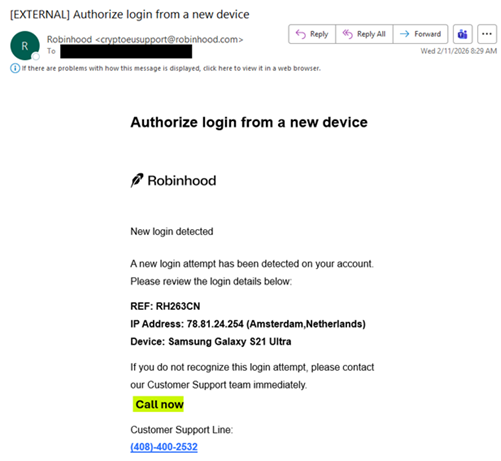
The NJCCIC observed multiple Telephone-Oriented Attack Delivery (TOAD) emails targeting New Jersey State employees. Threat actors use email spoofing to make the email appear to come from the legitimate robinhood[.]com. The email header information reveals the sender’s hostname as v[number][.]megaserve[.]de, a domain used by netcup. This legitimate German web hosting provider assigns default names to their Virtual Private Servers (VPS). In this TOAD campaign, threat actors utilize an inexpensive VPS to spoof Robinhood in the “From” field to send thousands of emails. Although they successfully spoofed the Robinhood domain, the threat actors cannot hide the server that sent the emails. The threat actors rely on their targets to see “Robinhood” and not the megaserv[.]de server name hidden in the background.
These urgent emails impersonate Robinhood and claim that a new login attempt has been detected on the target’s account. They include a phone number to call Customer Support if the login is not recognized. If called, threat actors trick their targets into divulging sensitive information or downloading remote access software to commit further malicious activity.
Legitimate Robinhood phone support is only available through a callback request made inside the official app or website. They will send a push notification when you are next in line, with the exact phone number a representative will call you from, to ensure security and verify it on your caller ID. Robinhood will never ask you to call a phone number to “authorize” a new device, ask for your password or multi-factor authentication (MFA) code, or request that you download software or transfer funds.
Recommendations
Exercise caution with communications from known senders or legitimate platforms.

Navigate directly to legitimate apps or websites and verify before submitting account credentials, providing personal or financial information, or downloading files.

Enable MFA and keep systems and browsers up to date. If threat actors gain remote access, disconnect from the internet and run anti-virus/anti-malware scans.

If sensitive information was entered, change passwords for compromised accounts, use the “Log out of all other sessions” feature in the real Robinhood app, monitor for unauthorized activity, and review the Identity Theft and Compromised PII 

NJCCIC Informational Report for additional recommendations and resources.

Forward the entire email (including headers) to report this phishing scam to Robinhood (reportphishing@robinhood.com) and report abuse to the hosting provider (abuse@netcup.de).

Report malicious cyber activity to the NJCCIC and the FBI’s  IC3.

Unusual Activity Detected

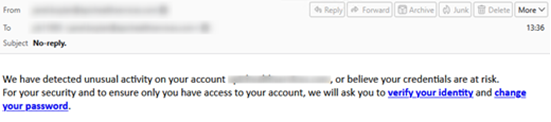
The NJCCIC observed a significant increase in phishing campaigns impersonating security alerts about unusual account activity, including warnings about credential loss and account access. These emails use a subject line of “No Reply” and spoofed addresses, which makes the message appear to be sent from the recipient’s email address. Two links are provided in the body of the email, prompting the user to either verify their identity or change their password.

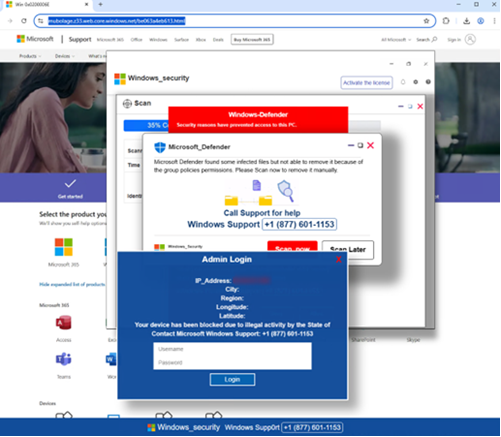
When a link is clicked, users are directed to a phishing website that resembles a Microsoft support page and displays pop-up notifications mimicking a Microsoft Defender security alert. This “security alert” claims that infected files were found on the system and cannot be removed due to group policy permissions. The pop-up notification offers the option to scan the system now or call the provided phone number. Calling the number connects the user with the threat actors behind the campaign. They may attempt to persuade the user to install malicious software, provide their credentials, or grant remote access. The social engineering tactics used in this phishing campaign are a common way for attackers to gain their targets’ trust.
Recommendations
Exercise caution with unsolicited communications from known senders.

Confirm requests from senders by verifying their contact information obtained from trusted and official sources before taking action, such as opening attachments or clicking links.

Hover over links in emails or attachments to view the actual destination URL before clicking.

Type official website URLs into browsers manually and only submit sensitive information on official websites.

If you suspect an account has been compromised, change the account’s password immediately and add a secondary authentication method.

Review the Don’t Take the Bait! Phishing and Other Social Engineering Attacks NJCCIC product for more information on common phishing and social engineering attacks.

Enable multi-factor authentication (MFA) and keep systems and browsers up to date.

Report malicious cyber activity to the NJCCIC and the FBI’s IC3.

MS-ISAC CYBERSECURITY ADVISORY – A Vulnerability in Dell RecoverPoint for Virtual Machines Could Allow for Arbitrary Code Execution – PATCH: NOW

A vulnerability has been discovered in Dell RecoverPoint for Virtual Machines which could allow for arbitrary code execution. Dell RecoverPoint for Virtual Machines is an enterprise-grade solution for VMware Virtual Machines (VMs) enabling local, remote, and concurrent local and remote replication with continuous cyber resilience for on premises recovery to any point-in time (PiT).

Successful exploitation of the vulnerability could allow for arbitrary code execution in the context of the logged on user. Depending on the privileges associated with the user an attacker could then install programs; view, change, or delete data; or create new accounts with full user rights. Users whose accounts are configured to have fewer user rights on the system could be less impacted than those who operate with administrative user rights.

THREAT INTELLIGENCE:
Dell has received a report from Google/Mandiant of limited active exploitation of this vulnerability.

SYSTEMS AFFECTED:

  • RecoverPoint for Virtual Machines versions prior to 6.0.3.1 HF1

RISK:
Government:

  • Large and medium government entities: High
  • Small government entities: Medium

Businesses:

  • Large and medium business entities: High
  • Small business entities: Medium

Home users: Low

TECHNICAL SUMMARY:
A vulnerability has been discovered in Dell RecoverPoint for Virtual Machines which could allow for arbitrary code execution. Details of the vulnerability are as follows:

Tactic: Execution (TA0002)
Technique: Exploitation for Client Execution (T1203):

  • Dell RecoverPoint for Virtual Machines, versions prior to 6.0.3.1 HF1, contain a hardcoded credential vulnerability. This is considered critical as an unauthenticated remote attacker with knowledge of the hardcoded credential could potentially exploit this vulnerability leading to unauthorized access to the underlying operating system and root-level persistence. (CVE-2026-22769)

Successful exploitation of the vulnerability could allow for arbitrary code execution in the context of the logged on user. Depending on the privileges associated with the user an attacker could then install programs; view, change, or delete data; or create new accounts with full user rights. Users whose accounts are configured to have fewer user rights on the system could be less impacted than those who operate with administrative user rights.

RECOMMENDATIONS:
We recommend the following actions be taken:

  • Apply appropriate updates provided by Dell to vulnerable systems immediately after appropriate testing. (M1051: Update Software)
    • Safeguard 7.1 : Establish and Maintain a Vulnerability Management Process: Establish and maintain a documented vulnerability management process for enterprise assets. Review and update documentation annually, or when significant enterprise changes occur that could impact this Safeguard.
    • Safeguard 7.2 : Establish and Maintain a Remediation Process: Establish and maintain a risk-based remediation strategy documented in a remediation process, with monthly, or more frequent, reviews.
    • Safeguard 7.4: Perform Automated Application Patch Management: Perform application updates on enterprise assets through automated patch management on a monthly, or more frequent, basis.
    • Safeguard 7.6 : Perform Automated Vulnerability Scans of Externally-Exposed Enterprise Assets: Perform automated vulnerability scans of externally-exposed enterprise assets using a SCAP-compliant vulnerability scanning tool. Perform scans on a monthly, or more frequent, basis.
    • Safeguard 7.7 : Remediate Detected Vulnerabilities: Remediate detected vulnerabilities in software through processes and tooling on a monthly, or more frequent, basis, based on the remediation process.
    • Safeguard 16.13 Conduct Application Penetration Testing: Conduct application penetration testing. For critical applications, authenticated penetration testing is better suited to finding business logic vulnerabilities than code scanning and automated security testing. Penetration testing relies on the skill of the tester to manually manipulate an application as an authenticated and unauthenticated user.
    • Safeguard 12.1: Ensure Network Infrastructure is Up-to-Date: Ensure network infrastructure is kept up-to-date. Example implementations include running the latest stable release of software and/or using currently supported network-as-a-service (NaaS) offerings. Review software versions monthly, or more frequently, to verify software support.
    • Safeguard 18.1 : Establish and Maintain a Penetration Testing Program: Establish and maintain a penetration testing program appropriate to the size, complexity, and maturity of the enterprise. Penetration testing program characteristics include scope, such as network, web application, Application Programming Interface (API), hosted services, and physical premise controls; frequency; limitations, such as acceptable hours, and excluded attack types; point of contact information; remediation, such as how findings will be routed internally; and retrospective requirements.
    • Safeguard 18.2 : Perform Periodic External Penetration Tests: Perform periodic external penetration tests based on program requirements, no less than annually. External penetration testing must include enterprise and environmental reconnaissance to detect exploitable information. Penetration testing requires specialized skills and experience and must be conducted through a qualified party. The testing may be clear box or opaque box.
    • Safeguard 18.3 : Remediate Penetration Test Findings: Remediate penetration test findings based on the enterprise’s policy for remediation scope and prioritization.
  • Apply the Principle of Least Privilege to all systems and services. Run all software as a non-privileged user (one without administrative privileges) to diminish the effects of a successful attack. (M1026: Privileged Account Management)
    • Safeguard 4.7: Manage Default Accounts on Enterprise Assets and Software: Manage default accounts on enterprise assets and software, such as root, administrator, and other pre-configured vendor accounts. Example implementations can include: disabling default accounts or making them unusable.
    • Safeguard 5.4: Restrict Administrator Privileges to Dedicated Administrator Accounts: Restrict administrator privileges to dedicated administrator accounts on enterprise assets. Conduct general computing activities, such as internet browsing, email, and productivity suite use, from the user’s primary, non-privileged account.
  • Vulnerability scanning is used to find potentially exploitable software vulnerabilities to remediate them. (M1016: Vulnerability Scanning)
    • Safeguard 16.13: Conduct Application Penetration Testing: Conduct application penetration testing. For critical applications, authenticated penetration testing is better suited to finding business logic vulnerabilities than code scanning and automated security testing. Penetration testing relies on the skill of the tester to manually manipulate an application as an authenticated and unauthenticated user.
  • Use capabilities to detect and block conditions that may lead to or be indicative of a software exploit occurring. (M1050: Exploit Protection)
    • Safeguard 10.5: Enable Anti-Exploitation Features: Enable anti-exploitation features on enterprise assets and software, where possible, such as Microsoft? Data Execution Prevention (DEP), Windows? Defender Exploit Guard (WDEG), or Apple? System Integrity Protection (SIP) and Gatekeeper™.
  • Architect sections of the network to isolate critical systems, functions, or resources. Use physical and logical segmentation to prevent access to potentially sensitive systems and information. Use a DMZ to contain any internet-facing services that should not be exposed from the internal network. Configure separate virtual private cloud (VPC) instances to isolate critical cloud systems. (M1030:Network Segmentation)
    • Safeguard 12.2: Establish and Maintain a Secure Network Architecture: Establish and maintain a secure network architecture. A secure network architecture must address segmentation, least privilege, and availability, at a minimum.
  • Use capabilities to detect and block conditions that may lead to or be indicative of a software exploit occurring. (M1050:Exploit Protection)
    • Safeguard 10.5: Enable Anti-Exploitation Features: Enable anti-exploitation features on enterprise assets and software, where possible, such as Microsoft? Data Execution Prevention (DEP), Windows? Defender Exploit Guard (WDEG), or Apple? System Integrity Protection (SIP) and Gatekeeper™.

REFERENCES:Dell:
https://www.dell.com/support/kbdoc/en-us/000426773/dsa-2026-079

Google/Mandiant:
https://cloud.google.com/blog/topics/threat-intelligence/unc6201-exploiting-dell-recoverpoint-zero-day/

CVE:
https://cve.mitre.org/cgi-bin/cvename.cgi?name=CVE-2026-22769
There’s No Pot of Gold at the End of These Lures

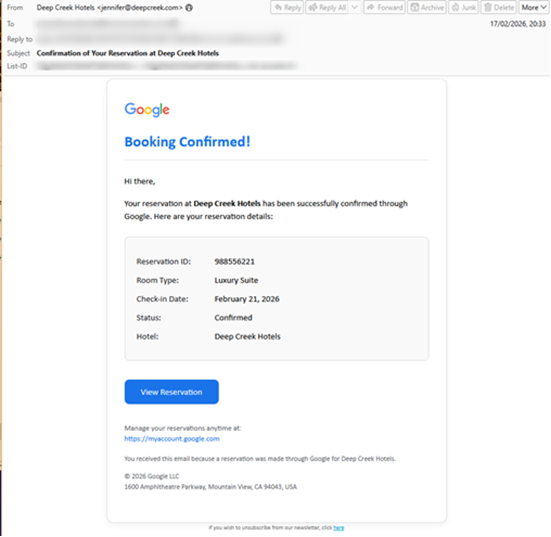
The NJCCIC has observed a phishing campaign using multiple lures to capture Google credentials. These emails claim to be hotel reservations, job opportunities, or invitations to digital workspaces, and have subjects such as:
Reservation Confirmed
Mountain Time Vacation Rentals
You Have Been Granted Access to the CW Digital

Marketing Workspace Opportunity
Social Media Manager at Samsung Electronics
Confirmation of Your Reservation at Deep Creek Hotels

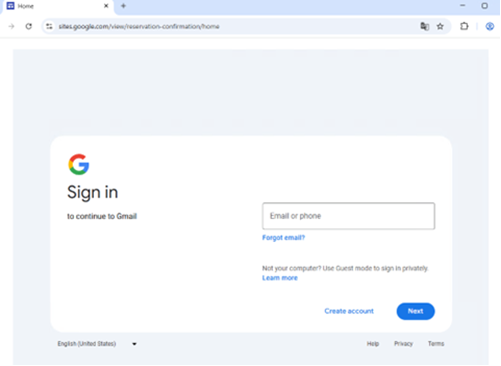
The messages include a link that, after completing a CAPTCHA, directs users to a Google Sites page displaying a fake Google login prompt. Credentials entered on this page are stolen, along with 2FA tokens and session cookies. It uses the Adversary-in-the-Middle (AiTM) technique, leveraging the synchronous relay capabilities of the Tycoon Phishing-as-a-Service (PhaaS) platform to capture credentials in real time.

Recommendations
Exercise caution with communications from known senders or legitimate platforms.

Confirm requests from senders via contact information obtained from verified and official sources before taking action, such as clicking on links or opening attachments.

Navigate directly to legitimate websites and verify before submitting account credentials, providing personal or financial information, or downloading files.

Enable multi-factor authentication (MFA) and keep systems and browsers up to date.

If sensitive information was entered, change passwords for compromised accounts, monitor for unauthorized activity, and review the Identity Theft and Compromised PII 

NJCCIC Informational Report for additional recommendations and resources, including credit freezes.

Report malicious cyber activity to the NJCCIC and the FBI’s IC3.

Increase in Malware Enabled ATM Jackpotting Incidents Across United States

The Federal Bureau of Investigation (FBI) released this FBI Liaison Alert System (FLASH)  to disseminate indicators of compromise (IOCs) and technical details associated with malware enabled ATM jackpotting.
Threat actors exploit physical and software vulnerabilities in ATMs and deploy malware to dispense cash without a legitimate transaction. The FBI has observed an increase in ATM jackpotting incidents across the United States. Out of 1,900 ATM jackpotting incidents reported since 2020, over 700 of them with more than $20 million in losses occurred in 2025 alone.
This FBI FLASH provides technical details, IOCs, recommended mitigations, and is being provided to encourage organizations to implement the recommended mitigation steps, outline the information requested from the public, and to assist agencies and organizations in guarding against the persistent malicious actions of cybercriminals.
Administrative Note
The information in this document is being provided by the FBI, with no guarantees or warranties, for potential use at the sole discretion of recipients to protect against cyber threats. This data is provided to help cybersecurity professionals and system administrators guard against the persistent malicious actions of cyber actors. The FBI does not endorse any commercial entity, product, company, or service, including any entities, products, or services linked within this document. Any reference to specific commercial entities, products, processes, or services by service mark, trademark, manufacturer, or otherwise, does not constitute or imply endorsement, recommendation, or favoring by the FBI.

Celebrating Two Years of CSF 2.0!

Today marks two years since the publication of the Cybersecurity Framework (CSF) 2.0!

Published in 2024, the CSF 2.0 included the addition of a Govern Function, increased emphasis on cybersecurity supply chain risk management, updated categories and subcategories to address current threat and technology shifts, and expansion into a suite of resources designed to make the CSF 2.0 easier to consume and put into practice—enabling organizations to better manage and reduce their cybersecurity risk.

The CSF 2.0 has been widely embraced by millions of organizations of all sizes and sectors around the globe and continues to be the most downloaded NIST technical publication (with over 3 million views and downloads, to date). The team has been hard at work the last two years…

Read the Blog