Survey Says…Scam!

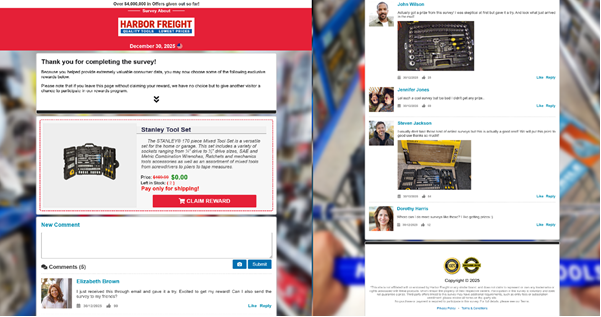
The NJCCIC observed a phishing campaign that impersonates several brands, claiming to be invitations to a feedback survey with an exclusive prize for completing it. These phishing emails contain links that use URL shorteners to obfuscate the true malicious destinations, and have subjects such as:
Marriott Luxury Pillows 2-piece set from Marriott Car emergency kit Winner Announcement! Claim Your Free Stanley Tool Set from Harbor Freight Claim Your Free Nespresso Vertuo Next Deluxe with Aeroccino 3 and 32 Capsules
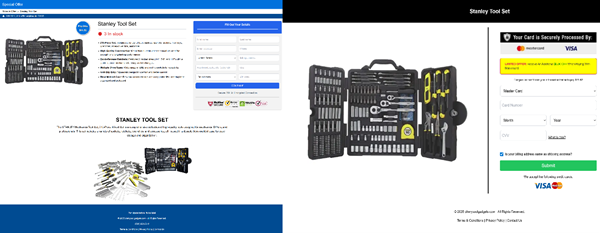
Upon clicking the provided link, users are redirected to a feedback survey. If completed, they are given the option to claim a reward for their time. The site alleges that a prize is available for free, provided shipping costs are paid. The page also includes comments that appear to be from others who have already claimed this deal. The campaign asks for address information and payment details to complete the order. It also states that there is limited stock available and that only a few minutes remain before the offer is gone, creating a sense of urgency to act.
Recommendations
Avoid clicking links and opening attachments in unsolicited emails.

Confirm requests from senders via contact information obtained from verified and official sources.

Users should only submit payment and personal information on official websites.

Maintain robust and up-to-date endpoint detection tools on every endpoint.

Consider leveraging behavior-based detection tools rather than signature-based tools.

Users who submitted payment information to these webpages are advised to contact their banking institutions to report the fraudulent purchases.

Report malicious cyber activity to the NJCCIC and the FBI’s IC3.

The Great Remote Job Rip-Off

Threat actors continue to impersonate recruiters and employers to target potential job seekers with fake or unrealistic remote job offers. They often send unsolicited emails or text messages that promise high pay for little work, require payment to get a job or training, lure targets with bad checks to buy fake work equipment or supplies, involve repackaging or shipping items often purchased with stolen credit cards, or request personal data, leading to financial loss and identity theft. Over the past month, the NJCCIC has observed an increase in remote job scams targeting New Jersey State employees and residents

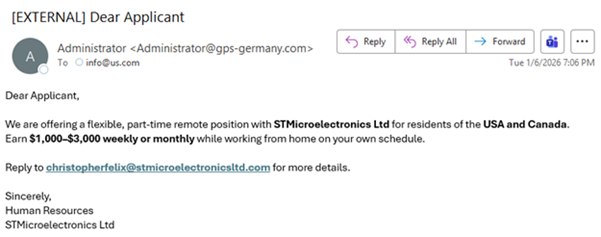
Threat actors are targeting New Jersey State employees in this latest job scam. They claim to represent Human Resources for an organization that is not the same as the sender’s domain. Another red flag is that the reply-to email address is in the body of the email and does not match the sender’s email address. They offer an unrealistic part-time remote job opportunity targeting US and Canadian residents and use a generic “Dear Applicant” greeting

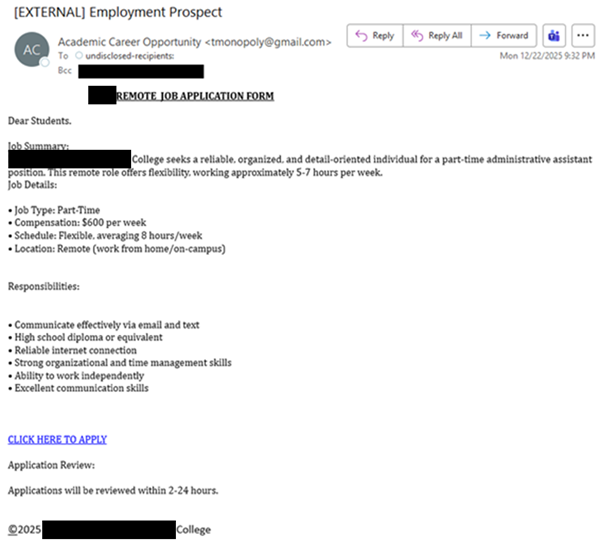
In another campaign, threat actors impersonate an educational institution to encourage their targets to apply for a remote job. Instead of using the official educational institution’s domain, the emails are sent from a Gmail account to multiple New Jersey State employees in the BCC field and use a generic “Dear Students” greeting. Threat actors claim a quick turnaround to convince their targets to act quickly and apply by stating that applications will be reviewed within two to 24 hours. If the “CLICK HERE TO APPLY” link is clicked, targets are directed to a Microsoft Forms page to capture sensitive information. Additionally, the copyright symbol at the bottom of the email is hyperlinked to a Microsoft phishing page to steal account credentials.

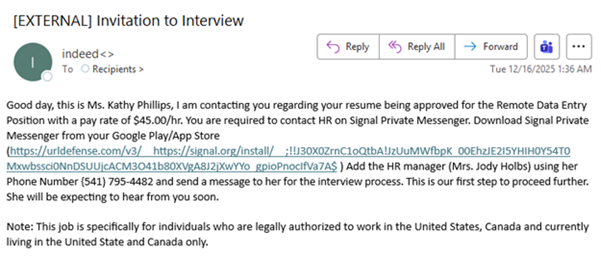
In the above campaign, threat actors claim to be recruiters expressing interest in the target’s resume for an interview for the purported remote position. The email is sent to multiple recipients and claims to be an Indeed interview invitation. Legitimate Indeed communications are more customized and formal and sent directly through the Indeed account. The threat actors request that the target contacts Human Resources for more information about the interview process via Signal by clicking on the link. Legitimate companies or recruiters typically do not conduct interviews through such instant messaging platforms.

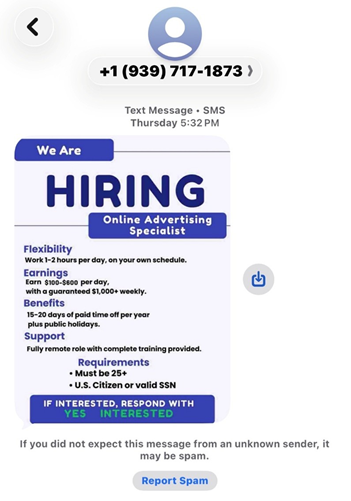
Threat actors continue to target unsuspecting job seekers via text messages, initiating unsolicited conversations about potential job opportunities. The message outlines the position’s benefits, including flexible hours, competitive earnings, remote work opportunities, training, and requirements. If the target responds with “Yes,” the threat actors send a phishing link or attempt to persuade them to continue the conversation on a different platform to disclose their personal information, such as a Social Security number (SSN), a photo of their driver’s license, and banking information, supposedly to set up direct deposit.
The NJCCIC also received reports of threat actors impersonating a recruiter from hire-desk[.]com. The malicious email contains a Calendly scheduling link and a Google Meet invitation link. Calendly links are used in phishing campaigns to direct targets to malicious websites that request sensitive information or account credentials. Google Meet users can join meetings on mobile phones or tablets via the Google Meet app, or they can connect from their computer browser, as the software does not require installation. The red flag in this campaign is the Google Meet link that prompts the target to install a “GoogleMeetSetup[.]exe” file, disguised as a remote monitoring and management (RMM) tool. This trojanized installer is used for initial access and persistence to commit further malicious activity.
Recommendations
Exercise caution with unsolicited communications from unknown senders or legitimate organizations and platforms.

Confirm requests from senders using contact information obtained from verified and official sources before taking action, such as clicking links or opening attachments or files.

Consider contacting the company’s human resources department to verify if the job offer is legitimate and if the person is indeed employed there.

Type official website URLs into browsers manually and only submit sensitive information on official websites.

Be careful when posting your resume publicly, as this information can be misused to exploit you.

Refrain from job offers that do not involve a phone or video interview, lack specific duties and company information, and create a sense of urgency and pressure to provide personal information quickly.

Keep systems and browsers up to date. Ignore and block suspicious emails and phone numbers.

Report malicious cyber activity to the NJCCIC, the FBI’s IC3, and the FTC.

Webinar on 1/23 | Introduction to Draft NIST IR 8587

Public Webinar: NIST IR 8587, Protecting Tokens and Assertions from Forgery, Theft, and Misuse (Initial Public Draft)

Date: January 23, 2026
Time: 12:00 – 1:00 PM ET

This free live webinar, hosted by the NIST and the Cybersecurity and Infrastructure Security Agency (CISA), introduces the recently released initial public draft of NIST Interagency Report 8587, “Protecting Tokens and Assertions from Forgery, Theft, and Misuse. During the webinar, the Report’s authors will walk through key implementation guidance aimed at federal agencies and cloud service providers (CSPs) to secure identity tokens and assertions against forgery, theft, and misuse.

This information is especially relevant for identity and access management professionals, federal IT teams, and CSPs serving government clients, as it addresses critical vulnerabilities in modern cloud and federated identity systems.

Feedback Sought

During this event, we will familiarize the audience with the draft Report and encourage written feedback during the open comment period (closing on January 30, 2026). We encourage broad input from government and industry stakeholders and are specifically hoping for feedback on:

  • Signing Key Validity Periods
  • Token Validity Periods
  • Key Protection and Isolation
  • Key Scoping
  • Emerging Standards

Attending the webinar is a great opportunity to prepare informed comments before the deadline. We look forward to seeing you there!

Learn More & Register

Multiple Vulnerabilities in Mozilla Products Could Allow for Arbitrary Code Execution – PATCH: NOW

Multiple vulnerabilities have been discovered in Mozilla products, the most severe of which could allow for arbitrary code execution. 

  • Mozilla Firefox is a web browser used to access the Internet.
  • Mozilla Firefox ESR is a version of the web browser intended to be deployed in large organizations.
  • Mozilla Thunderbird is an email client.
  • Mozilla Thunderbird ESR is a version of the email client intended to be deployed in large organizations.

Successful exploitation of the most severe of these vulnerabilities could allow for arbitrary code execution. Depending on the privileges associated with the user an attacker could then install programs; view, change, or delete data; or create new accounts with full user rights. Users whose accounts are configured to have fewer user rights on the system could be less impacted than those who operate with administrative user rights.

THREAT INTELLIGENCE:
There are currently no reports of these vulnerabilities being exploited in the wild. 

SYSTEMS AFFECTED:

  • Firefox versions prior to 147
  • Firefox ESR versions prior to 115.32
  • Firefox ESR versions prior to 140.7
  • Thunderbird versions prior to 147
  • Thunderbird ESR versions prior to 140.7

RISK:
Government:

  • Large and medium government entities: High
  • Small government: Medium

Businesses:

  • Large and medium business entities: High
  • Small business entities: Medium

Home Users: Low 

TECHNICAL SUMMARY:
Multiple vulnerabilities have been discovered in Mozilla products, the most severe of which could allow for arbitrary code execution. Details of these vulnerabilities are as follows: 

Tactic: Initial Access (TA0001):
Technique: Drive-by Compromise (T1189)

  • Mitigation bypass in the DOM: Security component. (CVE-2026-0877)
  • Sandbox escape due to incorrect boundary conditions in the Graphics: CanvasWebGL component. (CVE-2026-0878)
  • Sandbox escape due to incorrect boundary conditions in the Graphics component. (CVE-2026-0879)
  • Sandbox escape due to integer overflow in the Graphics component. (CVE-2026-0880)
  • Sandbox escape in the Messaging System component. (CVE-2026-0881)
  • Use-after-free in the IPC component. (CVE-2026-0882)
  • Memory safety bugs fixed in Firefox ESR 140.7, Thunderbird ESR 140.7, Firefox 147 and Thunderbird 147. (CVE-2026-0891)

Additional lower severity vulnerabilities include:

  • Information disclosure in the Networking component. (CVE-2026-0883)
  • Use-after-free in the JavaScript Engine component. (CVE-2026-0884)
  • Use-after-free in the JavaScript: GC component. (CVE-2026-0885)
  • Incorrect boundary conditions in the Graphics component. (CVE-2026-0886)
  • Clickjacking issue, information disclosure in the PDF Viewer component. (CVE-2026-0887)
  • Information disclosure in the XML component. (CVE-2026-0888)
  • Denial-of-service in the DOM: Service Workers component. (CVE-2026-0889)
  • Spoofing issue in the DOM: Copy & Paste and Drag & Drop component. (CVE-2026-0890)
  • Memory safety bugs fixed in Firefox 147 and Thunderbird 147. (CVE-2026-0892)
  • Spoofing issue in the Downloads Panel component. (CVE-2025-14327)

Successful exploitation of the most severe of these vulnerabilities could allow for arbitrary code execution. Depending on the privileges associated with the user an attacker could then install programs; view, change, or delete data; or create new accounts with full user rights. Users whose accounts are configured to have fewer user rights on the system could be less impacted than those who operate with administrative user rights.

RECOMMENDATIONS:
We recommend the following actions be taken:

  • Apply appropriate updates provided by Mozilla to vulnerable systems immediately after appropriate testing. (M1051:Update Software)
    • Safeguard 7.1: Establish and Maintain a Vulnerability Management Process: Establish and maintain a documented vulnerability management process for enterprise assets. Review and update documentation annually, or when significant enterprise changes occur that could impact this Safeguard.
    • Safeguard 7.4: Perform Automated Application Patch Management: Perform application updates on enterprise assets through automated patch management on a monthly, or more frequent, basis.
    • Safeguard 7.7: Remediate Detected Vulnerabilities: Remediate detected vulnerabilities in software through processes and tooling on a monthly, or more frequent, basis, based on the remediation process.
    • Safeguard 9.1: Ensure Use of Only Fully Supported Browsers and Email Clients: Ensure only fully supported browsers and email clients are allowed to execute in the enterprise, only using the latest version of browsers and email clients provided through the vendor.
  • Apply the Principle of Least Privilege to all systems and services. Run all software as a non-privileged user (one without administrative privileges) to diminish the effects of a successful attack. (M1026:Privileged Account Management)
    • Safeguard 4.7: Manage Default Accounts on Enterprise Assets and Software: Manage default accounts on enterprise assets and software, such as root, administrator, and other pre-configured vendor accounts. Example implementations can include: disabling default accounts or making them unusable.
    • Safeguard 5.4: Restrict Administrator Privileges to Dedicated Administrator Accounts: Restrict administrator privileges to dedicated administrator accounts on enterprise assets. Conduct general computing activities, such as internet browsing, email, and productivity suite use, from the user’s primary, non-privileged account.
  • Use capabilities to detect and block conditions that may lead to or be indicative of a software exploit occurring. (M1050:Exploit Protection)
    • Safeguard 10.5: Enable Anti-Exploitation Features: Enable anti-exploitation features on enterprise assets and software, where possible, such as Microsoft® Data Execution Prevention (DEP), Windows® Defender Exploit Guard (WDEG), or Apple® System Integrity Protection (SIP) and Gatekeeper™.
  • Restrict use of certain websites, block downloads/attachments, block JavaScript, restrict browser extensions, etc. (M1021:Restrict Web-Based Content)
    • Safeguard 9.2: Use DNS Filtering Services: Use DNS filtering services on all enterprise assets to block access to known malicious domains.
    • Safeguard 9.3: Maintain and Enforce Network-Based URL Filters: Enforce and update network-based URL filters to limit an enterprise asset from connecting to potentially malicious or unapproved websites. Example implementations include category-based filtering, reputation-based filtering, or through the use of block lists. Enforce filters for all enterprise assets.
    • Safeguard 9.6: Block Unnecessary File Types: Block unnecessary file types attempting to enter the enterprise’s email gateway.
  • Block execution of code on a system through application control, and/or script blocking. (M1038:Execution Prevention)
    • Safeguard 2.5: Allowlist Authorized Software: Use technical controls, such as application allowlisting, to ensure that only authorized software can execute or be accessed. Reassess bi-annually, or more frequently.
    • Safeguard 2.6: Allowlist Authorized Libraries: Use technical controls to ensure that only authorized software libraries, such as specific .dll, .ocx, .so, etc., files, are allowed to load into a system process. Block unauthorized libraries from loading into a system process. Reassess bi-annually, or more frequently.
    • Safeguard 2.7: Allowlist Authorized Scripts: Use technical controls, such as digital signatures and version control, to ensure that only authorized scripts, such as specific .ps1, .py, etc., files, are allowed to execute. Block unauthorized scripts from executing. Reassess bi-annually, or more frequently.
  • Use capabilities to prevent suspicious behavior patterns from occurring on endpoint systems. This could include suspicious process, file, API call, etc. behavior. (M1040:Behavior Prevention on Endpoint)
    • Safeguard 13.2: Deploy a Host-Based Intrusion Detection Solution: Deploy a host-based intrusion detection solution on enterprise assets, where appropriate and/or supported.
    • Safeguard 13.7: Deploy a Host-Based Intrusion Prevention Solution: Deploy a host-based intrusion prevention solution on enterprise assets, where appropriate and/or supported. Example implementations include use of an Endpoint Detection and Response (EDR) client or host-based IPS agent.
  • Inform and educate users regarding the threats posed by hypertext links contained in emails or attachments especially from un-trusted sources. Remind users not to visit un-trusted websites or follow links provided by unknown or un-trusted sources. (M1017:User Training)
    • Safeguard 14.1: Establish and Maintain a Security Awareness Program: Establish and maintain a security awareness program. The purpose of a security awareness program is to educate the enterprise’s workforce on how to interact with enterprise assets and data in a secure manner. Conduct training at hire and, at a minimum, annually. Review and update content annually, or when significant enterprise changes occur that could impact this Safeguard.
    • Safeguard 14.2: Train Workforce Members to Recognize Social Engineering Attacks: Train workforce members to recognize social engineering attacks, such as phishing, pre-texting, and tailgating.

REFERENCES:

CVE:
https://cve.mitre.org/cgi-bin/cvename.cgi?name=CVE-2025-14327
https://cve.mitre.org/cgi-bin/cvename.cgi?name=CVE-2026-0877
https://cve.mitre.org/cgi-bin/cvename.cgi?name=CVE-2026-0878
https://cve.mitre.org/cgi-bin/cvename.cgi?name=CVE-2026-0879
https://cve.mitre.org/cgi-bin/cvename.cgi?name=CVE-2026-0880
https://cve.mitre.org/cgi-bin/cvename.cgi?name=CVE-2026-0881
https://cve.mitre.org/cgi-bin/cvename.cgi?name=CVE-2026-0882
https://cve.mitre.org/cgi-bin/cvename.cgi?name=CVE-2026-0883
https://cve.mitre.org/cgi-bin/cvename.cgi?name=CVE-2026-0884
https://cve.mitre.org/cgi-bin/cvename.cgi?name=CVE-2026-0885
https://cve.mitre.org/cgi-bin/cvename.cgi?name=CVE-2026-0886
https://cve.mitre.org/cgi-bin/cvename.cgi?name=CVE-2026-0887
https://cve.mitre.org/cgi-bin/cvename.cgi?name=CVE-2026-0888
https://cve.mitre.org/cgi-bin/cvename.cgi?name=CVE-2026-0889
https://cve.mitre.org/cgi-bin/cvename.cgi?name=CVE-2026-0890
https://cve.mitre.org/cgi-bin/cvename.cgi?name=CVE-2026-0891
https://cve.mitre.org/cgi-bin/cvename.cgi?name=CVE-2026-0892

Mozilla:
https://www.mozilla.org/en-US/security/advisories/
https://www.mozilla.org/en-US/security/advisories/mfsa2026-01/
https://www.mozilla.org/en-US/security/advisories/mfsa2026-02/
https://www.mozilla.org/en-US/security/advisories/mfsa2026-03/

Critical Patches Issued for Microsoft Products, January 13, 2026 – PATCH NOW

Multiple vulnerabilities have been discovered in Microsoft products, the most severe of which could allow for remote code execution. Successful exploitation of the most severe of these vulnerabilities could result in an attacker gaining the same privileges as the logged-on user. Depending on the privileges associated with the user, an attacker could then install programs; view, change, or delete data; or create new accounts with full user rights. Users whose accounts are configured to have fewer user rights on the system could be less impacted than those who operate with administrative user rights.

THREAT INTELLIGENCE:
Microsoft has reported that CVE-2026-20805 has been exploited in the wild. 

SYSTEMS AFFECTED:

  • Azure Connected Machine Agent
  • Azure Core shared client library for Python
  • Capability Access Management Service (camsvc)
  • Connected Devices Platform Service (Cdpsvc)
  • Desktop Window Manager
  • Dynamic Root of Trust for Measurement (DRTM)
  • Graphics Kernel
  • Host Process for Windows Tasks
  • Inbox COM Objects
  • Microsoft Graphics Component
  • Microsoft Office
  • Microsoft Office Excel
  • Microsoft Office SharePoint
  • Microsoft Office Word
  • Printer Association Object
  • SQL Server
  • Tablet Windows User Interface (TWINUI) Subsystem
  • Windows Admin Center
  • Windows Ancillary Function Driver for WinSock
  • Windows Client-Side Caching (CSC) Service
  • Windows Clipboard Server
  • Windows Cloud Files Mini Filter Driver
  • Windows Common Log File System Driver
  • Windows DWM
  • Windows Error Reporting
  • Windows File Explorer
  • Windows Hello
  • Windows HTTP.sys
  • Windows Hyper-V
  • Windows Installer
  • Windows Internet Connection Sharing (ICS)
  • Windows Kerberos
  • Windows Kernel
  • Windows Kernel Memory
  • Windows Kernel-Mode Drivers
  • Windows LDAP – Lightweight Directory Access Protocol
  • Windows Local Security Authority Subsystem Service (LSASS)
  • Windows Local Session Manager (LSM)
  • Windows Management Services
  • Windows Media
  • Windows NDIS
  • Windows NTFS
  • Windows NTLM
  • Windows Remote Assistance
  • Windows Remote Procedure Call
  • Windows Remote Procedure Call Interface Definition Language (IDL)
  • Windows Routing and Remote Access Service (RRAS)
  • Windows Secure Boot
  • Windows Server Update Service
  • Windows Shell
  • Windows SMB Server
  • Windows Telephony Service
  • Windows TPM
  • Windows Virtualization-Based Security (VBS) Enclave
  • Windows WalletService
  • Windows Win32K – ICOMP

RISK:
Government:

  • Large and medium government entities: High
  • Small government entities: Medium

Businesses:

  • Large and medium business entities: High
  • Small business entities: Medium 

Home users: Low

TECHNICAL SUMMARY:
Multiple vulnerabilities have been discovered in Microsoft products, the most severe of which could allow for remote code execution.   

A full list of all vulnerabilities can be found in the Microsoft link in the Reference section.

Successful exploitation of the most severe of these vulnerabilities could result in an attacker gaining the same privileges as the logged-on user. Depending on the privileges associated with the user, an attacker could then install programs; view, change, or delete data; or create new accounts with full user rights. Users whose accounts are configured to have fewer user rights on the system could be less impacted than those who operate with administrative user rights. 

RECOMMENDATIONS:
We recommend the following actions be taken:

  • Apply appropriate updates provided by Microsoft to vulnerable systems immediately after appropriate testing. (M1051: Update Software)
    • Safeguard 7.1 : Establish and Maintain a Vulnerability Management Process: Establish and maintain a documented vulnerability management process for enterprise assets. Review and update documentation annually, or when significant enterprise changes occur that could impact this Safeguard.
    • Safeguard 7.2: Establish and Maintain a Remediation Process: Establish and maintain a risk-based remediation strategy documented in a remediation process, with monthly, or more frequent, reviews.
    • Safeguard 7.4: Perform Automated Application Patch Management: Perform application updates on enterprise assets through automated patch management on a monthly, or more frequent, basis.
    • Safeguard 7.5 : Perform Automated Vulnerability Scans of Internal Enterprise Assets: Perform automated vulnerability scans of internal enterprise assets on a quarterly, or more frequent, basis. Conduct both authenticated and unauthenticated scans, using a SCAP-compliant vulnerability scanning tool.
    • Safeguard 7.7: Remediate Detected Vulnerabilities: Remediate detected vulnerabilities in software through processes and tooling on a monthly, or more frequent, basis, based on the remediation process.
    • Safeguard 12.1: Ensure Network Infrastructure is Up-to-Date: Ensure network infrastructure is kept up-to-date. Example implementations include running the latest stable release of software and/or using currently supported network-as-a-service (NaaS) offerings. Review software versions monthly, or more frequently, to verify software support.
    • Safeguard 18.1: Establish and Maintain a Penetration Testing Program: Establish and maintain a penetration testing program appropriate to the size, complexity, and maturity of the enterprise. Penetration testing program characteristics include scope, such as network, web application, Application Programming Interface (API), hosted services, and physical premise controls; frequency; limitations, such as acceptable hours, and excluded attack types; point of contact information; remediation, such as how findings will be routed internally; and retrospective requirements.
    • Safeguard 18.2: Perform Periodic External Penetration Tests: Perform periodic external penetration tests based on program requirements, no less than annually. External penetration testing must include enterprise and environmental reconnaissance to detect exploitable information. Penetration testing requires specialized skills and experience and must be conducted through a qualified party. The testing may be clear box or opaque box.
    • Safeguard 18.3: Remediate Penetration Test Findings: Remediate penetration test findings based on the enterprise’s policy for remediation scope and prioritization.
  • Apply the Principle of Least Privilege to all systems and services. Run all software as a non-privileged user (one without administrative privileges) to diminish the effects of a successful attack. (M1026: Privileged Account Management)
    • Safeguard 4.7: Manage Default Accounts on Enterprise Assets and Software: Manage default accounts on enterprise assets and software, such as root, administrator, and other pre-configured vendor accounts. Example implementations can include: disabling default accounts or making them unusable.
    • Safeguard 5.5: Establish and Maintain an Inventory of Service Accounts: Establish and maintain an inventory of service accounts. The inventory, at a minimum, must contain department owner, review date, and purpose. Perform service account reviews to validate that all active accounts are authorized, on a recurring schedule at a minimum quarterly, or more frequently.
  • Vulnerability scanning is used to find potentially exploitable software vulnerabilities to remediate them. (M1016: Vulnerability Scanning)
    • Safeguard 16.13: Conduct Application Penetration Testing: Conduct application penetration testing. For critical applications, authenticated penetration testing is better suited to finding business logic vulnerabilities than code scanning and automated security testing. Penetration testing relies on the skill of the tester to manually manipulate an application as an authenticated and unauthenticated user.
  • Architect sections of the network to isolate critical systems, functions, or resources. Use physical and logical segmentation to prevent access to potentially sensitive systems and information. Use a DMZ to contain any internet-facing services that should not be exposed from the internal network. Configure separate virtual private cloud (VPC) instances to isolate critical cloud systems. (M1030: Network Segmentation)
    • Safeguard 12.2: Establish and Maintain a Secure Network Architecture: Establish and maintain a secure network architecture. A secure network architecture must address segmentation, least privilege, and availability, at a minimum.
  • Use capabilities to detect and block conditions that may lead to or be indicative of a software exploit occurring. (M1050: Exploit Protection)
    • Safeguard 10.5:  Enable Anti-Exploitation Features: Enable anti-exploitation features on enterprise assets and software, where possible, such as Microsoft® Data Execution Prevention (DEP), Windows® Defender Exploit Guard (WDEG), or Apple® System Integrity Protection (SIP) and Gatekeeper™.

REFERENCES:

Microsoft:
https://msrc.microsoft.com/update-guide/en-us
https://msrc.microsoft.com/update-guide/releaseNote/2026-Jan

Multiple Vulnerabilities in Fortinet Products Could Allow for Arbitrary Code Execution – PATCH NOW

Multiple vulnerabilities have been discovered in Fortinet products, the most severe of which could allow for arbitrary code execution.

  • FortiSandbox is an advanced threat detection solution from Fortinet that uses sandboxing to analyze suspicious files and network traffic for advanced threats like zero-day malware and ransomware.
  • FortiWeb is a web application firewall (WAF) that protects web applications and APIs from cyberattacks like SQL injection and cross-site scripting, while also helping to meet compliance requirements.
  • FortiVoice is a unified communications solution that combines voice, chat, conferencing, and fax into a single, secure platform for businesses and schools.
  • FortiOS is the Fortinet’s proprietary Operation System which is utilized across multiple product lines.
  • FortiProxy is a secure web gateway product from Fortinet that protects users from internet-borne attacks, enforces compliance, and improves network performance.
  • FortiClientEMS is a centralized management platform for deploying, configuring, monitoring, and enforcing security policies across numerous endpoints (computers) running the FortiClient agent.
  • FortiSwitchManager is Fortinet’s dedicated, on-premise platform for centrally managing FortiSwitch devices in large deployments.
  • FortiFone is Fortinet’s secure, enterprise-grade unified communications solution.

Successful exploitation of the most severe of these vulnerabilities could allow for arbitrary code execution in the context of the affected service account. Depending on the privileges associated with the service account an attacker could then install programs; view, change, or delete data; or create new accounts with full user rights. Service accounts that are configured to have fewer user rights on the system could be less impacted than those who operate with administrative user rights.

THREAT INTELLIGENCE:
There are currently no reports of these vulnerabilities being exploited in the wild.

SYSTEMS AFFECTED:

  • FortiVoice 7.2.0 through 7.2.2
  • FortiVoice 7.0.0 through 7.0.7
  • FortiClientEMS 7.4.3 through 7.4.4
  • FortiClientEMS 7.4.0 through 7.4.1
  • FortiClientEMS 7.2.0 through 7.2.10
  • FortiClientEMS 7.0 all versions
  • FortiOS 7.6.0 through 7.6.3
  • FortiOS 7.4.0 through 7.4.8
  • FortiOS 7.2.0 through 7.2.11
  • FortiOS 7.0.0 through 7.0.17
  • FortiOS 6.4.0 through 6.4.16
  • FortiSASE 25.2.b
  • FortiSASE 25.1.a.2
  • FortiSwitchManager 7.2.0 through 7.2.6
  • FortiSwitchManager 7.0.0 through 7.0.5
  • FortiSandbox 5.0.0 through 5.0.4
  • FortiSandbox 4.4 all versions
  • FortiSandbox 4.2 all versions
  • FortiSandbox 4.0 all versions
  • FortiFone 7.0.0 through 7.0.1
  • FortiFone 3.0.13 through 3.0.23
  • FortiSIEM 7.4.0
  • FortiSIEM 7.3.0 through 7.3.4
  • FortiSIEM 7.2.0 through 7.2.6
  • FortiSIEM 7.1.0 through 7.1.8
  • FortiSIEM 7.0.0 through 7.0.4
  • FortiSIEM 7.0.0 through 7.0.4

RISK:
Government:

  • Large and medium government entities: High
  • Small government entities: Medium

Businesses:

  • Large and medium business entities: High
  • Small business entities: Medium

Home users: Low

TECHNICAL SUMMARY:
Multiple vulnerabilities have been discovered in Fortinet products, the most severe of which could allow for arbitrary code execution. Details of the vulnerabilities are as follows: 

Tactic: Initial Access (TA0001)
Technique: Exploitation Public-Facing Application  (T1190):

  • A heap-based buffer overflow vulnerability [CWE-122] in FortiOS and FortiSwitchManager cw_acd daemon may allow a remote unauthenticated attacker to execute arbitrary code or commands via specifically crafted requests. (CVE-2025-25249)
  • An improper neutralization of special elements used in an OS command (‘OS Command Injection’) vulnerability [CWE-78] in FortiSIEM may allow an unauthenticated attacker to execute unauthorized code or commands via crafted TCP requests. (CVE-2025-64155)

Details of lower severity vulnerabilities:

  • An improper limitation of a pathname to a restricted directory (‘path traversal’) vulnerability in FortiVoice may allow a privileged attacker to delete files from the underlying filesystem via crafted HTTP or HTTPs requests. (CVE-2025-58693)
  • An improper neutralization of special elements used in an SQL command (‘SQL Injection’) vulnerability [CWE-89] in FortiClientEMS may allow an authenticated attacker with at least read-only admin permission to execute unauthorized SQL code or commands via crafted HTTP or HTTPs requests. (CVE-2025-59922)
  • A Server-Side Request Forgery (SSRF) vulnerability [CWE-918] in FortiSandbox may allow an authenticated attacker to proxy internal requests limited to plaintext endpoints only via crafted HTTP requests. (CVE-2025-67685)
  • An exposure of sensitive information to an unauthorized actor [CWE-200] vulnerability in FortiFone Web Portal page may allow an unauthenticated attacker to obtain the device configuration via crafted HTTP or HTTPS requests. (CVE-2025-47855)

Successful exploitation of the most severe of these vulnerabilities could allow for arbitrary code execution in the context of the affected service account. Depending on the privileges associated with the service account an attacker could then install programs; view, change, or delete data; or create new accounts with full user rights. Service accounts that are configured to have fewer user rights on the system could be less impacted than those who operate with administrative user rights.

RECOMMENDATIONS:
We recommend the following actions be taken:

  • Apply the stable channel update provided by Fortinet to vulnerable systems immediately after appropriate testing. (M1051: Update Software)
    • Safeguard 7.1 : Establish and Maintain a Vulnerability Management Process: Establish and maintain a documented vulnerability management process for enterprise assets. Review and update documentation annually, or when significant enterprise changes occur that could impact this Safeguard.
    • Safeguard 7.2 : Establish and Maintain a Remediation Process: Establish and maintain a risk-based remediation strategy documented in a remediation process, with monthly, or more frequent, reviews.
    • Safeguard 7.4: Perform Automated Application Patch Management: Perform application updates on enterprise assets through automated patch management on a monthly, or more frequent, basis.
    • Safeguard 7.6 : Perform Automated Vulnerability Scans of Externally-Exposed Enterprise Assets: Perform automated vulnerability scans of externally-exposed enterprise assets using a SCAP-compliant vulnerability scanning tool. Perform scans on a monthly, or more frequent, basis.
    • Safeguard 7.7 : Remediate Detected Vulnerabilities: Remediate detected vulnerabilities in software through processes and tooling on a monthly, or more frequent, basis, based on the remediation process.
    • Safeguard 16.13 Conduct Application Penetration Testing: Conduct application penetration testing. For critical applications, authenticated penetration testing is better suited to finding business logic vulnerabilities than code scanning and automated security testing. Penetration testing relies on the skill of the tester to manually manipulate an application as an authenticated and unauthenticated user.
    • Safeguard 12.1: Ensure Network Infrastructure is Up-to-Date: Ensure network infrastructure is kept up-to-date. Example implementations include running the latest stable release of software and/or using currently supported network-as-a-service (NaaS) offerings. Review software versions monthly, or more frequently, to verify software support.
    • Safeguard 18.1 : Establish and Maintain a Penetration Testing Program: Establish and maintain a penetration testing program appropriate to the size, complexity, and maturity of the enterprise. Penetration testing program characteristics include scope, such as network, web application, Application Programming Interface (API), hosted services, and physical premise controls; frequency; limitations, such as acceptable hours, and excluded attack types; point of contact information; remediation, such as how findings will be routed internally; and retrospective requirements.
    • Safeguard 18.2 : Perform Periodic External Penetration Tests: Perform periodic external penetration tests based on program requirements, no less than annually. External penetration testing must include enterprise and environmental reconnaissance to detect exploitable information. Penetration testing requires specialized skills and experience and must be conducted through a qualified party. The testing may be clear box or opaque box.
    • Safeguard 18.3 : Remediate Penetration Test Findings: Remediate penetration test findings based on the enterprise’s policy for remediation scope and prioritization.
  • Apply the Principle of Least Privilege to all systems and services. Run all software as a non-privileged user (one without administrative privileges) to diminish the effects of a successful attack. (M1026: Privileged Account Management)
    • Safeguard 4.7: Manage Default Accounts on Enterprise Assets and Software: Manage default accounts on enterprise assets and software, such as root, administrator, and other pre-configured vendor accounts. Example implementations can include: disabling default accounts or making them unusable.
    • Safeguard 5.4: Restrict Administrator Privileges to Dedicated Administrator Accounts: Restrict administrator privileges to dedicated administrator accounts on enterprise assets. Conduct general computing activities, such as internet browsing, email, and productivity suite use, from the user’s primary, non-privileged account.
  • Vulnerability scanning is used to find potentially exploitable software vulnerabilities to remediate them. (M1016: Vulnerability Scanning)
    • Safeguard 16.13: Conduct Application Penetration Testing: Conduct application penetration testing. For critical applications, authenticated penetration testing is better suited to finding business logic vulnerabilities than code scanning and automated security testing. Penetration testing relies on the skill of the tester to manually manipulate an application as an authenticated and unauthenticated user.
  • Use capabilities to detect and block conditions that may lead to or be indicative of a software exploit occurring. (M1050: Exploit Protection)
    • Safeguard 10.5: Enable Anti-Exploitation Features: Enable anti-exploitation features on enterprise assets and software, where possible, such as Microsoft® Data Execution Prevention (DEP), Windows® Defender Exploit Guard (WDEG), or Apple® System Integrity Protection (SIP) and Gatekeeper™.
  • Architect sections of the network to isolate critical systems, functions, or resources. Use physical and logical segmentation to prevent access to potentially sensitive systems and information. Use a DMZ to contain any internet-facing services that should not be exposed from the internal network. Configure separate virtual private cloud (VPC) instances to isolate critical cloud systems. (M1030: Network Segmentation)
    • Safeguard 12.2: Establish and Maintain a Secure Network Architecture: Establish and maintain a secure network architecture. A secure network architecture must address segmentation, least privilege, and availability, at a minimum.
  • Use capabilities to detect and block conditions that may lead to or be indicative of a software exploit occurring. (M1050: Exploit Protection)
    • Safeguard 10.5: Enable Anti-Exploitation Features: Enable anti-exploitation features on enterprise assets and software, where possible, such as Microsoft® Data Execution Prevention (DEP), Windows® Defender Exploit Guard (WDEG), or Apple® System Integrity Protection (SIP) and Gatekeeper™.

REFERENCES:

Fortinet:
https://fortiguard.fortinet.com/psirt
https://fortiguard.fortinet.com/psirt/FG-IR-25-778
https://fortiguard.fortinet.com/psirt/FG-IR-25-735
https://fortiguard.fortinet.com/psirt/FG-IR-25-084
https://fortiguard.fortinet.com/psirt/FG-IR-25-783
https://fortiguard.fortinet.com/psirt/FG-IR-25-260
https://fortiguard.fortinet.com/psirt/FG-IR-25-772

CVE: 
https://cve.mitre.org/cgi-bin/cvename.cgi?name=CVE-2025-25249
https://cve.mitre.org/cgi-bin/cvename.cgi?name=CVE-2025-64155
https://cve.mitre.org/cgi-bin/cvename.cgi?name=CVE-2025-58693
https://cve.mitre.org/cgi-bin/cvename.cgi?name=CVE-2025-59922
https://cve.mitre.org/cgi-bin/cvename.cgi?name=CVE-2025-67685
https://cve.mitre.org/cgi-bin/cvename.cgi?name=CVE-2025-47855

Multiple Vulnerabilities in Google Chrome Could Allow for Arbitrary Code Execution – PATCH NOW

Multiple vulnerabilities have been discovered in Google Chrome, the most severe of which could allow for arbitrary code execution. Successful exploitation of the most severe of these vulnerabilities could allow for arbitrary code execution in the context of the logged on user. Depending on the privileges associated with the user an attacker could then install programs; view, change, or delete data; or create new accounts with full user rights. Users whose accounts are configured to have fewer user rights on the system could be less impacted than those who operate with administrative user rights.

THREAT INTELLIGENCE:
There are no reports of exploitation of these vulnerabilities in the wild.

SYSTEMS AFFECTED:

  • Chrome prior to 144.0.7559.59/60 for Windows and MAC
  • Chrome prior to 144.0.7559.59 for Linux

RISK:
Government:

  • Large and medium government entities: Medium
  • Small government entities: Medium

Businesses:

  • Large and medium business entities: Medium
  • Small business entities: Medium

Home users: Low

TECHNICAL SUMMARY:

Multiple vulnerabilities have been discovered in Google Chrome, the most severe of which could allow for arbitrary code execution. Details of these vulnerabilities are as follows:

Tactic: Initial Access (TA0001):

Technique: Drive-By Compromise (T1189):

  • Out of bounds memory access in V8 (CVE-2026-0899)

Additional lower severity vulnerabilities include:

  • Inappropriate implementation in Blink (CVE-2026-0901)
  • Insufficient validation of untrusted input in Downloads (CVE-2026-0903)
  • Incorrect security UI in Digital Credentials (CVE-2026-0904)
  • Insufficient policy enforcement in Network (CVE-2026-0905)
  • Incorrect security UI (CVE-2026-0906)
  • Incorrect security UI in Split View (CVE-2026-0907)
  • Inappropriate implementation in V8 (CVE-2026-0900, CVE-2026-0902)
  • Use after free in ANGLE (CVE-2026-0908)

Successful exploitation of the most severe of these vulnerabilities could allow for arbitrary code execution in the context of the logged on user. Depending on the privileges associated with the user an attacker could then install programs; view, change, or delete data; or create new accounts with full user rights. Users whose accounts are configured to have fewer user rights on the system could be less impacted than those who operate with administrative user rights.

RECOMMENDATIONS:
We recommend the following actions be taken:

  • Apply appropriate updates provided by Google to vulnerable systems immediately after appropriate testing. (M1051: Update Software)
    • Safeguard 7.1: Establish and Maintain a Vulnerability Management Process: Establish and maintain a documented vulnerability management process for enterprise assets. Review and update documentation annually, or when significant enterprise changes occur that could impact this Safeguard.
    • Safeguard 7.4: Perform Automated Application Patch Management: Perform application updates on enterprise assets through automated patch management on a monthly, or more frequent, basis.
    • Safeguard 7.7: Remediate Detected Vulnerabilities: Remediate detected vulnerabilities in software through processes and tooling on a monthly, or more frequent, basis, based on the remediation process.
    • Safeguard 9.1: Ensure Use of Only Fully Supported Browsers and Email Clients: Ensure only fully supported browsers and email clients are allowed to execute in the enterprise, only using the latest version of browsers and email clients provided through the vendor.
  • Apply the Principle of Least Privilege to all systems and services. Run all software as a non-privileged user (one without administrative privileges) to diminish the effects of a successful attack. (M1026: Privileged Account Management)
    • Safeguard 4.7: Manage Default Accounts on Enterprise Assets and Software: Manage default accounts on enterprise assets and software, such as root, administrator, and other pre-configured vendor accounts. Example implementations can include: disabling default accounts or making them unusable.
    • Safeguard 5.4: Restrict Administrator Privileges to Dedicated Administrator Accounts: Restrict administrator privileges to dedicated administrator accounts on enterprise assets. Conduct general computing activities, such as internet browsing, email, and productivity suite use, from the user’s primary, non-privileged account.
  • Restrict execution of code to a virtual environment on or in transit to an endpoint system. (M1048: Application Isolation and Sandboxing)
  • Use capabilities to detect and block conditions that may lead to or be indicative of a software exploit occurring. (M1050: Exploit Protection)
    • Safeguard 10.5:  Enable Anti-Exploitation Features: Enable anti-exploitation features on enterprise assets and software, where possible, such as Microsoft® Data Execution Prevention (DEP), Windows® Defender Exploit Guard (WDEG), or Apple® System Integrity Protection (SIP) and Gatekeeper™.
  • Restrict use of certain websites, block downloads/attachments, block Javascript, restrict browser extensions, etc. (M1021: Restrict Web-Based Content)
    • Safeguard 9.2: Use DNS Filtering Services: Use DNS filtering services on all enterprise assets to block access to known malicious domains.
    • Safeguard 9.3: Maintain and Enforce Network-Based URL Filters: Enforce and update network-based URL filters to limit an enterprise asset from connecting to potentially malicious or unapproved websites. Example implementations include category-based filtering, reputation-based filtering, or through the use of block lists. Enforce filters for all enterprise assets.
    • Safeguard 9.6: Block Unnecessary File Types: Block unnecessary file types attempting to enter the enterprise’s email gateway.
  • Inform and educate users regarding the threats posed by hypertext links contained in emails or attachments especially from un-trusted sources. Remind users not to visit un-trusted websites or follow links provided by unknown or un-trusted sources. (M1017: User Training)
    • Safeguard 14.1: Establish and Maintain a Security Awareness Program: Establish and maintain a security awareness program. The purpose of a security awareness program is to educate the enterprise’s workforce on how to interact with enterprise assets and data in a secure manner. Conduct training at hire and, at a minimum, annually. Review and update content annually, or when significant enterprise changes occur that could impact this Safeguard.
    • Safeguard 14.2: Train Workforce Members to Recognize Social Engineering Attacks: Train workforce members to recognize social engineering attacks, such as phishing, pre-texting, and tailgating.

REFERENCES:

Google:

https://chromereleases.googleblog.com/2026/01/stable-channel-update-for-desktop_13.html

CVE:

https://cve.mitre.org/cgi-bin/cvename.cgi?name=CVE-2026-0899

https://cve.mitre.org/cgi-bin/cvename.cgi?name=CVE-2026-0900

https://cve.mitre.org/cgi-bin/cvename.cgi?name=CVE-2026-0901

https://cve.mitre.org/cgi-bin/cvename.cgi?name=CVE-2026-0902

https://cve.mitre.org/cgi-bin/cvename.cgi?name=CVE-2026-0903

https://cve.mitre.org/cgi-bin/cvename.cgi?name=CVE-2026-0904

https://cve.mitre.org/cgi-bin/cvename.cgi?name=CVE-2026-0905

https://cve.mitre.org/cgi-bin/cvename.cgi?name=CVE-2026-0906

https://cve.mitre.org/cgi-bin/cvename.cgi?name=CVE-2026-0907https://cve.mitre.org/cgi-bin/cvename.cgi?name=CVE-2026-0908
Multiple Vulnerabilities in Adobe Products Could Allow for Arbitrary Code Execution – PATCH: NOW

Multiple vulnerabilities have been discovered in Adobe products, the most severe of which could allow for arbitrary code execution.

  • Adobe Bridge is a creative asset manager that lets you preview, organize, edit, and publish multiple creative assets quickly and easily.
  • Adobe Dreamweaver is a web design integrated development environment (IDE) that is used to develop and design websites.
  • Adobe InDesign is a professional page layout and desktop publishing software used for designing and publishing content for both print and digital media.
  • Adobe InCopy is a professional word processor designed for writers and editors to collaborate with designers on documents simultaneously.
  • Adobe Photoshop is a powerful raster graphics editor developed by Adobe for image creation, editing, and manipulation.
  • Adobe Illustrator is a professional vector graphics editor used for creating logos, icons, typography, and other scalable graphics that retain clarity at any size.
  • Adobe Substance 3D is a suite of tools for creating 3D content, including modeling, texturing, and rendering.
  • Adobe ColdFusion is a rapid development platform for building and deploying web and mobile applications.

Successful exploitation of the most severe of these vulnerabilities could allow for arbitrary code execution in the context of the logged on user. Depending on the privileges associated with the user, an attacker could then install programs; view, change, or delete data; or create new accounts with full user rights. Users whose accounts are configured to have fewer user rights on the system could be less impacted than those who operate with administrative user rights.

THREAT INTELLIGENCE:
There are currently no reports of these vulnerabilities being exploited in the wild. 

SYSTEMS AFFECTED:

  • Adobe Bridge 15.1.2 (LTS) and earlier versions
  • Adobe Bridge 16.0 and earlier versions
  • Adobe Dreamweaver 21.6 and earlier versions
  • Adobe InCopy 19.5.5 and earlier versions
  • Adobe InCopy 21.0 and earlier versions
  • Adobe InDesign ID19.5.5 and earlier versions
  • Adobe InDesign ID21.0 and earlier versions
  • Adobe Substance 3D Designer 15.0.3 and earlier versions
  • Adobe Substance 3D Modeler 1.22.4 and earlier versions
  • Adobe Substance 3D Painter 11.0.3 and earlier versions
  • Adobe Substance 3D Sampler 5.1.0 and earlier versions
  • Adobe Substance 3D Stager 3.1.5 and earlier versions
  • ColdFusion 2023 Update 17 and earlier versions
  • ColdFusion 2025 Update 5 and earlier versions
  • Illustrator 2025 29.8.3 and earlier versions
  • Illustrator 2026 30.0 and earlier versions

RISK:
Government:

  • Large and medium government entities: Medium
  • Small government entities: Medium

Businesses:

  • Large and medium business entities: Medium
  • Small business entities: Medium

Home users: Low

TECHNICAL SUMMARY:
Multiple vulnerabilities have been discovered in Adobe products, the most severe of which could allow for arbitrary code execution. Details of these vulnerabilities are as follows: 

Tactic: Execution (TA0002)
Technique: Exploitation for Client Execution (T1203): 

Adobe Bridge:

  • Heap-based Buffer Overflow (CVE-2026-21283)

Adobe Dreamweaver:

  • Improper Neutralization of Special Elements used in an OS Command (‘OS Command Injection’) (CVE-2026-21267)
  • Improper Input Validation (CVE-2026-21268, CVE-2026-21271, CVE-2026-21272, CVE-2026-21267)
  • Incorrect Authorization (CVE-2026-21274)

Adobe InCopy:

  • Heap-based Buffer Overflow (CVE-2026-21281)

Adobe InDesign:

  • Access of Uninitialized Pointer (CVE-2026-21275, CVE-2026-21276)
  • Heap-based Buffer Overflow (CVE-2026-21277, CVE-2026-21304)
  • Out-of-bounds Read (CVE-2026-21278)

Substance 3D Designer:

  • Out-of-bounds Read (CVE-2026-21308)

Substance 3D Modeler:

  • Out-of-bounds Write (CVE-2026-21298, CVE-2026-21299)
  • NULL Pointer Dereference (CVE-2026-21300, CVE-2026-21301)
  • Out-of-bounds Read (CVE-2026-21302, CVE-2026-21303)

Substance 3D Painter:

  • Out-of-bounds Write (CVE-2026-21305)

Substance 3D Sampler:

  • Out-of-bounds Write (CVE-2026-21306)

Substance 3D Stager:

  • Use After Free (CVE-2026-21287)

ColdFusion:

  • XML External Entity Injection in Dependency: Apache Tika (CVE-2025-66516)

Adobe Illustrator:

  • Untrusted Search Path (CVE-2026-21280)
  • NULL Pointer Dereference (CVE-2026-21288)

Successful exploitation of the most severe of these vulnerabilities could allow for arbitrary code execution in the context of the logged on user. Depending on the privileges associated with the user, an attacker could then install programs; view, change, or delete data; or create new accounts with full user rights. Users whose accounts are configured to have fewer user rights on the system could be less impacted than those who operate with administrative user rights.

RECOMMENDATIONS:
We recommend the following actions be taken:

  • Apply the stable channel update provided by Adobe to vulnerable systems immediately after appropriate testing. (M1051: Update Software)
    • Safeguard 7.1: Establish and Maintain a Vulnerability Management Process: Establish and maintain a documented vulnerability management process for enterprise assets. Review and update documentation annually, or when significant enterprise changes occur that could impact this Safeguard.
    • Safeguard 7.2: Establish and Maintain a Remediation Process: Establish and maintain a risk-based remediation strategy documented in a remediation process, with monthly, or more frequent, reviews.
    • Safeguard 7.6: Perform Automated Vulnerability Scans of Externally-Exposed Enterprise Assets: Perform automated vulnerability scans of externally-exposed enterprise assets using a SCAP-compliant vulnerability scanning tool. Perform scans on a monthly, or more frequent, basis.
    • Safeguard 7.7: Remediate Detected Vulnerabilities: Remediate detected vulnerabilities in software through processes and tooling on a monthly, or more frequent, basis, based on the remediation process.
    • Safeguard 16.13: Conduct Application Penetration Testing: Conduct application penetration testing. For critical applications, authenticated penetration testing is better suited to finding business logic vulnerabilities than code scanning and automated security testing. Penetration testing relies on the skill of the tester to manually manipulate an application as an authenticated and unauthenticated user.
    • Safeguard 18.1: Establish and Maintain a Penetration Testing Program: Establish and maintain a penetration testing program appropriate to the size, complexity, and maturity of the enterprise. Penetration testing program characteristics include scope, such as network, web application, Application Programming Interface (API), hosted services, and physical premise controls; frequency; limitations, such as acceptable hours, and excluded attack types; point of contact information; remediation, such as how findings will be routed internally; and retrospective requirements.
    • Safeguard 18.2: Perform Periodic External Penetration Tests: Perform periodic external penetration tests based on program requirements, no less than annually. External penetration testing must include enterprise and environmental reconnaissance to detect exploitable information. Penetration testing requires specialized skills and experience and must be conducted through a qualified party. The testing may be clear box or opaque box.
    • Safeguard 18.3: Remediate Penetration Test Findings: Remediate penetration test findings based on the enterprise’s policy for remediation scope and prioritization.
  • Apply the Principle of Least Privilege to all systems and services. Run all software as a non-privileged user (one without administrative privileges) to diminish the effects of a successful attack. (M1026: Privileged Account Management)
    • Safeguard 4.7: Manage Default Accounts on Enterprise Assets and Software: Manage default accounts on enterprise assets and software, such as root, administrator, and other pre-configured vendor accounts. Example implementations can include: disabling default accounts or making them unusable.
    • Safeguard 5.4: Restrict Administrator Privileges to Dedicated Administrator Accounts: Restrict administrator privileges to dedicated administrator accounts on enterprise assets. Conduct general computing activities, such as internet browsing, email, and productivity suite use, from the user’s primary, non-privileged account.
  • Restrict use of certain websites, block downloads/attachments, block Javascript, restrict browser extensions, etc. (M1021: Restrict Web-Based Content)
    • Safeguard 2.3: Address Unauthorized Software: Ensure that unauthorized software is either removed from use on enterprise assets or receives a documented exception. Review monthly, or more frequently.
    • Safeguard 2.7: Allowlist Authorized Scripts: Use technical controls, such as digital signatures and version control, to ensure that only authorized scripts, such as specific .ps1, .py, etc., files, are allowed to execute. Block unauthorized scripts from executing. Reassess bi-annually, or more frequently.
    • Safeguard 9.3: Maintain and Enforce Network-Based URL Filters: Enforce and update network-based URL filters to limit an enterprise asset from connecting to potentially malicious or unapproved websites. Example implementations include category-based filtering, reputation-based filtering, or through the use of block lists. Enforce filters for all enterprise assets.
    • Safeguard 9.6: Block Unnecessary File Types: Block unnecessary file types attempting to enter the enterprise’s email gateway.
  • Use capabilities to detect and block conditions that may lead to or be indicative of a software exploit occurring. (M1050: Exploit Protection)
    • Safeguard 10.5: Enable Anti-Exploitation Features: Enable anti-exploitation features on enterprise assets and software, where possible, such as Microsoft® Data Execution Prevention (DEP), Windows® Defender Exploit Guard (WDEG), or Apple® System Integrity Protection (SIP) and Gatekeeper™.
  • Block execution of code on a system through application control, and/or script blocking. (M1038:Execution Prevention)
    • Safeguard 2.5: Allowlist Authorized Software: Use technical controls, such as application allowlisting, to ensure that only authorized software can execute or be accessed. Reassess bi-annually, or more frequently.
    • Safeguard 2.6: Allowlist Authorized Libraries: Use technical controls to ensure that only authorized software libraries, such as specific .dll, .ocx, .so, etc., files, are allowed to load into a system process. Block unauthorized libraries from loading into a system process. Reassess bi-annually, or more frequently.
    • Safeguard 2.7: Allowlist Authorized Scripts: Use technical controls, such as digital signatures and version control, to ensure that only authorized scripts, such as specific .ps1, .py, etc., files, are allowed to execute. Block unauthorized scripts from executing. Reassess bi-annually, or more frequently.
  • Use capabilities to prevent suspicious behavior patterns from occurring on endpoint systems. This could include suspicious process, file, API call, etc. behavior. (M1040: Behavior Prevention on Endpoint)
    • Safeguard 13.2: Deploy a Host-Based Intrusion Detection Solution: Deploy a host-based intrusion detection solution on enterprise assets, where appropriate and/or supported.
    • Safeguard 13.7: Deploy a Host-Based Intrusion Prevention Solution: Deploy a host-based intrusion prevention solution on enterprise assets, where appropriate and/or supported. Example implementations include use of an Endpoint Detection and Response (EDR) client or host-based IPS agent.

REFERENCES:

Adobe:
https://helpx.adobe.com/security/Home.html
https://helpx.adobe.com/security/products/dreamweaver/apsb26-01.html
https://helpx.adobe.com/security/products/indesign/apsb26-02.html
https://helpx.adobe.com/security/products/illustrator/apsb26-03.html
https://helpx.adobe.com/security/products/incopy/apsb26-04.html
https://helpx.adobe.com/security/products/bridge/apsb26-07.html
https://helpx.adobe.com/security/products/substance3d-modeler/apsb26-08.html
https://helpx.adobe.com/security/products/substance3d_stager/apsb26-09.html
https://helpx.adobe.com/security/products/substance3d_painter/apsb26-10.html
https://helpx.adobe.com/security/products/substance3d-sampler/apsb26-11.html
https://helpx.adobe.com/security/products/coldfusion/apsb26-12.html
https://helpx.adobe.com/security/products/substance3d_designer/apsb26-13.html
 
CVE:
https://cve.mitre.org/cgi-bin/cvename.cgi?name=CVE-2025-66516
https://cve.mitre.org/cgi-bin/cvename.cgi?name=CVE-2026-21267
https://cve.mitre.org/cgi-bin/cvename.cgi?name=CVE-2026-21268
https://cve.mitre.org/cgi-bin/cvename.cgi?name=CVE-2026-21271
https://cve.mitre.org/cgi-bin/cvename.cgi?name=CVE-2026-21272
https://cve.mitre.org/cgi-bin/cvename.cgi?name=CVE-2026-21274
https://cve.mitre.org/cgi-bin/cvename.cgi?name=CVE-2026-21275
https://cve.mitre.org/cgi-bin/cvename.cgi?name=CVE-2026-21276
https://cve.mitre.org/cgi-bin/cvename.cgi?name=CVE-2026-21277
https://cve.mitre.org/cgi-bin/cvename.cgi?name=CVE-2026-21278
https://cve.mitre.org/cgi-bin/cvename.cgi?name=CVE-2026-21280
https://cve.mitre.org/cgi-bin/cvename.cgi?name=CVE-2026-21281
https://cve.mitre.org/cgi-bin/cvename.cgi?name=CVE-2026-21283
https://cve.mitre.org/cgi-bin/cvename.cgi?name=CVE-2026-21287
https://cve.mitre.org/cgi-bin/cvename.cgi?name=CVE-2026-21288
https://cve.mitre.org/cgi-bin/cvename.cgi?name=CVE-2026-21298
https://cve.mitre.org/cgi-bin/cvename.cgi?name=CVE-2026-21299
https://cve.mitre.org/cgi-bin/cvename.cgi?name=CVE-2026-21300
https://cve.mitre.org/cgi-bin/cvename.cgi?name=CVE-2026-21301
https://cve.mitre.org/cgi-bin/cvename.cgi?name=CVE-2026-21302
https://cve.mitre.org/cgi-bin/cvename.cgi?name=CVE-2026-21303
https://cve.mitre.org/cgi-bin/cvename.cgi?name=CVE-2026-21304
https://cve.mitre.org/cgi-bin/cvename.cgi?name=CVE-2026-21305
https://cve.mitre.org/cgi-bin/cvename.cgi?name=CVE-2026-21306
https://cve.mitre.org/cgi-bin/cvename.cgi?name=CVE-2026-21308

Guidance on Secure Connectivity Principles for Operational Technology

The Cybersecurity and Infrastructure Security Agency (CISA) and the UK National Cyber Security Centre, in collaboration with other federal and international partners, have released Secure Connectivity Principles for Operational Technology guidance to help asset owners address increasing business and regulatory pressures for connectivity into operational technology networks.
Operational technology (OT) environments – which have long been centered on safety, uptime, and operational continuity – are now more interconnected than ever. Driven by the need for increased efficiency, agility, and integration, these advancements offer significant operational benefits (such as real-time analytics, predictive maintenance and remote monitoring & administration), but they also introduce risks.
Organizations deploying or operating OT systems often face challenges in prioritizing cyber security due to operational constraints, such as dependence on legacy technologies that were never designed for modern connectivity or security requirements. These challenges are compounded by the increasing use of third-party vendors, remote access solutions and supply chain integrations, all of which expand the potential attack surface. In an OT environment, risks are elevated since a cyber intrusion can lead to physical harm, environmental impact, or potentially the disruption of an operator of essential service (OES).
Exposed and insecure OT connectivity is known to be targeted by both opportunistic and highly capable threat actors. This activity includes state-sponsored actors actively targeting critical national infrastructure (CNI) networks. The threat is not just limited to state-sponsored actors with recent incidents showing how exposed OT infrastructure is opportunistically targeted by hacktivists. Strengthening the cyber security of CNI, including securing OT connections, can challenge attackers’ efforts and raise the threshold necessary to cause physical harm, environmental impact, and disruption.
System owners should use the listed principles as a framework to design, implement, and manage secure OT connectivity, for both new and existing OT systems. These principles are particularly critical for operators of essential services.

Upcoming NIST Webinar: Resources for Ransomware Risk Management

Date: January 28, 2026

Time: 2:00-3:00PM ET

Ransomware is a persistent risk to organizations of all sizes and sectors, and addressing this risk requires collaboration across the public and private sectors to develop practical resources for organizations to reduce their ransomware risks.

Speakers from the National Institute of Standards and Technology (NIST), the Center for Internet Security (CIS), and the Institute for Security and Technology (IST) will provide an overview of available ransomware risk management resources that help organizations get started with ransomware risk management by establishing foundational safeguards and building from there. Two resources that will be featured include:  

  • NIST Ransomware Risk Management CSF 2.0 Community Profile—published as an Initial Public Draft on January 13, 2025, reflects changes made to the Cybersecurity Framework (CSF) from CSF 1.1 to CSF 2.0 which identifies security objectives that support managing, detecting, responding to, and recovering from ransomware events. The publication can be used to gauge an organization’s readiness to counter ransomware threats, mitigate potential consequences of a ransomware event, and to develop a ransomware countermeasure playbook.
  • The IST and the Ransomware Task Force Blueprint for Ransomware Defense—which provides small to medium-sized enterprises (SMEs) with an actionable framework to defend against the most common attacks. It is comprised of a subset of Implementation Group 1 (IG1) Safeguards from the CIS Critical Security Controls (CIS Controls) v8 and aligned with NIST’s Cybersecurity Framework 2.0, to help SMEs understand where they can get started with establishing a ransomware risk management strategy.

Speakers will provide an overview of the resources above, including how they were developed collaboratively, and will also discuss current and future efforts to address ransomware risk management.  Ample time will be saved audience questions, ideas, and discussion.

Speakers:

  • Bill Fisher, Security Engineer, NIST
  • Valecia Stocchetti, Senior Cybersecurity Engineer, CIS Critical Security Controls
  • Michael Klein, Senior Director for Preparedness and Response, Institute for Security and Technology (IST)
  • Moderator: Daniel Eliot, Lead for Small Business Engagement, NIST
Register Here