Increase in Compromised NJ Public Sector Accounts

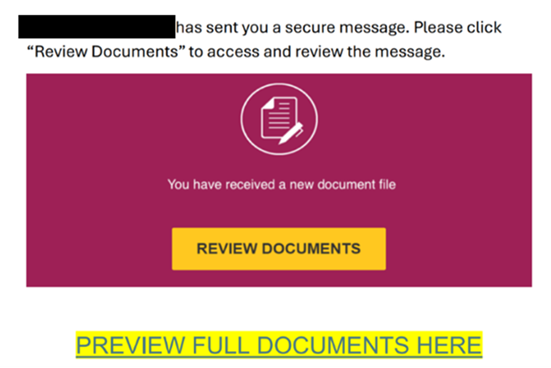
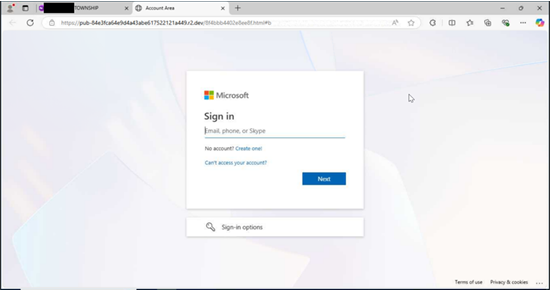
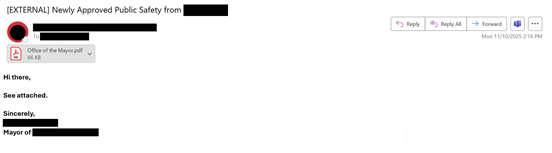
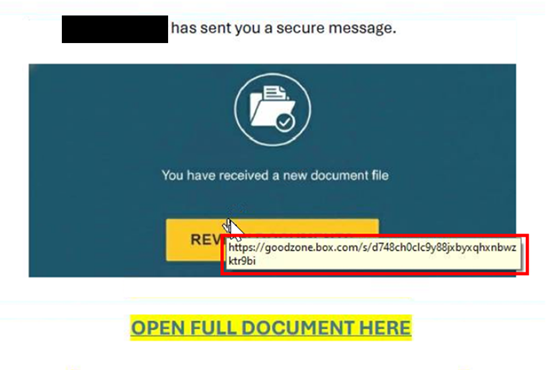
Over the last several weeks, the NJCCIC has observed an increase in compromised New Jersey public sector accounts. These accounts are often compromised after a user submits their account credentials to a fraudulent webpage navigated to via a phishing email. These phishing emails are typically sent from accounts known to the recipient and therefore appear legitimate and trustworthy; however, the trusted sender’s account has been compromised, unbeknownst to the recipient. Recently observed tactics include the use of encrypted emails and attachments, and calendar invites to deliver malicious links and attachments. Threat actors’ use of personalized subject lines and file names lends authenticity to the messages, making recipients more likely to engage with them.
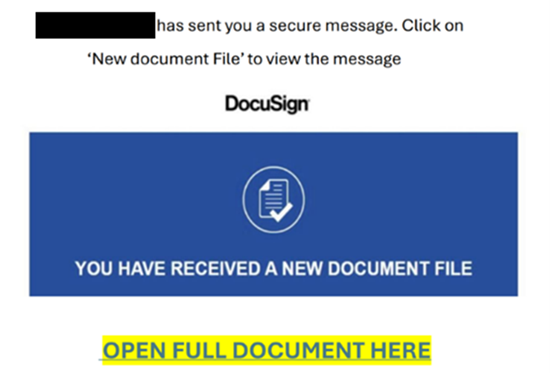
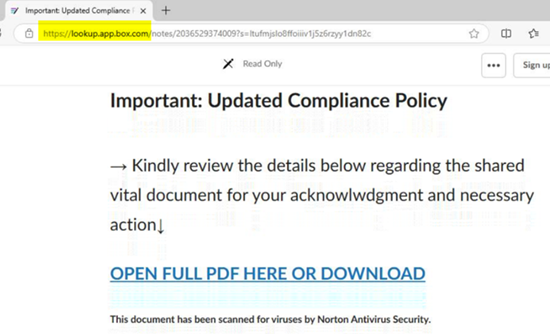
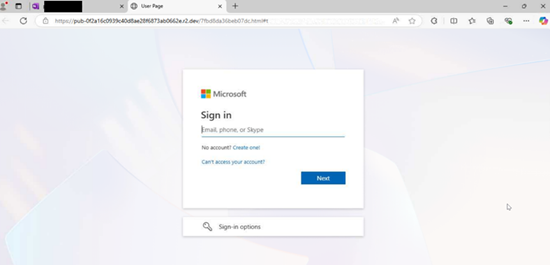
These phishing emails often use similar lures, in which the communications reference a document, message, report, or file that needs to be viewed. Specifically, the NJCCIC has noted an increase in Docusign phishing. Once the user clicks the included link in the email or attachment, they are often directed to a website that requests account credentials to view the document. If account credentials are entered, they are stolen by the threat actors. There have also been increasing efforts to obtain multi-factor authentication codes in these phishing schemes. The threat URLs included in recent campaigns often reference the compromised account’s organization, Microsoft products such as SharePoint, or document creator or form builder resources including Docusign or Jotform.
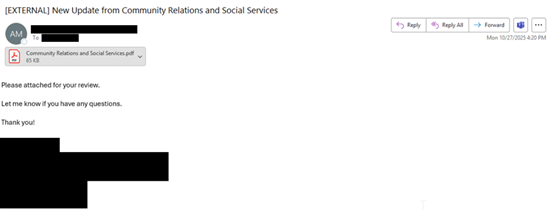
Many of these phishing emails originate from familiar, yet compromised, accounts associated with county and local government entities, such as health departments, social services, school districts, mayors’ offices, and public safety offices. As a result, recipients are likely to trust these communications. However, these phishing emails are often sent without context, with minimal content in the email body, and may come from accounts with which the recipient does not typically share documents. Document signing platforms are also frequently impersonated in these schemes. If you do not normally electronically sign documents received from the sender, this could indicate that the message is suspicious.
Examples from these phishing messages are included below.
Recommendations
Avoid opening attachments or clicking links delivered in emails and meeting invites, even those from known contacts, unless they are expected and in line with an established relationship. Verify communications with the sender via a separate means of communication before taking any action on their requests. Type official website URLs into browsers manually and only submit sensitive information on official websites. Notify users of this and similar tactics to increase awareness and reduce the risk of account compromises. Review the Don’t Take the Bait! Phishing and Other Social Engineering Attacks NJCCIC product for more information on common phishing and social engineering attacks.
Reporting
The NJCCIC encourages recipients who discover signs of malicious cyber activity to contact the NJCCIC via the cyber incident report form at www.cyber.nj.gov/report.

You’re Invited: Cybersecurity Connections Event & Networking Lunch on January 13, 2026

Due to the lapse in annual appropriations for the Department of Commerce, the NIST National Cybersecurity Center of Excellence (NCCoE) rescheduled the Cybersecurity Connections event that was originally scheduled for October 14, 2025. We apologize for the inconvenience and appreciate your understanding.

Event Date: January 13, 2026

Event Time: 11:00 a.m. – 1:30 p.m. (EST)

Event Location: 9700 Great Seneca Hwy, Rockville, MD 20850

Join the NIST NCCoE for a Cybersecurity Connections event highlighting exciting career opportunities in the cybersecurity field! Hosted in partnership with NICE (NIST), the Maryland Department of Commerce, and Montgomery County, this event is a unique opportunity to learn from industry experts and connect with cybersecurity professionals. By attending, you’ll gain valuable insights into the latest approaches to strengthening the cybersecurity workforce and network with like-minded professionals.

This event will feature a keynote presentation from Jessica Gulick, CEO and Founder of Katzcy and Commissioner of the U.S. Cyber Team. Jessica will discuss how the U.S. Cyber Games is advancing cybersecurity awareness, skills development, and cyber career preparation on a global scale. The keynote will also spotlight opportunities for Maryland-based individuals and organizations to engage with and support the initiatives of the U.S. Cyber Team.

In addition, our expert panel on building a robust cybersecurity workforce will discuss topics such as the critical skills and competencies needed to succeed in today’s cybersecurity landscape, the accessibility of cybersecurity education, and what workforce challenges critical infrastructure owners and operators may face in the future. This panel will be followed by a networking lunch, generously provided by the Montgomery County Economic Development Corporation on behalf of Montgomery County.

View the agenda.

Secure Your Spot!

Register now to attend in-person or virtually! We look forward to connecting with you to foster collaboration and innovation in the cybersecurity community.

*Registration closes on January 6.Register Now!
Recommendation for Key Management Comment on Draft Revision of NIST SP 800-57 Part 1

The initial public draft of NIST Special Publication (SP) 800-57 Part 1 Revision 6, Recommendation for Key Management: Part 1 – General, is available for comment through February 5, 2026. This recommendation provides general guidelines and best practices for managing cryptographic keying material.

Some of the proposed changes from Revision 5 include:

  • Ascon, as specified in SP 800-232, and the new quantum-resistant algorithms specified in Federal Information Processing Standards (FIPS) 203, 204, and 205 have been included.
  • The keys used for both key establishment and key storage are now discussed separately.
  • The security categories used in the Post-Quantum Cryptography (PQC) competition have been included, along with the quantum-resistant algorithms.
  • The time frames for algorithm approval status have been removed and replaced with references to SP 800-131A.
  • A section has been added to discuss keying material storage and mechanisms.

A complete list of changes is in Appendix F of the draft.

See the publication details for a copy of the draft and instructions for submitting comments.

Read More

NJCCIC: Beware of Holiday Travel Scams

NJCCIC:
Beware of Holiday Travel Scams Threat actors continue their attempts to trick users making hotel reservations and other travel arrangements by impersonating major brands. In one large-scale phishing campaign, they target potential travelers using malicious spam linked through the Want Your Feedback service, which prompts them to click the link to visit a hotel’s website and confirm their reservation using a credit card.

If clicked, the target is redirected through various websites before landing on a customized phishing page featuring logos from companies such as Airbnb and Booking.com. In another scheme, threat actors use compromised email accounts to send customer service-themed requests to hotel reservation email addresses. These emails contain a malicious link and employ the ClickFix social engineering tactic to compromise booking platforms, such as Expedia, with infostealer malware that captures account credentials.

The NJCCIC advises users to scrutinize messages containing urgent language or confirmation of updates, changes, or requests. Additionally, type official website URLs into browsers manually and only submit personal or financial information on official websites. For more information, view the NJCCIC’s latest alerts and advisories.

Multiple Vulnerabilities in Mozilla Products Could Allow for Arbitrary Code Execution – PATCH: NOW

Multiple vulnerabilities have been discovered in Mozilla products, the most severe of which could allow for arbitrary code execution. 

  • Mozilla Firefox is a web browser used to access the Internet.
  • Mozilla Firefox ESR is a version of the web browser intended to be deployed in large organizations.

Successful exploitation of the most severe of these vulnerabilities could allow for arbitrary code execution. Depending on the privileges associated with the user an attacker could then install programs; view, change, or delete data; or create new accounts with full user rights. Users whose accounts are configured to have fewer user rights on the system could be less impacted than those who operate with administrative user rights.

THREAT INTELLIGENCE:
There are currently no reports of these vulnerabilities being exploited in the wild. 

SYSTEMS AFFECTED:

  • Firefox versions prior to 146
  • Firefox ESR versions prior to 115.31
  • Firefox ESR versions prior to 140.6

RISK:
Government:

  • Large and medium government entities: High
  • Small government: Medium

Businesses:

  • Large and medium business entities: High
  • Small business entities: Medium

Home Users: Low

TECHNICAL SUMMARY:
Multiple vulnerabilities have been discovered in Mozilla products, the most severe of which could allow for arbitrary code execution. Details of these vulnerabilities are as follows: 

Tactic: Initial Access (TA0001):
Technique: Drive-by Compromise (T1189)

  • Use-after-free in the WebRTC. (CVE-2025-14321)
  • Sandbox escape due to incorrect boundary conditions in the Graphics. (CVE-2025-14322)
  • Privilege escalation in the DOM. (CVE-2025-14323)
  • JIT miscompilation in the JavaScript Engine. (CVE-2025-14324, CVE-2025-14325)
  • Memory safety bugs fixed in Firefox 146 and Thunderbird 146. (CVE-2025-14332)
  • Memory safety bugs fixed in Firefox ESR 140.6, Thunderbird ESR 140.6, Firefox 146 and Thunderbird 146. (CVE-2025-14333)

Additional lower severity vulnerabilities include:

  • Use-after-free in the Audio/Video. (CVE-2025-14326)
  • Spoofing issue in the Downloads Panel component. (CVE-2025-14327)
  • Privilege escalation in the Netmonitor component. (CVE-2025-14328, CVE-2025-14329)
  • JIT miscompilation in the JavaScript Engine. (CVE-2025-14330)
  • Same-origin policy bypass in the Request Handling component. (CVE-2025-14331)

Successful exploitation of the most severe of these vulnerabilities could allow for arbitrary code execution. Depending on the privileges associated with the user an attacker could then install programs; view, change, or delete data; or create new accounts with full user rights. Users whose accounts are configured to have fewer user rights on the system could be less impacted than those who operate with administrative user rights.

RECOMMENDATIONS:
We recommend the following actions be taken:

  • Apply appropriate updates provided by Mozilla to vulnerable systems immediately after appropriate testing. (M1051:Update Software)
    • Safeguard 7.1: Establish and Maintain a Vulnerability Management Process: Establish and maintain a documented vulnerability management process for enterprise assets. Review and update documentation annually, or when significant enterprise changes occur that could impact this Safeguard.
    • Safeguard 7.4: Perform Automated Application Patch Management: Perform application updates on enterprise assets through automated patch management on a monthly, or more frequent, basis.
    • Safeguard 7.7: Remediate Detected Vulnerabilities: Remediate detected vulnerabilities in software through processes and tooling on a monthly, or more frequent, basis, based on the remediation process.
    • Safeguard 9.1: Ensure Use of Only Fully Supported Browsers and Email Clients: Ensure only fully supported browsers and email clients are allowed to execute in the enterprise, only using the latest version of browsers and email clients provided through the vendor.
  • Apply the Principle of Least Privilege to all systems and services. Run all software as a non-privileged user (one without administrative privileges) to diminish the effects of a successful attack. (M1026:Privileged Account Management)
    • Safeguard 4.7: Manage Default Accounts on Enterprise Assets and Software: Manage default accounts on enterprise assets and software, such as root, administrator, and other pre-configured vendor accounts. Example implementations can include: disabling default accounts or making them unusable.
    • Safeguard 5.4: Restrict Administrator Privileges to Dedicated Administrator Accounts: Restrict administrator privileges to dedicated administrator accounts on enterprise assets. Conduct general computing activities, such as internet browsing, email, and productivity suite use, from the user’s primary, non-privileged account.
  • Use capabilities to detect and block conditions that may lead to or be indicative of a software exploit occurring. (M1050:Exploit Protection)
    • Safeguard 10.5: Enable Anti-Exploitation Features: Enable anti-exploitation features on enterprise assets and software, where possible, such as Microsoft® Data Execution Prevention (DEP), Windows® Defender Exploit Guard (WDEG), or Apple® System Integrity Protection (SIP) and Gatekeeper™.
  • Restrict use of certain websites, block downloads/attachments, block JavaScript, restrict browser extensions, etc. (M1021:Restrict Web-Based Content)
    • Safeguard 9.2: Use DNS Filtering Services: Use DNS filtering services on all enterprise assets to block access to known malicious domains.
    • Safeguard 9.3: Maintain and Enforce Network-Based URL Filters: Enforce and update network-based URL filters to limit an enterprise asset from connecting to potentially malicious or unapproved websites. Example implementations include category-based filtering, reputation-based filtering, or through the use of block lists. Enforce filters for all enterprise assets.
    • Safeguard 9.6: Block Unnecessary File Types: Block unnecessary file types attempting to enter the enterprise’s email gateway.
  • Block execution of code on a system through application control, and/or script blocking. (M1038:Execution Prevention)
    • Safeguard 2.5: Allowlist Authorized Software: Use technical controls, such as application allowlisting, to ensure that only authorized software can execute or be accessed. Reassess bi-annually, or more frequently.
    • Safeguard 2.6: Allowlist Authorized Libraries: Use technical controls to ensure that only authorized software libraries, such as specific .dll, .ocx, .so, etc., files, are allowed to load into a system process. Block unauthorized libraries from loading into a system process. Reassess bi-annually, or more frequently.
    • Safeguard 2.7: Allowlist Authorized Scripts: Use technical controls, such as digital signatures and version control, to ensure that only authorized scripts, such as specific .ps1, .py, etc., files, are allowed to execute. Block unauthorized scripts from executing. Reassess bi-annually, or more frequently.
  • Use capabilities to prevent suspicious behavior patterns from occurring on endpoint systems. This could include suspicious process, file, API call, etc. behavior. (M1040:Behavior Prevention on Endpoint)
    • Safeguard 13.2: Deploy a Host-Based Intrusion Detection Solution: Deploy a host-based intrusion detection solution on enterprise assets, where appropriate and/or supported.
    • Safeguard 13.7: Deploy a Host-Based Intrusion Prevention Solution: Deploy a host-based intrusion prevention solution on enterprise assets, where appropriate and/or supported. Example implementations include use of an Endpoint Detection and Response (EDR) client or host-based IPS agent.
  • Inform and educate users regarding the threats posed by hypertext links contained in emails or attachments especially from un-trusted sources. Remind users not to visit un-trusted websites or follow links provided by unknown or un-trusted sources. (M1017:User Training)
    • Safeguard 14.1: Establish and Maintain a Security Awareness Program: Establish and maintain a security awareness program. The purpose of a security awareness program is to educate the enterprise’s workforce on how to interact with enterprise assets and data in a secure manner. Conduct training at hire and, at a minimum, annually. Review and update content annually, or when significant enterprise changes occur that could impact this Safeguard.
    • Safeguard 14.2: Train Workforce Members to Recognize Social Engineering Attacks: Train workforce members to recognize social engineering attacks, such as phishing, pre-texting, and tailgating.

REFERENCES:

CVE:
https://cve.mitre.org/cgi-bin/cvename.cgi?name=CVE-2025-14321
https://cve.mitre.org/cgi-bin/cvename.cgi?name=CVE-2025-14322
https://cve.mitre.org/cgi-bin/cvename.cgi?name=CVE-2025-14323
https://cve.mitre.org/cgi-bin/cvename.cgi?name=CVE-2025-14324
https://cve.mitre.org/cgi-bin/cvename.cgi?name=CVE-2025-14325
https://cve.mitre.org/cgi-bin/cvename.cgi?name=CVE-2025-14326
https://cve.mitre.org/cgi-bin/cvename.cgi?name=CVE-2025-14327
https://cve.mitre.org/cgi-bin/cvename.cgi?name=CVE-2025-14328
https://cve.mitre.org/cgi-bin/cvename.cgi?name=CVE-2025-14329
https://cve.mitre.org/cgi-bin/cvename.cgi?name=CVE-2025-14330
https://cve.mitre.org/cgi-bin/cvename.cgi?name=CVE-2025-14331
https://cve.mitre.org/cgi-bin/cvename.cgi?name=CVE-2025-14332
https://cve.mitre.org/cgi-bin/cvename.cgi?name=CVE-2025-14333

Mozilla:
https://www.mozilla.org/en-US/security/advisories/
https://www.mozilla.org/en-US/security/advisories/mfsa2025-92/
https://www.mozilla.org/en-US/security/advisories/mfsa2025-93/
https://www.mozilla.org/en-US/security/advisories/mfsa2025-94/