Critical Patches Issued for Microsoft Products, December 9, 2025 – PATCH NOW

Multiple vulnerabilities have been discovered in Microsoft products, the most severe of which could allow for remote code execution. Successful exploitation of the most severe of these vulnerabilities could result in an attacker gaining the same privileges as the logged-on user. Depending on the privileges associated with the user, an attacker could then install programs; view, change, or delete data; or create new accounts with full user rights. Users whose accounts are configured to have fewer user rights on the system could be less impacted than those who operate with administrative user rights.

THREAT INTELLIGENCE:
There are currently no reports of this vulnerability being exploited in the wild. 

SYSTEMS AFFECTED:

  • Windows PowerShell
  • Windows Projected File System
  • Windows Storage VSP Driver
  • Windows Cloud Files Mini Filter Driver
  • Microsoft Edge for iOS
  • Windows Message Queuing
  • Windows Resilient File System (ReFS)
  • Windows Win32K – GRFX
  • Windows Projected File System Filter Driver
  • Windows DirectX
  • Windows Client-Side Caching (CSC) Service
  • Windows Defender Firewall Service
  • Microsoft Brokering File System
  • Windows Common Log File System Driver
  • Windows Remote Access Connection Manager
  • Windows Routing and Remote Access Service (RRAS)
  • Azure Monitor Agent
  • Microsoft Office Access
  • Microsoft Office Excel
  • Microsoft Office
  • Microsoft Office Word
  • Microsoft Office Outlook
  • Windows Shell
  • Windows Hyper-V
  • Windows Camera Frame Server Monitor
  • Windows Installer
  • Application Information Services
  • Microsoft Exchange Server
  • Microsoft Graphics Component
  • Copilot
  • Microsoft Office SharePoint
  • Storvsp.sys Driver
  • Windows DWM Core Library

RISK:
Government:

  • Large and medium government entities: High
  • Small government entities: Medium

Businesses:

  • Large and medium business entities: High
  • Small business entities: Medium 

Home users: Low

TECHNICAL SUMMARY:
Multiple vulnerabilities have been discovered in Microsoft products, the most severe of which could allow for remote code execution.   

A full list of all vulnerabilities can be found in the Microsoft link in the Reference section.

Successful exploitation of the most severe of these vulnerabilities could result in an attacker gaining the same privileges as the logged-on user. Depending on the privileges associated with the user, an attacker could then install programs; view, change, or delete data; or create new accounts with full user rights. Users whose accounts are configured to have fewer user rights on the system could be less impacted than those who operate with administrative user rights. 

RECOMMENDATIONS:
We recommend the following actions be taken:

  • Apply appropriate updates provided by Microsoft to vulnerable systems immediately after appropriate testing. (M1051: Update Software)
    • Safeguard 7.1 : Establish and Maintain a Vulnerability Management Process: Establish and maintain a documented vulnerability management process for enterprise assets. Review and update documentation annually, or when significant enterprise changes occur that could impact this Safeguard.
    • Safeguard 7.2: Establish and Maintain a Remediation Process: Establish and maintain a risk-based remediation strategy documented in a remediation process, with monthly, or more frequent, reviews.
    • Safeguard 7.4: Perform Automated Application Patch Management: Perform application updates on enterprise assets through automated patch management on a monthly, or more frequent, basis.
    • Safeguard 7.5 : Perform Automated Vulnerability Scans of Internal Enterprise Assets: Perform automated vulnerability scans of internal enterprise assets on a quarterly, or more frequent, basis. Conduct both authenticated and unauthenticated scans, using a SCAP-compliant vulnerability scanning tool.
    • Safeguard 7.7: Remediate Detected Vulnerabilities: Remediate detected vulnerabilities in software through processes and tooling on a monthly, or more frequent, basis, based on the remediation process.
    • Safeguard 12.1: Ensure Network Infrastructure is Up-to-Date: Ensure network infrastructure is kept up-to-date. Example implementations include running the latest stable release of software and/or using currently supported network-as-a-service (NaaS) offerings. Review software versions monthly, or more frequently, to verify software support.
    • Safeguard 18.1: Establish and Maintain a Penetration Testing Program: Establish and maintain a penetration testing program appropriate to the size, complexity, and maturity of the enterprise. Penetration testing program characteristics include scope, such as network, web application, Application Programming Interface (API), hosted services, and physical premise controls; frequency; limitations, such as acceptable hours, and excluded attack types; point of contact information; remediation, such as how findings will be routed internally; and retrospective requirements.
    • Safeguard 18.2: Perform Periodic External Penetration Tests: Perform periodic external penetration tests based on program requirements, no less than annually. External penetration testing must include enterprise and environmental reconnaissance to detect exploitable information. Penetration testing requires specialized skills and experience and must be conducted through a qualified party. The testing may be clear box or opaque box.
    • Safeguard 18.3: Remediate Penetration Test Findings: Remediate penetration test findings based on the enterprise’s policy for remediation scope and prioritization.
  • Apply the Principle of Least Privilege to all systems and services. Run all software as a non-privileged user (one without administrative privileges) to diminish the effects of a successful attack. (M1026: Privileged Account Management)
    • Safeguard 4.7: Manage Default Accounts on Enterprise Assets and Software: Manage default accounts on enterprise assets and software, such as root, administrator, and other pre-configured vendor accounts. Example implementations can include: disabling default accounts or making them unusable.
    • Safeguard 5.5: Establish and Maintain an Inventory of Service Accounts: Establish and maintain an inventory of service accounts. The inventory, at a minimum, must contain department owner, review date, and purpose. Perform service account reviews to validate that all active accounts are authorized, on a recurring schedule at a minimum quarterly, or more frequently.
  • Vulnerability scanning is used to find potentially exploitable software vulnerabilities to remediate them. (M1016: Vulnerability Scanning)
    • Safeguard 16.13: Conduct Application Penetration Testing: Conduct application penetration testing. For critical applications, authenticated penetration testing is better suited to finding business logic vulnerabilities than code scanning and automated security testing. Penetration testing relies on the skill of the tester to manually manipulate an application as an authenticated and unauthenticated user.
  • Architect sections of the network to isolate critical systems, functions, or resources. Use physical and logical segmentation to prevent access to potentially sensitive systems and information. Use a DMZ to contain any internet-facing services that should not be exposed from the internal network. Configure separate virtual private cloud (VPC) instances to isolate critical cloud systems. (M1030: Network Segmentation)
    • Safeguard 12.2: Establish and Maintain a Secure Network Architecture: Establish and maintain a secure network architecture. A secure network architecture must address segmentation, least privilege, and availability, at a minimum.
  • Use capabilities to detect and block conditions that may lead to or be indicative of a software exploit occurring. (M1050: Exploit Protection)
    • Safeguard 10.5:  Enable Anti-Exploitation Features: Enable anti-exploitation features on enterprise assets and software, where possible, such as Microsoft® Data Execution Prevention (DEP), Windows® Defender Exploit Guard (WDEG), or Apple® System Integrity Protection (SIP) and Gatekeeper™.

REFERENCES:

Microsoft:
https://msrc.microsoft.com/update-guide/en-us
https://msrc.microsoft.com/update-guide/releaseNote/2025-Dec

Updated Draft Guidelines for National Checklist Program for IT Products

Available for Public Comment—National Checklist Program for IT Products: Guidelines for Checklist Users and Developers

NIST Special Publication (SP) 800-70r5 ipd (Revision 5, initial public draft), National Checklist Program for IT Products – Guidelines for Checklist Users and Developers, is now available for public comment through January 16, 2026, at 11:59 PM (EST).

NIST established the National Checklist Program (NCP) to facilitate the generation of security checklists from authoritative sources, centralize the location of checklists, and make checklists broadly accessible. SP 800-70r5 ipd describes the uses, benefits, and management of checklists and checklist control catalogs, as well as the policies, procedures, and general requirements for participation in the NCP.

Why Security Configuration Checklists Matter

A security configuration checklist is a document or technical content that contains instructions or procedures for securely configuring an IT product to match an operational environment’s risk tolerance, verifying that the product has been configured properly, and/or identifying unauthorized changes to the product. Using these checklists can minimize the attack surface, reduce vulnerabilities, lessen the impacts of successful attacks, and identify changes that might otherwise go undetected.

What’s New in Revision 5?

This revision introduces significant updates to improve usability, automation, and alignment with modern cybersecurity practices.

Key Highlights

  • Traceability and Compliance: Enhanced mapping concepts between checklist settings, NIST Cybersecurity Framework (CSF) 2.0 outcomes, SP 800-53 controls, and Common Configuration Enumeration (CCE) identifiers for evidence-ready automation and reporting
  • Expanded Coverage: Guidance that includes cloud platforms, IoT, and AI systems and reflects the latest NIST research and federal requirements
  • Modernized Automation: Explicit support for a wide range of automated checklist formats
  • Control Catalog Approach: Encourages developers to use catalogs of controls for rapid, consistent checklist generation and easier tailoring to different risk postures
  • Operational Environment Tailoring: Detailed recommendations for customizing checklists to fit stand-alone, managed (enterprise), specialized security-limited functionality (SSLF), and legacy environments
  • Checklist Life Cycle: Clear procedures for checklist development, testing, documentation, submission, public review, maintenance, and archival

Intended Audience

This document is intended for users and developers of security configuration.  

  • For checklist users, this document makes recommendations on how they should select checklists from the NIST National Checklist Repository, evaluate and test checklists, and apply them to IT products.
  • For checklist developers, this document sets forth the policies, procedures, and general requirements for participation in the NCP.

Submit Comments

The comment period for SP 800-70r5 ipd is open through January 16, 2026, at 11:59 PM (EST). Email comments to: checklists@nist.gov

Read the Publication

Vulnerability in React Server Component Could Allow for Remote Code Execution

This Multi-State Information Sharing and Analysis Center (MS-ISAC) Advisory is being provided to assist agencies and organizations in guarding against the persistent malicious actions of cybercriminals.

A vulnerability in the React Server Components (RSC) implementation has been discovered that could allow for remote code execution. Specifically, it could allow for unauthenticated remote code execution on affected servers. The issue stems from unsafe deserialization of RSC “Flight” protocol payloads, enabling an attacker to send a crafted request that triggers execution of code on the server. This is now being called, “React2Shell” by security researchers.
Threat Intelligence
Active exploitation has been reported in the wild, specifically by Chinese threat actor groups.
Systems Affected
React Server Components – all versions prior to React 19.0.1, 19.1.2, and 19.2.1 Next.js 15.x – all versions prior to the patched 15.x release Next.js 16.x – all versions prior to the patched 16.x release Any frameworks or tools that bundle React Server Components prior to the patched React versions
Risk
Government:
– Large and medium government entities: High
– Small government entities: Medium
Businesses:
– Large and medium business entities: High
– Small business entities: Medium
Home Users: Low
Recommendations
Apply appropriate updates provided by React to vulnerable systems immediately after appropriate testing. Apply the Principle of Least Privilege to all systems and services. Run all software as a non-privileged user (one without administrative privileges) to diminish the effects of a successful attack. Use vulnerability scanning to find potentially exploitable software vulnerabilities to remediate them. Architect sections of the network to isolate critical systems, functions, or resources. Use physical and logical segmentation to prevent access to potentially sensitive systems and information. Use a DMZ to contain any internet-facing services that should not be exposed from the internal network. Configure separate virtual private cloud (VPC) instances to isolate critical cloud systems. Use capabilities to detect and block conditions that may lead to or be indicative of a software exploit occurring.

Charting the Course for NIST OSCAL: NIST CSWP 53 is Available for Public Comment

The initial public draft of NIST Cybersecurity White Paper (CSWP) 53, Charting the Course for NIST OSCAL, is available for public comment. This paper introduces the Open Security Controls Assessment Language (OSCAL) — an open-source, machine-readable language that standardizes security documentation for better monitoring and risk management.

OSCAL was developed to modernize manual, paper-based cybersecurity compliance through automated, scalable processes and continuous assessments. This draft describes OSCAL’s layered architecture, its growing global adoption, and its future integration with emerging technologies (e.g., digital twins, agentic AI) for autonomous risk reasoning and continuous assurance.

The public comment period is open through January 13, 2026. See the publication details for a copy of the draft and instructions for submitting comments.

Read More

Principles for the Secure Integration of Artificial Intelligence in Operational Technology

Since the public release of ChatGPT in November 2022, artificial intelligence (AI) has been integrated into many facets of human society. For critical infrastructure owners and operators, AI can potentially be used to increase efficiency and productivity, enhance decision-making, save costs, and improve customer experience. Despite the many benefits, integrating AI into operational technology (OT) environments that manage essential public services also introduces significant risks—such as OT process models drifting over time or safety-process bypasses—that owners and operators must carefully manage to ensure the availability and reliability of critical infrastructure.
The Cybersecurity and Infrastructure Security Agency (CISA) and Australian Signals Directorate’s Australian Cyber Security Centre, in collaboration with Federal  and International partners, have released Cybersecurity Guidance  which provides  critical infrastructure owners and operators with practical information for integrating AI into OT environments. This guidance outlines four key principles critical infrastructure owners and operators can follow to leverage the benefits of AI in OT systems while reducing risk.
The authoring agencies encourage critical infrastructure owners and operators to review this guidance and action the principles so they can safely and securely integrate AI into OT systems.
Please do not hesitate to contact the NJCCIC at njccic@cyber.nj.gov with any questions.  Also, for more background on our recent cybersecurity efforts, please visit cyber.nj.gov

NICE Releases NICE Framework Components v2.1.0

NICE Framework Graphic (Feb 2025)NICE is pleased to announce the release of NICE Framework Components v2.1.0. The NICE Workforce Framework for Cybersecurity (NICE Framework) establishes a standard approach and common language for describing cybersecurity work and learner capabilities. NICE Framework Components include Work Role Categories, Work Roles, Competency Areas, and Task, Knowledge, and Skill (TKS) statements as well as the relationships between those elements. This minor update to the NICE Framework Components includes the following changes: Work Roles: Comprehensive revision of Cybercrime Investigation (IN-WRL-001), including Task-to-Knowledge/Skill alignments. Competency Areas: Updated Artificial Intelligence (AI) Security (NF-COM-002). Administrative updates You can access the updated NICE Framework Components on the Current Versions page of the NICE Framework Resource Center. A summary of changes and version records can be found on the NICE Framework History and Change Logs webpage. The NICE Program Office takes a software update versioning approach for NICE Framework components, with a mix of minor and major updates over time. While users of the NICE Framework are encouraged to reference the most recent published version of the components, users may choose to continue using older versions. Please note that outdated versions may not be supported by the NICE Program Office. Learn more about NICE Framework revisions, how to use the NICE Framework, and how to engage in its continued development at the NICE Framework Resource Center.

PRC State-Sponsored Actors Use BRICKSTORM Malware Across Public Sector and Information Technology Systems

The Cybersecurity and Infrastructure Security Agency (CISA) is aware of ongoing intrusions by People’s Republic of China (PRC) state-sponsored cyber threat actors using BRICKSTORM malware for long-term persistence on victim systems. BRICKSTORM is a sophisticated backdoor for VMware vSphere and Windows environments.  Victim organizations are primarily in the Government Services and Facilities and Information Technology Sectors. BRICKSTORM enables cyber actors to maintain stealthy access and provides capabilities for initiation, persistence, and secure command and control. The malware employs advanced functionality, including multiple layers of encryption (e.g., HTTPS, WebSockets, and nested TLS), DNS-over-HTTPS (DoH) to conceal communications, and a SOCKS proxy to facilitate lateral movement and tunneling within victim networks. BRICKSTORM also incorporates long-term persistence mechanisms, such as a self-monitoring function that automatically reinstalls or restarts the malware if disrupted, ensuring its continued operation.
The initial access vector varies. In one confirmed compromise, PRC state-sponsored cyber threat actors accessed a web server inside the organization’s demilitarized zone (DMZ), moved laterally to an internal VMware vCenter server, then implanted BRICKSTORM malware. See CISA, the National Security Agency, and Canadian Cyber Security Centre’s (Cyber Centre’s) Joint Malware Analysis Report (MAR) BRICKSTORM Backdoor for analysis of the BRICKSTORM sample CISA obtained during an incident response engagement for this victim. The MAR also discusses seven additional BRICKSTORM samples, which exhibit variations in functionality and capabilities, further highlighting the complexity and adaptability of this malware.
After obtaining access to victim systems, PRC state-sponsored cyber threat actors obtain and use legitimate credentials by performing system backups or capturing Active Directory database information to exfiltrate sensitive information. Cyber threat actors then target VMware vSphere platforms to steal cloned virtual machine (VM) snapshots for credential extraction and create hidden rogue VMs to evade detection.
CISA recommends network defenders hunt for existing intrusions and mitigate further compromise by taking the following actions:
Scan for BRICKSTORM using CISA-created YARA and Sigma rules, found in the joint (MAR) BRICKSTORM Backdoor. Block unauthorized DNS-over-HTTPS (DoH) providers and external DoH network traffic to reduce unmonitored communications. Take inventory of all network edge devices and monitor for any suspicious network connectivity originating from these devices. Ensure proper network segmentation that restricts network traffic from the DMZ to the internal network.

Beware of Fraudulent Digital Asset Purchases

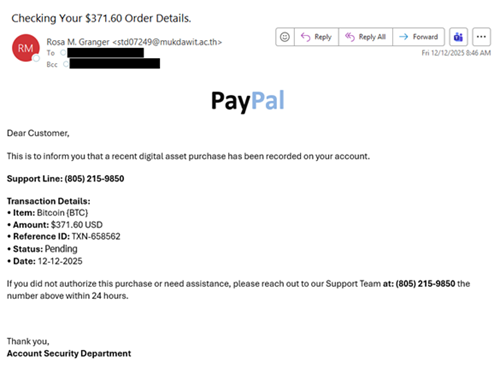
The NJCCIC observed multiple Telephone-Oriented Attack Delivery (TOAD) campaigns targeting New Jersey State employees that purported to be legitimate notifications for purchases of digital assets or currencies. In one campaign, the email content lacks relevant context to the subject line phrases, such as “new log needs confirmation” or “update waiting for review.” The emails come from suspicious domains or out-of-country top-level domains (TLDs) and may contain an Adobe PDF attachment detailing the PayPal purchase. Another red flag is a purchase notification that is not personalized but sent to multiple recipients. Threat actors may add recipients in the “Bcc” field to appear more legitimate or circumvent some security filters that might identify emails sent to an extensive list in the “To” or “Cc” fields. In this campaign, threat actors create urgency by including a phone number if the target requires immediate assistance within the next 24 hours to dispute the “590.99$ USD” PayPal transaction. If the target calls the phone number, the threat actors impersonating a security team representative convince them to divulge sensitive information, such as account credentials or financial details, or download malicious software or a supposed remote support tool, which enables the threat actors to gain access to the device.

In a similar TOAD campaign, the subject line displays “your digital shield is now operational” and lacks relevant context to the email, which claims to be a Bitcoin purchase of “348.87 USD” via PayPal. The fraudulent transaction is part of an automated recurring purchase program or a monthly subscription. Threat actors provide a phone number for the target to cancel future automatic purchases or make changes within 24 hours.

In a separate campaign, the emails claim to be a Bitcoin purchase awaiting approval due to a previous transaction of “USD 767.69” reaching the maximum approved limit for a 24-hour period. They also include a billing support phone number for the target to call if they require assistance or wish to review the transaction details. Additionally, the fraudulent emails are disguised as WordPress notifications from the legitimate “comment-reply[@]wordpress[.]com” email address that facilitates blog comment notification and reply features. The threat actors abuse this service, hoping that their target will respond to the “posted” fraudulent purchase, either by calling the phone number or replying as a comment.
Recommendations
Refrain from clicking links, opening attachments, responding to, or acting on communications from unknown senders.

Exercise caution with unsolicited communications from known senders or legitimate platforms. Scrutinize messages, especially those with urgent language or confirmation of updates, changes, or requests.

Confirm messages from senders by verifying their contact information obtained from trusted and official sources before taking action, such as clicking on links or opening attachments.

Type official website URLs into browsers manually and only submit account credentials, personal information, or financial details on official websites.

Refrain from downloading or installing software from unknown sources. Keep systems and browsers up to date.

Monitor accounts and statements for any unauthorized activity.

Report malicious cyber activity to the NJCCIC and the FBI’s IC3.

Upcoming NIST Webinar: Resources for Ransomware Risk Management

Date: January 28, 2026

Time: 2:00-3:00PM ET

Ransomware is a persistent risk to organizations of all sizes and sectors, and addressing this risk requires collaboration across the public and private sectors to develop practical resources for organizations to reduce their ransomware risks.

Speakers from the National Institute of Standards and Technology (NIST), the Center for Internet Security (CIS), and the Institute for Security and Technology (IST) will provide an overview of available ransomware risk management resources that help organizations get started with ransomware risk management by establishing foundational safeguards and building from there. Two resources that will be featured include:  

  • NIST Ransomware Risk Management CSF 2.0 Community Profile—published as an Initial Public Draft on January 13, 2025, reflects changes made to the Cybersecurity Framework (CSF) from CSF 1.1 to CSF 2.0 which identifies security objectives that support managing, detecting, responding to, and recovering from ransomware events. The publication can be used to gauge an organization’s readiness to counter ransomware threats, mitigate potential consequences of a ransomware event, and to develop a ransomware countermeasure playbook.
  • The IST and the Ransomware Task Force Blueprint for Ransomware Defense—which provides small to medium-sized enterprises (SMEs) with an actionable framework to defend against the most common attacks. It is comprised of a subset of Implementation Group 1 (IG1) Safeguards from the CIS Critical Security Controls (CIS Controls) v8 and aligned with NIST’s Cybersecurity Framework 2.0, to help SMEs understand where they can get started with establishing a ransomware risk management strategy.

Speakers will provide an overview of the resources above, including how they were developed collaboratively, and will also discuss current and future efforts to address ransomware risk management.  Ample time will be saved audience questions, ideas, and discussion.

Speakers:

  • Bill Fisher, Security Engineer, NIST
  • Valecia Stocchetti, Senior Cybersecurity Engineer, CIS Critical Security Controls
  • Michael Klein, Senior Director for Preparedness and Response, Institute for Security and Technology (IST)
  • Moderator: Daniel Eliot, Lead for Small Business Engagement, NIST
Register Here

Increase in Compromised NJ Public Sector Accounts

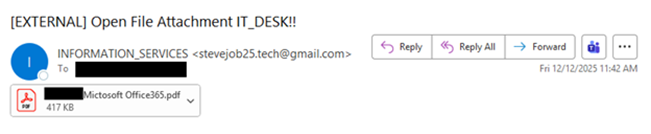
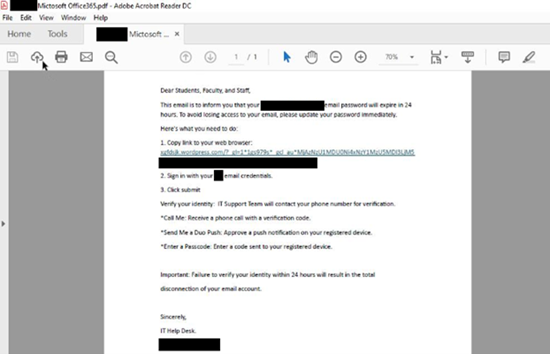
Over the last several weeks, the NJCCIC has observed an increase in compromised New Jersey public sector accounts. These accounts are often compromised after a user submits their account credentials to a fraudulent webpage navigated to via a phishing email. These phishing emails are typically sent from accounts known to the recipient and therefore appear legitimate and trustworthy; however, the trusted sender’s account has been compromised, unbeknownst to the recipient. Recently observed tactics include the use of encrypted emails and attachments, and calendar invites to deliver malicious links and attachments. Threat actors’ use of personalized subject lines and file names lends authenticity to the messages, making recipients more likely to engage with them.
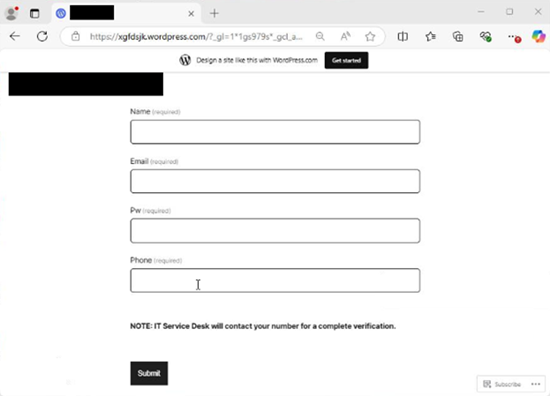
These phishing emails often use similar lures, in which the communications reference a document, message, report, or file that needs to be viewed. Specifically, the NJCCIC has noted an increase in Docusign phishing. Once the user clicks the included link in the email or attachment, they are often directed to a website that requests account credentials to view the document. If account credentials are entered, they are stolen by the threat actors. There have also been increasing efforts to obtain multi-factor authentication codes in these phishing schemes. The threat URLs included in recent campaigns often reference the compromised account’s organization, Microsoft products such as SharePoint, or document creator or form builder resources including Docusign or Jotform.
Many of these phishing emails originate from familiar, yet compromised, accounts associated with county and local government entities, such as health departments, social services, school districts, mayors’ offices, and public safety offices. As a result, recipients are likely to trust these communications. However, these phishing emails are often sent without context, with minimal content in the email body, and may come from accounts with which the recipient does not typically share documents. Document signing platforms are also frequently impersonated in these schemes. If you do not normally electronically sign documents received from the sender, this could indicate that the message is suspicious.
Examples from these phishing messages are included below.
Recommendations
Avoid opening attachments or clicking links delivered in emails and meeting invites, even those from known contacts, unless they are expected and in line with an established relationship. Verify communications with the sender via a separate means of communication before taking any action on their requests. Type official website URLs into browsers manually and only submit sensitive information on official websites. Notify users of this and similar tactics to increase awareness and reduce the risk of account compromises. Review the Don’t Take the Bait! Phishing and Other Social Engineering Attacks NJCCIC product for more information on common phishing and social engineering attacks.
Reporting
The NJCCIC encourages recipients who discover signs of malicious cyber activity to contact the NJCCIC via the cyber incident report form at www.cyber.nj.gov/report.